
Workday HRIS vs Updoot HRIS Easy Comparison Chart
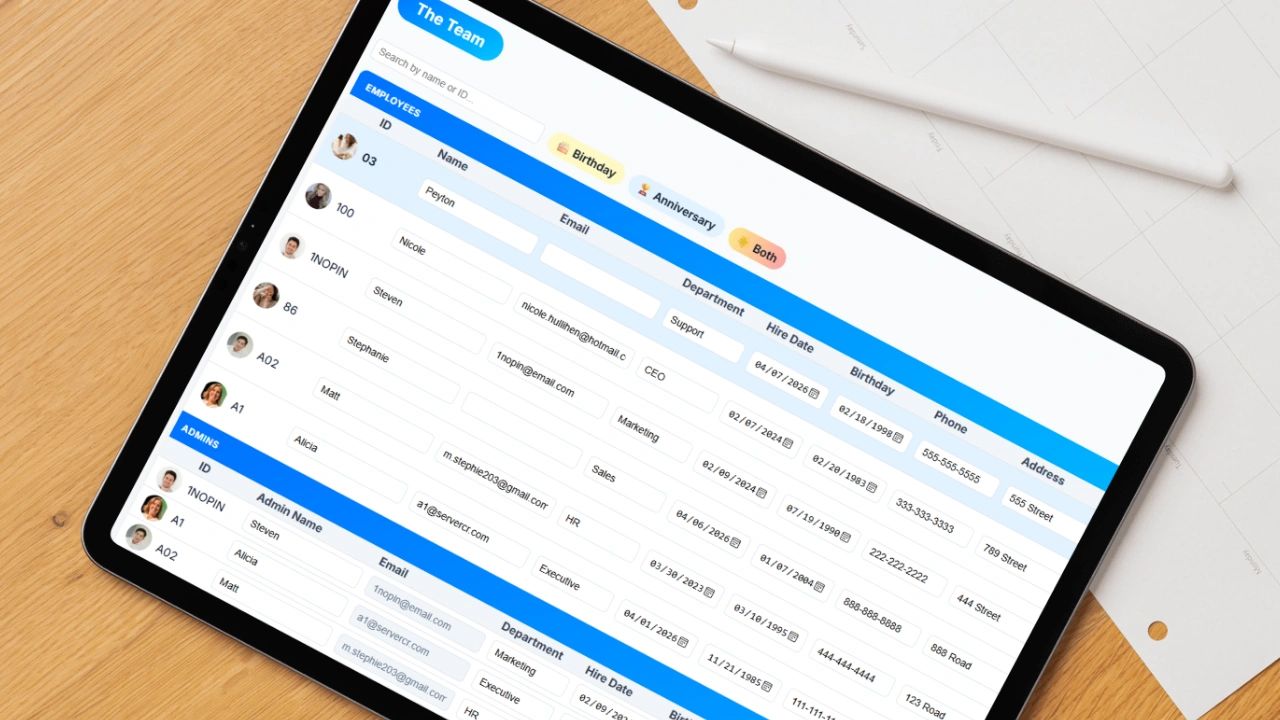
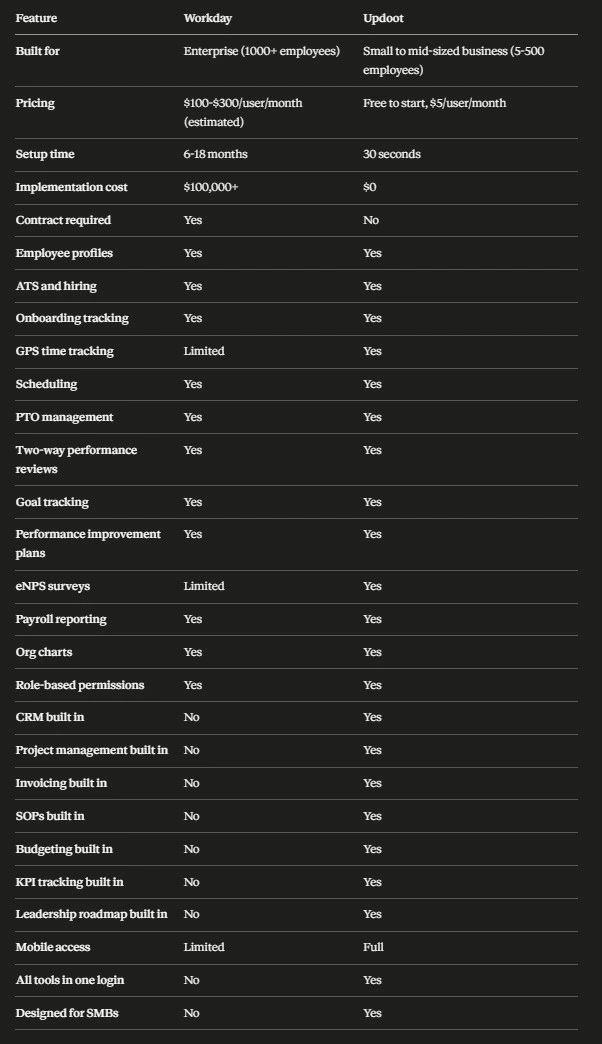
This comparison chart clearly shows the pros and cons of each Human Resource Information System HRIS.
Workday HRIS vs Updoot HRIS: Which One Is Right for Your Business?
When it comes to managing your workforce, the tools you choose can make or break your operations. Workday has long been the gold standard for enterprise HR software, but a new generation of platforms like Updoot is challenging that dominance by offering small and mid-sized businesses a smarter, more affordable alternative. Here is a breakdown of how the two compare across the areas that matter most.
What Is Workday HRIS?
Workday is a cloud-based enterprise software platform built for large organizations. It covers HR, payroll, finance, and planning, and it is widely used by Fortune 500 companies and large government agencies. It is powerful, deeply customizable, and comes with a price tag and implementation timeline to match. Most businesses that use Workday have dedicated IT teams, HR departments, and implementation consultants just to keep it running.
What Is Updoot HRIS?
Updoot is an all-in-one business management platform built specifically for small and mid-sized businesses that need real HR infrastructure without the enterprise overhead. The HRIS module inside Updoot is not a standalone HR tool bolted onto something else. It is a fully integrated part of a system that connects your people operations to your sales, finance, operations, and leadership functions all in one login.
Updoot was built by a COO who spent years running a workforce management software company and working directly with thousands of small businesses. After studying platforms like monday.com, Asana, Quickbooks Time, and traditional HRIS tools, the decision was made to build something that actually fits how small businesses operate: lean, fast, and practical from day one.
Employee Profiles and Records
The HRIS inside Updoot covers the full employee lifecycle. When someone is hired, you start with the ATS module where you track applicants, score candidates with hiring scorecards, and move people through a structured pipeline. Once hired, onboarding tracking keeps everything organized so nothing falls through the cracks. New hires get set up with a full employee profile that includes their job description, compensation history, emergency contacts, employment type, and any custom fields your business needs.
Time Tracking, Scheduling, and PTO
From there, Updoot handles the day-to-day HR work that eats up time in most small businesses. Employees clock in and out using GPS-enabled time tracking, so you always know where your team is working from. Schedules are built inside the platform and employees can see their shifts, request time off, and submit PTO requests that go through a structured approval workflow instead of a text message chain.
Performance Management and Reviews
Performance management is built in as well. Updoot includes two-way performance reviews so managers and employees both have a voice in the process. Goal tracking ties individual performance to company objectives so reviews are grounded in real data instead of gut feelings. When performance needs to improve, there is a structured performance improvement plan tool to handle that process professionally and consistently.
Employee Engagement and eNPS Surveys
The eNPS survey module lets you take a regular pulse on how your team is feeling. Employee Net Promoter Score surveys are a proven way to catch engagement problems before they become turnover problems, and having that data inside the same system where you manage everything else means you can actually act on it.
Payroll Reporting
Payroll reporting in Updoot generates structured reports that include regular hours, overtime, tips, commissions, and any other compensation components your business uses. This is not a full payroll processor, but it gives you the clean, organized data your payroll provider or accountant needs to run payroll accurately every time.
Org Charts and Permissions
The HRIS also includes an org chart that updates automatically as your team changes, so you always have a current picture of your organizational structure. Role-based permissions mean that sensitive information like compensation data stays locked down to the people who need to see it, while employees can still access their own profiles, schedules, and documents.
Connected to Your Whole Business
One of the biggest differentiators is that Updoot's HRIS does not operate in a silo. When a salesperson closes a deal, that information lives in the same system as their performance review. When a project goes over budget, your ops and finance data are right next to your HR data. When you are planning headcount, your vision tracker and roadmap builder are in the same login as your employee profiles. That kind of visibility across the whole business is something no standalone HRIS can give you, and it is something even Workday struggles to deliver for businesses that do not have a full enterprise tech stack to connect everything.
Setup and Implementation: Workday vs Updoot
Workday implementations are notoriously long and expensive. Most enterprise deployments take six to eighteen months and require third-party consultants. The cost of implementation alone can reach hundreds of thousands of dollars before a single employee logs in.
Updoot takes about thirty seconds to get started. There are no contracts, no setup fees, and no consultants required. You create an account, add your team, and start using it the same day. The interface is built to be intuitive so your managers and employees can figure it out without training sessions or documentation. If you can use a smartphone, you can use Updoot.
Pricing: Workday HRIS vs Updoot HRIS
Workday does not publish pricing publicly, but industry estimates put the cost at anywhere from $100 to $300 per user per month for enterprise plans, plus implementation and ongoing support costs.
Updoot is free to get started and costs $5 per user per month after that. For a team of twenty people, that is $100 a month total. For a team of fifty, it is $250 a month. Compare that to Workday where a fifty-person deployment could easily cost $5,000 to $15,000 per month plus the original implementation cost, and the math is not close.
There are no hidden fees, no module add-ons, and no annual contract requirements. You get the full platform for one flat rate per user.
Feature Comparison: Workday HRIS vs Updoot HRIS
Both platforms offer core HRIS functionality, but they are built for very different scales and use cases.
Workday offers deep configurability, global payroll, advanced analytics, and integrations with hundreds of enterprise tools. It is built to handle complex org structures, union rules, multi-country compliance, and large-scale workforce planning.
Updoot offers the features that actually matter to small and mid-sized businesses. Employee profiles with full compensation history. Job descriptions tied directly to performance reviews. A hiring pipeline that takes candidates from application to offer in one place. Onboarding checklists that make sure nothing gets missed. Two-way performance reviews with goal tracking built in. eNPS surveys to monitor team health. GPS time tracking with structured PTO approvals. Scheduling that employees can access from their phones. Payroll reporting that gives your accountant exactly what they need. An org chart that stays current automatically. And role-based permissions that keep sensitive data secure.
All of that is connected to your CRM, your project management, your invoicing, your SOPs, your budgeting, your KPIs, and your leadership roadmap. No other HRIS tool at this price point gives you that kind of integration across the whole business.
Mobile Access
Workday has a mobile app, but the experience is often limited compared to the desktop version and many features require desktop access to work properly.
Updoot is built to work on any device. Employees can clock in and out from their phones, check their schedules, view their PTO balances, and access SOPs and company documents from anywhere. Managers can approve time off requests, review performance data, and check team schedules without needing to be at a desk. The admin always has full visibility regardless of where the team is working.
Making the Switch From Workday or Spreadsheets to Updoot
One of the biggest reasons small businesses avoid implementing a real HRIS is the fear of disruption. They worry about migrating data, retraining staff, and dealing with a system that takes months to configure before it is useful.
Updoot eliminates that barrier entirely. You can start with one module and expand from there. Many businesses start with time tracking and scheduling because that is where the pain is most immediate, and then roll out performance reviews, hiring, and the rest of the HRIS over the following weeks. Because everything is in one platform, there is no integration work required as you expand. It just works.
The data migration process is straightforward. You can import employee information from a spreadsheet in minutes. There is no need to hire a consultant or dedicate a staff member to the implementation. Most businesses are fully operational in Updoot within a week.
Who Is Workday Built For?
Workday is built for enterprise organizations with large budgets, dedicated IT staff, and complex compliance requirements. If you are running a company with thousands of employees across multiple countries, Workday makes sense.
Who Is Updoot Built For?
Updoot is built for small and mid-sized businesses that need real HR infrastructure without the enterprise price tag or the six-month implementation. If you are running a team of five to five hundred people and you are still managing HR in spreadsheets, email threads, group chats, and paper files, Updoot was built specifically for you. It is also the right fit for businesses that are tired of paying for five different tools that do not talk to each other.
Industries that use Updoot include construction, staffing, professional services, retail, food and beverage, healthcare staffing, creative agencies, logistics, and any other business where managing people, time, and performance is central to how the company runs.
Frequently Asked Questions
Is Updoot a Workday alternative? Yes. For small and mid-sized businesses, Updoot is a direct alternative to Workday that costs a fraction of the price, requires no implementation consultant, and connects your HR data to the rest of your business operations.
How much does Updoot HRIS cost? Updoot is free to get started and $5 per user per month after that. There are no contracts, no setup fees, and no hidden costs.
Does Updoot replace spreadsheets for HR? Yes. Updoot replaces spreadsheets for time tracking, scheduling, PTO management, employee profiles, performance reviews, hiring, onboarding, payroll reporting, and more.
Can small businesses afford Workday? Most small businesses cannot justify the cost or complexity of Workday. Implementation alone typically costs six figures and takes up to eighteen months. Updoot was built specifically to give small businesses enterprise-level HR tools at a price that makes sense.
What HR features does Updoot include? Updoot includes employee profiles, compensation tracking, ATS and hiring pipelines, onboarding tracking, GPS time tracking, scheduling, PTO management, two-way performance reviews, goal tracking, performance improvement plans, eNPS surveys, payroll reporting, org charts, and role-based permissions.
The Bottom Line
Workday is a powerful tool for the organizations it was designed for. But for most small and mid-sized businesses, it is overkill, overpriced, and overwhelming to implement.
Updoot gives you a real HRIS that your whole team can actually use, connected to every other part of your business, for a fraction of the cost. You get the structure and accountability of enterprise HR software without needing a consultant, a six-figure budget, or six months of runway just to get started.
If you are ready to stop running HR out of a spreadsheet and start running it like a real business, Updoot is the place to start.
Learn more about apps for business
Vacation Scheduling Software: How to Find the Best
Every Small Business App You Need in a List
AI-Powered Software for Running a Small Business
Best App for Sales Performance Tracking: A Quick Comparison Chart
Best CRM for SaaS: What You Need to Look For
Homebase Scheduling vs. Updoot Scheduling
ClockShark Pricing vs. Updoot Pricing: Let's Talk Value
Shift Swap Software for Restaurants, Construction, Retail, More