
What Is an AI Agent Definition? Examples, and Use Cases in 2026
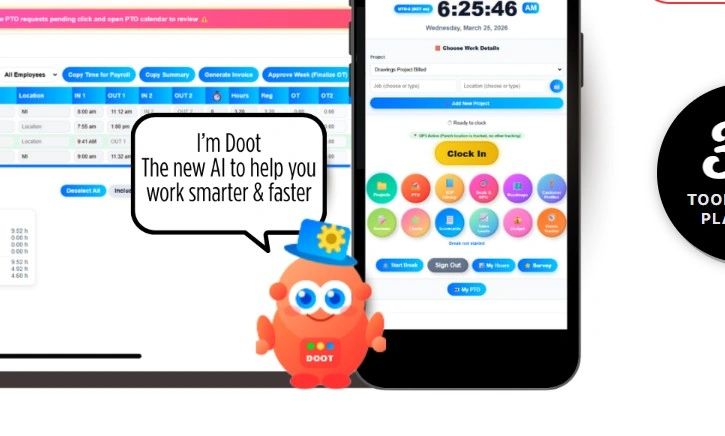
Here is a direct explanation of what an AI agent is and what it will do for you. If you have been following the world of artificial intelligence lately, you have probably heard the term "AI agent" everywhere. But what does it actually mean in 2026, and how is it different from the chatbots and AI tools we have been using for years?
This guide breaks down the AI agent definition, how AI agents work, the different types, and real-world examples of how companies are putting them to work today. We will also walk through how Updoot uses its AI agent Doot to handle everything from scheduling to project risk in ways that would have felt like science fiction just a few years ago.
What Is an AI Agent? The 2026 Definition
An AI agent is an autonomous software system that perceives its environment, reasons through complex goals, and takes action to complete those goals without needing a human to approve every single step.
The key word there is autonomous. A standard AI chatbot waits for you to ask it something, answers, and then stops. An AI agent does not stop. It plans, acts, checks the results, adjusts, and keeps going until the task is done.
Google Cloud defines AI agents as software systems that "show reasoning, planning, and memory and have a level of autonomy to make decisions, learn, and adapt." That combination of reasoning, memory, and action is what separates a true AI agent from a smarter-than-average autocomplete.
In 2026, most AI agents are built on large language models (LLMs) as their core reasoning engine. The LLM is the brain. Around that brain, developers layer in tools, memory systems, and action loops that let the agent actually do things in the world, not just talk about them.
How Is an AI Agent Different from a Chatbot?
This is the question most people have, and it is a fair one.
A chatbot reacts. You type something, it replies, done. An AI agent acts. You give it a goal, and it figures out the steps, executes them across multiple systems, monitors results, and course-corrects on its own.
Think of a chatbot as a very knowledgeable assistant who answers your questions. An AI agent is more like a junior colleague you can hand a project to and walk away from, trusting that it will come back to you with the work done.
A real example: if you asked a chatbot to "prepare a project kickoff agenda for Monday," it would write you a generic template. If you asked Updoot's AI agent Doot to do the same thing, Doot would pull the actual project brief from your workspace, check who is attending the meeting, look at open risks from the risk register, review what decisions are still pending, and build a tailored agenda that reflects the real state of the project. No template. Actual context.
The Core Components of an AI Agent
To understand what makes an AI agent tick, you need to know its building blocks. Every AI agent in 2026 is made up of some combination of the following:
Perception is how the agent takes in information. This could be text, data from connected tools, files, calendar events, emails, or anything else the agent has access to.
Reasoning is the brain. The LLM at the core of the agent processes what it perceives and figures out what to do next. Modern agents often reason in a loop, asking themselves what the goal is, what they know, what they need to find out, and what they should do next.
Memory is how the agent retains context over time. Short-term memory keeps track of the current task. Long-term memory lets the agent recall past interactions, decisions, and outcomes. The best AI agents remember what worked and what did not.
Planning is how the agent breaks a big goal into a sequence of smaller steps. Rather than trying to do everything at once, a well-designed agent creates a plan, executes step by step, and revises the plan when something changes.
Action is where the agent stops thinking and starts doing. Actions include sending messages, updating records, creating documents, scheduling events, querying databases, or calling external APIs.
Doot, Updoot's AI agent, uses all five of these. When a project manager connects a new project in Updoot, Doot perceives the project details, reasons about the goals and timeline, plans the work breakdown, remembers decisions from past similar projects, and takes actions like drafting the schedule and flagging potential risks before anyone has to ask.
Types of AI Agents in 2026
Not all AI agents are built the same. Here are the main types you will encounter:
Reactive agents respond to what they perceive right now. They have no memory of past events. They are fast and simple but limited to tasks that do not require context over time.
Goal-based agents plan their actions around a specific objective. They look ahead, evaluate options, and choose the path most likely to achieve the goal.
Learning agents improve over time. They track what worked and what did not and adjust their behavior accordingly. These are the agents that get better the more you use them.
Multi-agent systems involve multiple specialized agents working together. One agent might handle research, another drafts a report, and a third reviews it for errors. The agents coordinate to complete work that would be too complex for any single agent.
In 2026, multi-agent systems are becoming standard in enterprise software. Updoot uses a multi-agent approach inside Doot, where different sub-agents handle scheduling logic, risk analysis, and meeting facilitation, all coordinated by a central orchestrator.
How Updoot Uses Doot to Run Smarter Projects
Updoot is a project intelligence platform built around Doot, its AI agent. Instead of bolting AI onto existing workflows as an afterthought, Updoot was designed from the ground up for agentic work. Here is how Doot shows up across the platform in practice.
Schedule Management
Creating and maintaining a project schedule is one of the most time-consuming parts of project management. Dependencies shift, timelines slip, and keeping everything up to date manually is a constant drain.
Doot handles this differently. When a project manager inputs a project scope and key milestones into Updoot, Doot generates a draft schedule automatically. It factors in team capacity, known dependencies, and historical delivery data from past projects. When a milestone slips, Doot does not just flag it. It recalculates downstream impact, identifies which tasks are now at risk, and surfaces the updated schedule with recommended adjustments for the project manager to review.
The project manager still makes the final call. But instead of spending two hours updating a Gantt chart, they spend five minutes reviewing Doot's recommendation.
Project Tracking
Traditional project tracking tools tell you what happened. Doot tells you what is about to happen.
By continuously monitoring task completion rates, team comments, and connected data sources, Doot maintains a live picture of project health. It does not wait for a weekly status meeting to surface a problem. If a critical task has gone untouched for three days and the deadline is next week, Doot flags it immediately and suggests who on the team could pick it up based on their current workload.
This kind of real-time awareness is only possible because Doot is an AI agent, not a dashboard. It is actively monitoring and reasoning, not just displaying data.
Risk Management
Risk registers are a staple of project management. They are also, in most organizations, a document that gets updated once a quarter and mostly forgotten.
Doot changes that relationship with risk. At the start of every project, Doot generates a tailored risk register based on the project type, team size, timeline, and dependencies. Throughout the project, Doot monitors for signals that a risk is becoming more likely and updates probability scores automatically.
For example, if a third-party vendor is running two weeks behind on a dependency, Doot raises the likelihood of the associated delivery risk and adds it to the project manager's attention queue. It also suggests mitigation options based on how similar risks were handled in past projects logged in Updoot.
Risk management goes from a periodic document exercise to a live, intelligent process.
Meeting Agendas
One of the most surprisingly powerful things Doot does is prepare meeting agendas.
Before any project meeting, Doot reviews the current project state, outstanding decisions, flagged risks, and action items from the last meeting that have not been closed. It drafts an agenda ranked by urgency, with relevant context attached to each item so attendees can come prepared.
A typical Doot-generated agenda for a project status meeting might include the top two risks that need a decision this week, a summary of what has shipped since the last meeting, three open action items that are overdue, and a schedule variance update. All of this is pulled from live data in Updoot, not copied from last week's agenda.
Meeting facilitators can edit and approve the agenda before it goes out. Most of the time, they make small tweaks and send it as-is, because Doot has done the hard work of synthesis already.
Stakeholder Updates
Writing project status updates is another task that sounds simple but consistently takes longer than it should.
Doot drafts stakeholder updates on a cadence the project manager sets, pulling from the same live project data that powers the rest of the platform. The update format can be customized: some stakeholders want a two-sentence summary with a RAG status, others want a detailed breakdown by workstream.
Doot adapts to each audience and drafts accordingly. The project manager reviews, edits if needed, and sends. What used to take 45 minutes now takes 5.
Why AI Agents Are Becoming the Default in 2026
Three years ago, AI agents were mostly a research concept. Today they are in production across software engineering, finance, healthcare, and business operations.
The reason for this shift is not just better models. It is better infrastructure. Standards like MCP (Model Context Protocol), introduced by Anthropic, now give AI agents a shared interface to connect to external tools and data sources without requiring custom integration code for every combination. This has made it far easier to build agents that actually work inside existing business systems rather than alongside them.
For teams using Updoot, this means Doot can connect to the tools they already use: calendar systems, document platforms, communication tools, and data sources, pulling context from all of them to do its job without requiring a team of engineers to maintain the integrations.
What an AI Agent Cannot Do (Yet)
It is worth being honest about the limits.
AI agents in 2026 are powerful but not infallible. They can get reasoning wrong, especially on novel or highly ambiguous tasks. They can surface the wrong risk or draft an agenda that misses the most important topic if the underlying data is incomplete or poorly structured. They work best when they have good information to work from and a human in the loop who reviews their output before it goes out.
Doot is designed with this in mind. Every output from Doot is a recommendation, not an automated action taken without review. Project managers approve schedule changes, review risk updates, and edit agendas before they are shared. Doot handles the synthesis and analysis. Humans handle the judgment calls.
This is the right model for 2026. Fully autonomous agents that operate without oversight are still a work in progress. The most effective AI agents today are the ones that make human experts dramatically faster and more informed, not the ones that try to replace them.
Key Takeaways
An AI agent in 2026 is an autonomous software system that perceives its environment, reasons through goals, and takes action across multiple steps without constant human guidance.
AI agents are different from chatbots because they plan, act, monitor outcomes, and adapt, not just respond.
The core components of any AI agent are perception, reasoning, memory, planning, and action.
Multi-agent systems are now the standard in enterprise software, with specialized agents collaborating to handle complex workflows.
Updoot's Doot is a real-world example of an AI agent built into a project management platform, handling scheduling, risk, meeting agendas, project tracking, and stakeholder updates from a single connected system.
The most effective AI agents in production today augment human decision-making rather than replace it, handling synthesis and analysis so humans can focus on judgment and direction.
Frequently Asked Questions About AI Agents
What is an AI agent in simple terms?
An AI agent is a software program that can pursue a goal on its own by planning, taking actions, checking results, and adjusting its approach until the goal is complete.
How is an AI agent different from ChatGPT?
ChatGPT and similar tools are primarily reactive: they answer what you ask and then stop. An AI agent is proactive. It takes a goal, breaks it into steps, executes those steps across tools and systems, and keeps working until the task is done.
What is an example of an AI agent in the workplace?
Doot by Updoot is a practical example. It manages project schedules, monitors risks, drafts meeting agendas, and prepares stakeholder updates autonomously, surfacing recommendations to project managers who review and approve them.
Are AI agents safe to use in business?
Most enterprise AI agents today, including Doot, are built with a human-in-the-loop model where the agent surfaces recommendations and humans approve actions. This makes them reliable and safe for business use without requiring blind trust in automated decisions.
What is a multi-agent system?
A multi-agent system is a setup where multiple AI agents, each specialized for a different task, work together to complete a complex goal. Updoot's Doot uses this approach internally, coordinating sub-agents for scheduling, risk analysis, and meeting preparation.
Ready to see an AI agent in action? Learn more about how Updoot and Doot can transform the way your team manages projects.