
What Is a 9/80 Work Schedule? Guide and Template
.png)
The traditional 40-hour, 5-day workweek isn’t the only way to structure work anymore.
More companies especially in operations, engineering, and project-based environments, are adopting alternative schedules to improve productivity, employee satisfaction, and retention.
One of the most popular options?
👉 The 9/80 work schedule
But while it sounds simple, it’s often misunderstood—and if you don’t track it properly, it can create payroll confusion fast.
Let’s break it down clearly.
What Is a 9/80 Work Schedule?
A 9/80 work schedule allows employees to work:
- 80 hours over 9 days instead of 10
- With one day off every two weeks
How 9/80 Works
Instead of working 5 days each week, employees work:
Week 1:
- 4 days × 9 hours = 36 hours
- 1 day × 8 hours = 44 hours total
Week 2:
- 4 days × 9 hours = 36 hours
- 1 day OFF
👉 Total across 2 weeks:
44 + 36 = 80 hours
Typical Schedule Example
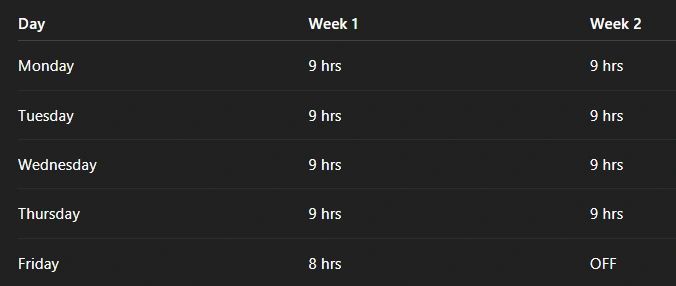
👉 Result:
- Every other Friday off
- Same total hours (80)
- Longer daily shifts
️ The Most Important Detail (Most People Miss This)
The 8-hour day in Week 1 is usually split across two workweeks for payroll purposes.
Why?
Because overtime laws (especially in places like California) are based on 40 hours per week, not two weeks.
🧾 How Payroll Actually Tracks It
That 8-hour Friday is split into:
- 4 hours → Week 1
- 4 hours → Week 2
So each week stays at: 👉 40 hours exactly
🚨 If You Don’t Do This…
You accidentally create:
- Overtime issues
- Compliance risks
- Payroll errors
👉 This is where most companies mess up.
Benefits of a 9/80 Work Schedule
When implemented correctly, this schedule has real advantages.
👍 1. Increased Employee Satisfaction
Employees get:
- A full day off every other week
- Better work-life balance
- More flexibility
👉 This alone can improve retention.
👍 2. Higher Productivity
Longer workdays often mean:
- Fewer interruptions
- More deep work
- Better focus
Especially in:
- Engineering
- Operations
- Project-based roles
👍 3. Reduced Commuting
One less commute every two weeks:
- Saves time
- Reduces stress
- Cuts transportation costs
👍 4. Competitive Hiring Advantage
Offering flexible schedules helps you:
- Attract better candidates
- Stand out vs traditional employers
️ Downsides of a 9/80 Schedule
It’s not perfect and you need to go in clear-eyed.
👎 1. Longer Workdays
9-hour days can lead to:
- Fatigue
- Reduced focus late in the day
- Burnout (if unmanaged)
👎 2. Scheduling Complexity
You now have:
- Split workweeks
- Alternating days off
- Coverage gaps
👉 This requires better planning.
👎 3. Payroll & Time Tracking Challenges
This is the big one.
If you don’t track time properly:
- Overtime gets miscalculated
- Hours don’t align with payroll
- Reporting breaks
👎 4. Not Ideal for All Roles
This schedule doesn’t work well for:
- Customer-facing roles needing daily coverage
- Retail or shift-based environments
- Teams requiring strict daily availability
How to Calculate a 9/80 Work Schedule
Let’s break it down clearly.
Total Hours Over 2 Weeks
(8 days × 9 hours) + (1 day × 8 hours) = 80 hours
Weekly Breakdown (Adjusted)
Because of the split day:
Week 1:
- 36 hours (Mon–Thurs)
- 4 hours (half of Friday) 👉 = 40 hours
Week 2:
- 36 hours (Mon–Thurs)
- 4 hours (other half of Friday) 👉 = 40 hours
👉 This keeps everything compliant.
Example: Employee Time Tracking
Let’s say an employee logs:
Week 1:
- Mon–Thurs: 9h each → 36h
- Friday: 8h (split 4/4)
Week 2:
- Mon–Thurs: 9h each → 36h
- Friday: OFF
Final Tracking:
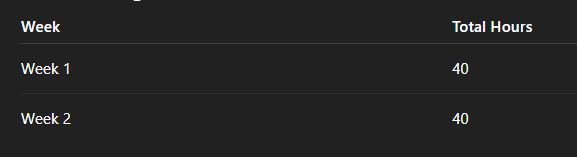
👉 Clean. No overtime.
Managing This in Microsoft Excel
You can track a 9/80 schedule in Excel but it gets messy fast.
You’ll need:
- Custom formulas
- Split-day logic
- Weekly caps
- Overtime rules
Example Challenge in Excel
You must:
- Detect the “split Friday”
- Allocate hours across weeks
- Prevent overtime miscalculations
👉 This is not simple spreadsheet work anymore.
The Smarter Way to Handle 9/80 Schedules
Instead of manually managing:
- Split workweeks
- Hour allocations
- Payroll alignment
Use a system that handles it automatically.
👉 This is where Updoot fits perfectly
With a structured system:
- Employees clock time normally
- Hours are tracked in real time
- Workweeks are automatically aligned
- Payroll and reporting stay accurate
What this solves:
- No manual hour splitting
- No payroll confusion
- No spreadsheet errors
- No overtime mistakes
👉 You get clean, reliable data tied directly to:
- Employees
- Projects
- Billing
When Should You Use a 9/80 Schedule?
This schedule works best if you:
✅ Have project-based work ✅ Want to improve employee retention ✅ Can manage flexible scheduling ✅ Have systems to track time accurately
It works especially well for:
- Engineering teams
- Operations teams
- Office-based roles
- Knowledge workers
It may NOT work well for:
- Retail
- Customer support teams needing daily coverage
- Hourly shift-based environments
Key Takeaways
- A 9/80 schedule = 80 hours over 9 days
- Employees get every other Friday off
- The 8-hour day must be split across workweeks
- Payroll accuracy depends on correct tracking
- Excel can handle it—but gets complex fast
- Systems like Updoot simplify everything
️ Final Thought
The 9/80 schedule is powerful but only if executed correctly.
Most companies don’t fail because of the schedule…
👉 They fail because they can’t track it properly.
If your time tracking breaks:
- Payroll breaks
- Billing breaks
- Trust breaks
Find more free templates here
Weekly and biweekly meeting agenda template
Level 10 meeting agenda template
Flextime policy and request template
Related articles on Scheduling
Shift Swap Software for Restaurants, Construction, Retail, More