
Vacation Scheduling Software: How to Find the Best
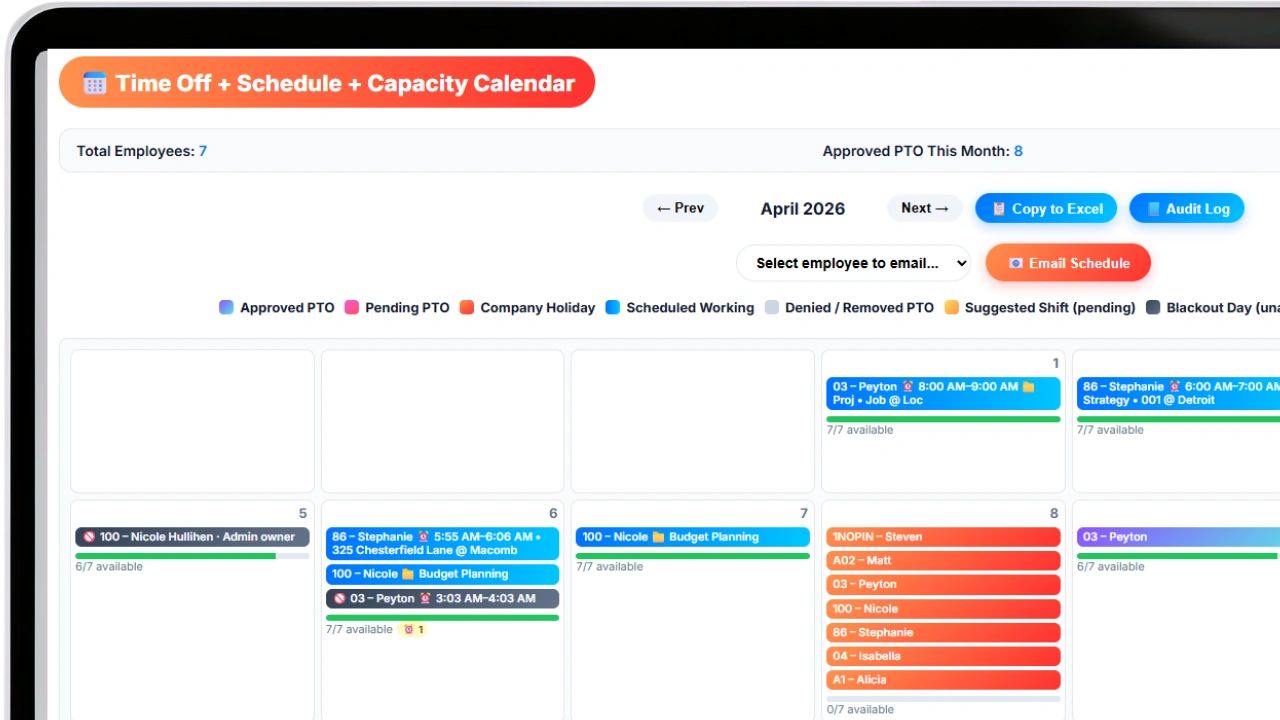
Use our free guide below to find the perfect vacation scheduling software for your business. Managing employee time off sounds simple until it is not. One person requests the same week as three of their teammates. A manager approves a vacation without checking coverage. A public holiday falls mid-week and throws off two weeks of scheduling. Payroll needs accrual data that no one has tracked accurately. What started as a basic calendar problem becomes a coordination mess that costs time, creates resentment, and occasionally leaves a business understaffed during its busiest periods.
Vacation scheduling software exists to solve exactly this set of problems. It brings structure, visibility, and automation to a process that most businesses handle poorly, and it pays for itself quickly in reduced administrative overhead and fewer costly scheduling errors.
This guide covers what vacation scheduling software is, what it does, who needs it, what to look for when choosing a platform, and how the right tool changes the way teams manage time off.
What Is Vacation Scheduling Software?
Vacation scheduling software is a category of business tool designed to manage employee time off requests, approvals, accruals, and coverage planning in a centralized, automated system. It replaces manual processes like email chains, shared spreadsheets, and paper request forms with a structured workflow that gives employees, managers, and HR teams a consistent, transparent experience.
At its core, vacation scheduling software does three things.
- It gives employees a place to submit time off requests and view their available balances.
- It gives managers a way to review, approve, or decline those requests with full visibility into team coverage.
- And it gives HR and payroll teams accurate, up-to-date records of accruals, balances, and usage without requiring manual reconciliation.
Beyond those basics, modern platforms extend into scheduling conflict detection, integration with payroll systems, compliance tracking for state and federal leave laws, and reporting that helps leadership understand how time off is being used across the organization.
Why Manual Time Off Management Fails
Before examining what vacation scheduling software offers, it is worth understanding what it replaces and why those legacy approaches break down.
Spreadsheets are the most common substitute. They are free, familiar, and flexible enough to handle simple scenarios. But they do not scale. A spreadsheet cannot enforce accrual policies automatically, alert a manager when approving a request would leave a team short-staffed, or sync with payroll. Every update requires someone to manually edit the file, and version control is a persistent problem. The moment two people edit the same spreadsheet at the same time, the data becomes unreliable.
Email request chains create a record, but it is buried across inboxes and impossible to audit quickly. A manager trying to answer "how many vacation days does this employee have left?" has to search through months of email threads to reconstruct the answer. That is not a sustainable system for any team larger than a handful of people.
Paper forms are even more limiting. They create no searchable record, require physical storage, and make it impossible to give employees real-time visibility into their own balances.
The cumulative cost of these approaches is not always visible immediately. It shows up in HR hours spent reconciling records at year-end, in payroll errors caused by inaccurate accrual data, in employee frustration when requests fall through the cracks, and in manager time spent arbitrating disputes that a transparent system would have prevented.
Core Features of Vacation Scheduling Software
Not all platforms are built the same way, but the best vacation scheduling software shares a set of foundational features that address the most common failure points in manual systems.
Employee Self-Service Portal
Employees should be able to submit time off requests, check their current balances, view the status of pending requests, and see a team calendar showing when colleagues are out, all without contacting HR. Self-service reduces administrative overhead and gives employees a sense of control and transparency over their own time.
Automated Accrual Tracking
Vacation accruals are often the most error-prone part of time off management. Employees earn time at different rates based on tenure, employment type, or policy tier. Overtime, leaves of absence, and unpaid time can all affect accrual calculations. Vacation scheduling software handles these calculations automatically based on the rules you define, eliminating the manual tracking that leads to errors and disputes.
Manager Approval Workflows
A structured approval workflow ensures that requests are routed to the right person, reviewed within a defined timeframe, and logged with a clear audit trail. The best systems also surface scheduling context at the point of approval, so managers can see who else is already out during the requested period before making a decision.
Team Coverage Visibility
Coverage conflicts are one of the most expensive consequences of uncoordinated time off. A team calendar view that shows all approved and pending time off at a glance lets managers spot potential gaps before approving requests that would create them. Some platforms allow managers to set minimum staffing thresholds that trigger alerts when a request would push coverage below acceptable levels.
Policy Enforcement
Every organization has time off policies: blackout dates, advance notice requirements, maximum consecutive days, carryover rules, and payout calculations for unused time. Vacation scheduling software can enforce these policies automatically, rejecting or flagging requests that violate defined rules rather than relying on managers to remember and apply policies consistently.
Integration with Payroll and HR Systems
Time off data needs to flow into payroll accurately and on time. Platforms that integrate with payroll systems eliminate the manual data transfer step that introduces errors and delays. This integration also ensures that payouts for unused vacation time, a requirement in many states, are calculated correctly without manual intervention.
Compliance and Reporting
Federal and state leave laws create compliance obligations that grow more complex as a business adds employees and operates across multiple locations. The Family and Medical Leave Act, state-specific paid leave programs, and local ordinances all impose requirements around eligibility, documentation, and notice. Vacation scheduling software with built-in compliance features helps employers track these obligations and generate the records needed to demonstrate compliance.
Who Needs Vacation Scheduling Software?
The honest answer is any organization with more than a handful of employees. The complexity threshold at which manual systems start to fail varies, but most businesses hit it somewhere between 10 and 25 employees. Beyond that point, the combination of different accrual rates, varying employment types, multiple managers, and overlapping time off patterns makes manual management genuinely unsustainable.
Small businesses often underestimate how much time they spend managing time off manually until they switch to a dedicated system. Even at 15 employees, automating accrual tracking and approval workflows can recover several hours of administrative time per week.
Mid-size companies face the added challenge of consistency. When multiple managers are independently approving time off requests without shared visibility, coverage decisions become unpredictable and employees in different departments experience the process very differently. A centralized platform creates a consistent experience and a single source of truth.
Enterprise organizations deal with all of the above plus compliance complexity across multiple jurisdictions, integration requirements with existing HRIS and payroll infrastructure, and the need for detailed reporting to support workforce planning.
Remote and distributed teams have a particular need for vacation scheduling software because the informal visibility that exists in a shared office does not exist when people are spread across time zones. A remote team member's absence has no visible signal unless it is captured in a shared system.
What to Look for When Choosing Vacation Scheduling Software
With a wide range of platforms on the market, evaluating your options requires clarity on what your specific situation demands.
Ease of use for employees matters more than it might seem. A system that employees find confusing or cumbersome will be underused, which undermines the entire point of centralizing time off management. Look for platforms with clean interfaces, mobile access, and minimal steps between a request and its submission.
Flexibility in policy configuration is critical if your organization has multiple employee types, tenure-based accrual tiers, or complex carryover rules. A rigid system that cannot reflect your actual policies will require manual workarounds that recreate the problems you were trying to solve.
Integration depth determines how much value the platform adds beyond its own interface. A vacation scheduling tool that syncs with your payroll system, your calendar applications, and your existing HR software creates a connected workflow. One that operates as an island requires duplicate data entry and manual reconciliation.
Reporting and analytics support workforce planning decisions that extend well beyond day-to-day scheduling. Understanding patterns in time off usage, identifying employees who are not using their time and may be at burnout risk, and forecasting coverage needs around peak periods all require data that only a system with strong reporting can surface.
Compliance support is non-negotiable for businesses operating in states with complex paid leave requirements. California, New York, Colorado, and several other states have enacted laws that require precise tracking and specific documentation. A platform that does not account for multi-jurisdiction compliance creates legal exposure.
Scalability matters if you expect to grow. A platform that works well at 20 employees but becomes unwieldy at 80 forces a disruptive migration at exactly the wrong time.
The Business Case for Vacation Scheduling Software
The return on investment from vacation scheduling software comes from several directions simultaneously.
- Administrative time savings are the most immediate and measurable. Organizations that switch from manual systems to automated platforms consistently report significant reductions in the time HR spends processing requests, reconciling records, and answering employee questions about balances. That time redirected to higher-value work represents real dollar savings.
- Reduced payroll errors are a direct financial benefit. Incorrect accrual calculations, missed payout requirements, and underpaid or overpaid time off balances all have monetary costs. Automation reduces the frequency of these errors and makes the ones that do occur easier to detect and correct quickly.
- Improved coverage and reduced understaffing protect revenue, particularly for customer-facing businesses where understaffing has a direct impact on service quality. A manager who can see team coverage at a glance before approving a request makes better decisions than one who is approving requests in an information vacuum.
- Employee experience improvements reduce turnover. Employees who find time off management transparent, fair, and easy to navigate report higher satisfaction with their employer. The inverse is also true: confusing, opaque, or inconsistent time off management is a common source of workplace frustration that contributes to attrition.
How Updoot Supports Vacation Scheduling and Workforce Management
Managing vacation and time off does not happen in isolation. It connects directly to how hours are tracked, how payroll is calculated, and how managers plan their teams week to week. A vacation request that is approved without reference to current workloads or upcoming projects creates downstream problems that a scheduling tool alone cannot solve.
Updoot brings time tracking and scheduling into the same workflow, so the data that informs time off decisions is the same data that feeds into payroll and project planning. When an employee's available balance is calculated from the same system that tracks their hours, the numbers stay consistent across every function that depends on them.
For managers, Updoot's reporting tools give a clear picture of how time off is distributed across teams, where coverage risk exists, and how planned absences interact with workload demands. For HR and payroll teams, that same data flows directly into the calculations that determine what employees are owed and when.
If your current process involves reconciling spreadsheets, chasing approvals through email, or manually updating payroll with time off balances, Updoot addresses each of those friction points in a single platform.
Frequently Asked Questions About Vacation Scheduling Software
Q: What is vacation scheduling software?A: Vacation scheduling software is a tool that manages employee time off requests, approvals, accrual tracking, and coverage planning in a centralized system. It replaces manual processes like spreadsheets and email chains with automated workflows that give employees, managers, and HR teams accurate, real-time information.
Q: How is vacation scheduling software different from a general HR platform?A: General HR platforms handle a broad range of functions including hiring, onboarding, performance management, and benefits administration. Vacation scheduling software is either a standalone tool focused specifically on time off management or a module within a broader HR platform. Some businesses use a dedicated vacation scheduling tool because it offers deeper functionality in this specific area than an all-in-one HR system.
Q: Can vacation scheduling software enforce different accrual policies for different employee types?A: Yes. Most platforms allow you to define separate accrual policies based on employment type, tenure tier, department, or location. This means full-time, part-time, and contract employees can each accrue time at different rates according to your specific policies, with the software handling the calculations automatically.
Q: Does vacation scheduling software integrate with payroll systems?A: Most modern platforms offer integrations with common payroll providers. The depth of integration varies by platform and payroll system. Look for integrations that sync accrual balances and approved time off directly to payroll, eliminating the need for manual data transfer.
Q: How does vacation scheduling software handle compliance with state leave laws?A: Platforms with compliance features can be configured to reflect the requirements of specific state and local leave laws, including accrual mandates, payout requirements, and documentation obligations. For businesses operating in multiple states, this is a critical feature that reduces legal exposure.
Q: Is vacation scheduling software suitable for remote teams?A: Yes, and it is often more valuable for remote teams than for office-based ones. Remote employees do not have the informal visibility signals that exist in a shared workspace, so a centralized system that shows who is out and when becomes the primary mechanism for maintaining coverage awareness.
Q: What happens to unused vacation time at year-end?A: This depends on your company policy and applicable state laws. Some states require that unused vacation be paid out upon termination. Others allow use-it-or-lose-it policies. Vacation scheduling software can be configured to enforce your specific carryover and payout rules automatically, ensuring compliance without manual calculation.
Q: How long does it take to implement vacation scheduling software?A: Implementation timelines vary based on the size of the organization, the complexity of the policies being configured, and the integrations required. Small businesses with straightforward policies can often be up and running within a few days. Larger organizations with complex requirements and multiple system integrations may need several weeks for full deployment.
Q: Can employees access vacation scheduling software on their phones?A: Most modern platforms offer mobile apps or mobile-optimized web interfaces that allow employees to submit requests, check balances, and view team calendars from any device. Mobile access is particularly important for field workers and remote employees who may not have regular access to a desktop.
Q: What should I look for in vacation scheduling software for a small business?A: Small businesses should prioritize ease of setup, intuitive interfaces for both employees and managers, flexible policy configuration, and integration with whatever payroll system they already use. Cost is also a relevant factor, as many platforms charge per employee per month, so the total cost scales with headcount.
Learn more about apps for business
Every Small Business App You Need in a List
AI-Powered Software for Running a Small Business
Workday HRIS vs Updoot HRIS Easy Comparison Chart
Best App for Sales Performance Tracking: A Quick Comparison Chart
Best CRM for SaaS: What You Need to Look For
Homebase Scheduling vs. Updoot Scheduling
ClockShark Pricing vs. Updoot Pricing: Let's Talk Value
Shift Swap Software for Restaurants, Construction, Retail, More
Related articles on HR
How Many Write-Ups Before Termination?
Small Business Employee Benefits to Retain Employees
Job Description Format to Follow and a Template
W2 vs 1099 Employee: Checklist to Choose the Right One
How to Hire for Cultural Fit and a Free Hiring Tracker
Salary Bands Meaning and How to Build Them
Employee Coaching Plan to Improve Performance and Results