
Time Doctor Alternatives: The Pros and Cons to Choose the Best
If you are searching for Time Doctor alternativAlternativeses, you already know what the problem is. The screenshot monitoring that fires every few minutes. The distraction pop-ups that interrupt employees mid-task. The webcam capture option that makes people feel watched rather than trusted. The pricing that starts reasonable and climbs quickly once you need the features that actually matter.
Time Doctor has been around for over a decade and does the basics of time tracking well. But in 2026, the complaints that show up consistently across G2, Capterra, and Reddit point to the same friction points: the surveillance-heavy approach damages morale, the AI features lag behind newer competitors, and essential integrations are locked behind higher pricing tiers.
If any of that sounds familiar, this article is for you. We are going to cover what Time Doctor actually is, where it falls short, and why Updoot has become the alternative teams choose when they want accurate time tracking without the surveillance atmosphere.
What is Time Doctor?
Time Doctor is a time tracking and employee monitoring platform built primarily for remote and hybrid teams. It tracks time spent on tasks and projects, captures screenshots of employee screens at intervals (every three minutes on higher tiers), monitors which websites and apps are being used during work hours, and shows managers a productivity percentage for each employee based on active computer use.
It also offers distraction alerts, which are pop-up notifications that ask employees if they are still working when the system detects idle time or off-task browsing. Video screencasts are available on higher plans, recording employee screens continuously.
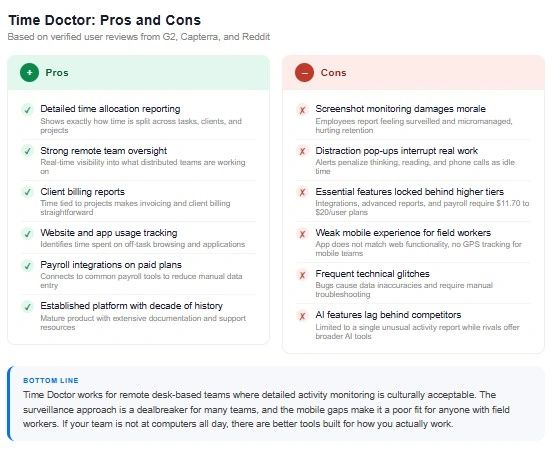
The reporting is detailed. Managers can see exactly how time was spent across projects, clients, and tasks. Payroll integrations and client billing features are included on paid plans. For remote teams where managers genuinely cannot see what employees are doing and accountability is the primary concern, Time Doctor delivers real data.
The problems are not with what Time Doctor measures. The problems are with how it measures, how that approach lands with employees, and what it costs to get the full feature set.
Where Time Doctor Falls Short
The Surveillance Problem
This is the issue that generates the most consistent feedback across review platforms. Screenshot capture, distraction pop-ups, idle time tracking, and optional webcam monitoring create an environment that many employees describe as micromanagement. The "idle time" penalty is particularly frustrating because it flags legitimate work activities like reading, thinking, or being on a phone call as unproductive time.
Employee pushback on Time Doctor is not a fringe complaint. It shows up repeatedly in verified reviews and in HR forums where managers describe losing good employees who objected to the monitoring approach. For teams built on trust, the surveillance model creates more problems than it solves.
Pricing Gates Essential Features
Time Doctor's Basic plan starts at $6.70 per user per month but reviewers consistently note it feels incomplete. Integrations, advanced reports, and payroll features are gated behind the $11.70 to $20 per user tiers. For a team of twenty people, the difference between the entry plan and the plan that actually covers your needs can be significant.
Limited Mobile Experience
Multiple recent Capterra reviewers flag mobile access limitations as a meaningful gap. For teams where some workers are at desks and others are in the field, a tool that works primarily as a desktop or browser experience leaves field workers underserved. The mobile app does not deliver the same functionality as the web version.
AI Features Lag Behind Competitors
Time Doctor added an unusual activity AI report in recent updates, but reviewers note that competitors have moved further with AI coaching, burnout detection, and smart analytics. For teams evaluating tools in 2026, the AI gap is a real differentiator.
Frequent Technical Glitches
Capterra reviewers specifically call out bugs and technical issues that disrupt time tracking, cause data inaccuracies, and require manual troubleshooting. For a tool whose primary job is accurate time records, reliability problems undermine the core value.
Updoot as a Time Doctor Alternative: A Detailed Comparison
Updoot was built for a different set of priorities than Time Doctor. Where Time Doctor is built around monitoring and accountability for remote knowledge workers, Updoot is built around accurate time tracking and operational management for hourly, field-based, and deskless teams. If your workforce uses a computer all day, Time Doctor is designed for you. If your workforce is on a job site, in a warehouse, behind a counter, or moving between locations, Updoot is.
Here is how they compare on the features that matter.
Time Tracking Approach
Time Doctor tracks computer activity and derives productivity scores from what employees do on their screens. It works for desk-based remote workers and produces detailed data about how time is allocated. For anyone not sitting at a computer, it produces nothing useful.
Updoot tracks time through a GPS-enabled clock-in and clock-out system with midnight splits, break timers, and kiosk punch mode for shared devices. Every punch is tied to a location. The record is clean and accurate without requiring employees to have a computer open. It works on any mobile device from day one.
Employee Experience
Time Doctor employees know they are being monitored. Screenshots, activity scores, and distraction pop-ups are visible reminders of surveillance. For some teams this is acceptable. For many it damages trust and retention.
Updoot employees clock in, do their work, and clock out. There is no surveillance layer. The accountability comes from accurate location-tied time records, not from screen captures. The experience is built for people whose jobs do not happen at a desk.
GPS and Location
Time Doctor does not include meaningful GPS tracking for field workers. The tool was built for remote desk workers and the location features reflect that.
Updoot includes GPS clock-in with location recorded on every punch, team location map, geofencing that enforces location rather than just recording it, and real-time location visibility for managers. These are not add-ons. They are included across plans.
Scheduling
Time Doctor does not include employee scheduling. It is a time tracking and monitoring tool, not a workforce management platform.
Updoot includes full scheduling with shift suggest, shift swap, and capacity management by job and location. The schedule connects directly to the time clock so discrepancies between scheduled shifts and actual punches get flagged automatically.
Payroll and HR
Time Doctor includes payroll integrations on higher tiers and basic reporting that feeds into billing and payroll workflows.
Updoot includes payroll-ready export to Gusto, ADP, Paychex, and more with pay rates, multipliers, and gross pay calculated in the export. PTO accruals and allocations across five categories, salaried employee setup, tips, bonuses, commission, and mileage tracking are all included. The HR vault stores emergency contacts, certifications, and employee documents in one place.
Operational Scope
Time Doctor is a focused tool. It does time tracking and monitoring for desk-based employees and does not expand much beyond that.
Updoot covers the full operational stack for small and mid-size businesses. In addition to time tracking and HR, it includes a sales CRM, invoice generator, project management, SOP library, budget to actual tracker, P&L builder, RASCI accountability charts, org chart builder, Vision Tracker for business planning, and a Gantt-style roadmap builder. For a business owner who wants one platform instead of six, Updoot covers ground that Time Doctor never touches.
AI
Time Doctor added an unusual activity report powered by AI in recent updates. The feature flags patterns that fall outside normal behavior for review.
Updoot includes an AI assistant named Doot built into the platform to help teams work faster across scheduling, documentation, and operations. The AI layer is woven into the product rather than added as a single report feature.
Who Should Choose Time Doctor
Time Doctor is the right choice for remote teams where employees work at computers all day and managers need detailed visibility into how time is being allocated across tasks, clients, and projects. If your team is fully remote, desk-based, and the monitoring approach is acceptable to your culture, Time Doctor produces accurate and detailed time allocation data. It is also a reasonable choice for agencies that need client billing reports tied to specific project work.
It is the wrong choice for any team with field workers, hourly employees who are not at computers, or any culture where the surveillance approach would damage trust and retention.
Who Should Choose Updoot
Updoot is the right choice for businesses managing hourly, field-based, or deskless workers where GPS time tracking, scheduling, and payroll accuracy are the core needs. It is also the right choice for business owners who want to consolidate operations into one platform rather than pay for separate tools for time tracking, scheduling, HR, invoicing, and business planning.
If you tried Time Doctor and found that the monitoring approach created more friction than it resolved, or that the mobile experience did not serve your field workers, or that the features you actually needed were locked behind a higher pricing tier, Updoot was built for exactly that situation.
The pitch is not that Updoot does everything Time Doctor does. They are built for different teams. The pitch is that if your team looks more like hourly workers and job sites than remote developers and productivity dashboards, Time Doctor was never the right tool and Updoot is.
Ready to see it? Sign up free and have your team clocked in today.
Frequently Asked Questions
What is the main difference between Time Doctor and Updoot?
Time Doctor is built for remote desk-based teams and relies on screenshot monitoring, activity scoring, and computer usage tracking to measure productivity. Updoot is built for hourly, field-based, and deskless teams and relies on GPS clock-in, scheduling, and accurate timesheet management. They serve different workforces. If your employees are not sitting at computers all day, Time Doctor was not designed for them.
Why do people look for Time Doctor alternatives?
The most common reasons are the surveillance atmosphere created by screenshot monitoring and distraction pop-ups, employee pushback and morale issues tied to the monitoring approach, pricing that requires upgrading to access essential features, limited mobile functionality for field workers, and technical glitches that affect time tracking accuracy.
Does Time Doctor work for field workers?
Not well. Time Doctor is designed for desk-based remote workers and its core features, screenshot monitoring, website tracking, and activity scoring, require employees to be working on a computer. For field workers who are not at a desk, the tool provides little useful data and no GPS location tracking.
Is Time Doctor worth the price?
That depends on your team. For fully remote desk-based teams where detailed activity monitoring is acceptable to your culture, Time Doctor provides real data. For hourly or field-based teams, you would be paying for a monitoring layer that does not apply to how your people work. Updoot covers GPS time tracking, scheduling, and HR at competitive pricing without the surveillance overhead.
Does Updoot replace Time Doctor for remote teams?
Updoot is purpose-built for field and hourly teams rather than remote knowledge workers. If your remote team works primarily at computers and you want activity-level visibility, Time Doctor is a closer fit for that specific use case. If your remote workers are not at computers, or if you need scheduling, GPS, and payroll features alongside time tracking, Updoot covers more ground.
What makes Updoot different from other Time Doctor alternatives?
Most Time Doctor alternatives either replicate the monitoring approach with different pricing, or strip down to a basic punch clock. Updoot covers the full operational need of a small or mid-size business, including time tracking with GPS, scheduling, PTO management, payroll export, HR vault, CRM, invoicing, project management, and business planning tools. It is not a monitoring tool with a prettier interface. It is a workforce and operations platform built for teams whose work happens outside a browser.
Can I import my Time Doctor data into Updoot?
Yes. Employee data and historical timesheet records can be imported from CSV exports. If you are moving an active team from Time Doctor, reach out to the Updoot support team and they will walk you through the migration without starting from scratch.