
Time and Scheduling Apps with Payroll Export Feature
.png)
See our list below of the top time and scheduling apps with payroll exports and click to see a sample report. A scheduling app that cannot connect to payroll is only doing half the job. Every hour your team works has to make it into your payroll system accurately, and if the path between your scheduling tool and your payroll provider runs through a spreadsheet and a manual data entry session, you are paying someone to do a job software should handle automatically.
Payroll-ready exports reduce end-of-pay-period cleanup and eliminate the errors that come from manually re-entering timesheet data into a separate system. For a business running bi-weekly payroll with 20 or more employees, the time savings alone justify the switch from a scheduling-only tool. People Managing People
This guide covers what a payroll export actually means, what to look for before you choose a platform, and the three scheduling apps that handle it best in 2026.
What Is a Payroll Export Feature in a Scheduling App?
A payroll export feature takes the hours your employees worked, as recorded by your scheduling and time tracking app, and produces a file or direct feed that your payroll provider can process without manual cleanup.
There are two versions of this and the difference matters.
A raw CSV export drops a spreadsheet of hours into your downloads folder. Someone still has to open it, check the formatting, map the columns to what your payroll system expects, and upload it manually. This is better than nothing but it is not a true payroll export.
A payroll-ready export is formatted specifically for your payroll provider. Gusto, ADP, Paychex, and similar platforms each have their own required fields and structure. A payroll-ready export matches that structure exactly so the file goes straight in without editing. No manual cleanup, no mapping, no re-entry errors.
The best platforms go further and offer a direct sync, where approved hours flow into your payroll system automatically without any file at all. When evaluating scheduling apps, always ask whether the export is raw CSV, payroll-ready, or a direct sync. The answer determines how much manual work remains after every pay period.
What to Look for in a Scheduling App with Payroll Export
Not every platform that claims payroll export actually delivers it cleanly. Here is what to check before committing.
Which payroll providers are supported. The most common are Gusto, ADP, Paychex, QuickBooks Payroll, and Rippling. If your payroll provider is not on the supported list, the export may still require manual formatting.
Whether overtime is calculated automatically. A scheduling app should know your overtime rules, daily, weekly, and for California double time, and apply them before the export runs. If overtime is calculated manually after export, errors will follow.
Whether time card approval is part of the workflow. Approved hours should be locked before they go to payroll. If employees or managers can edit timesheets after approval, the payroll data is not reliable.
Whether scheduling and time tracking live in the same platform. When scheduling and clock-in are separate tools, the data has to be reconciled before export. A single platform where the schedule and the time clock talk to each other produces a cleaner export with fewer discrepancies.
Whether tips, bonuses, and other pay components are included. For restaurants, hospitality, and sales teams, gross pay is not just hours multiplied by rate. A payroll export that only handles base hours forces manual additions for every other pay component.
The 3 Best Time and Scheduling Apps with Payroll Export Features in 2026
1. Updoot (Best Overall)
Updoot is the only platform on this list that combines scheduling, time tracking, HR, and a payroll-ready export in a single system built for growing businesses. Where other platforms export hours and leave everything else to a separate tool, Updoot connects every part of the workforce management workflow from the schedule through the time clock through to a payroll-ready file.
Scheduling that connects directly to time tracking. Updoot's shift scheduler handles job-based and location-based scheduling with suggested shifts, swap requests, and a capacity calendar. Because scheduling and the time clock live in the same platform, the hours recorded at clock-in automatically map to the correct shift, job code, and employee without any manual reconciliation.
A time clock built for hourly teams. The employee time clock includes GPS clock-in, midnight splits for overnight shifts, a break timer, California overtime tracking alongside daily and weekly overtime, and kiosk punch mode for shared devices. Time card approval includes a full audit log at both the admin and optional employee level so every change is tracked before the export runs.
Payroll-ready export formatted for the providers that matter. Updoot generates a payroll-ready export for Gusto, ADP, Paychex, and more. The export includes base hours, overtime, pay rates and multipliers, tips, bonuses, commission, and mileage in one file. There is no separate export for each pay component and no manual additions required after the fact.
Everything else that payroll actually depends on. Gross pay is not just hours. Updoot tracks tips, bonuses, commission, and mileage in the same place as time cards so the payroll export reflects actual compensation, not just clock time. Pay rates and multipliers are set per employee and applied automatically in the export.
HR built into the same platform. Updoot includes five categories of PTO accruals and allocations, a full HRIS, performance reviews, an applicant tracking system, and an employee HR vault. None of this requires a separate subscription. For a growing business, having HR data and payroll data in the same system means PTO balances, salaried employee setup, and role changes all flow into the payroll export without manual adjustments.
Beyond scheduling and payroll. Updoot also includes an SOP library, project management, a sales CRM, invoice generation, goal and KPI tracking, a Vision Tracker, a Gantt roadmap builder, an org chart, and an AI assistant called Doot. For businesses that are tired of managing six different tools that do not talk to each other, Updoot replaces most of the stack.
Best for: Growing businesses that need scheduling, time tracking, HR, and a clean payroll-ready export in one platform without paying for multiple tools.
2. Homebase
Homebase integrates with popular payroll providers including QuickBooks, ADP, Gusto, and Paychex, allowing businesses to export timesheets directly into payroll, reducing errors and saving time. GetApp
Homebase is designed for hourly teams at single physical locations, particularly restaurants, retail shops, and service businesses. The scheduling interface is clean, the time clock is reliable, and the payroll export workflow is straightforward. Basic payroll features are included on the entry-level plan, though full-service payroll processing requires an upgrade.
The limitation is scale. Homebase has limited customization for bigger businesses that need advanced features, and the mobile app needs improvement for day-to-day employee management. Multi-location businesses will find the platform becomes harder to manage as the operation grows. There is no HR beyond basic time off, no performance management, no project tracking, and no operational tools beyond scheduling and communication. GetApp
Best for: Single-location hourly businesses in restaurants, retail, or service industries that need straightforward scheduling and a clean payroll export without operational complexity.
3. Buddy Punch
Buddy Punch integrates with popular payroll software including Gusto, Workday, QuickBooks, ADP, Rippling, Paychex, TriNet, and more. The Starter plan includes time tracking, PTO tracking, and payroll integration features at $4.49 per user per month. Software Advice
Buddy Punch's payroll integration list is the widest on this list, covering providers that Homebase and some larger platforms miss. You can use the built-in payroll features or integrate with a payroll solution you already use, and the payroll sync is fully integrated with its time tracking features.
The platform is straightforward and well-suited to small businesses that need reliable clock-in, PTO tracking, and a payroll export without a complex setup. It does not have scheduling depth, HR tools, operational features, or the ability to track tips, bonuses, or commission. For businesses that need more than basic time tracking and a payroll export, the platform runs out of runway quickly.
Best for: Small businesses that need a wide payroll provider compatibility list and straightforward time tracking without operational complexity.
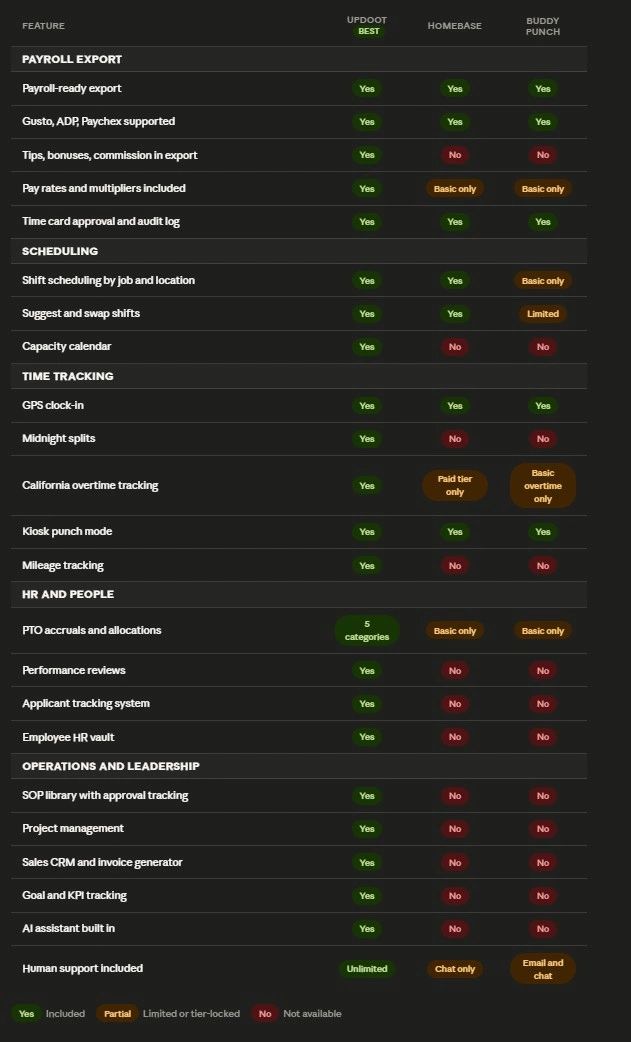
Scheduling Apps with Payroll Export: Feature Comparison
Which Platform Is Right for Your Business
Choose Updoot if your payroll includes more than just base hours. If your team earns tips, bonuses, commission, or mileage, and you need those components in the same export as clock time, Updoot is the only platform on this list that handles the full picture. It is also the right choice if you want scheduling, HR, operations, and leadership tools in the same platform rather than paying for a separate tool for each function.
Choose Homebase if you run a single physical location with hourly staff and your payroll is straightforward. The scheduling and time clock are clean, the payroll export covers the major providers, and the setup is fast. If your needs grow beyond one location or you need more than basic HR, you will outgrow it.
Choose Buddy Punch if your primary need is the widest possible payroll provider compatibility. Buddy Punch connects to more payroll systems than most competitors. If your payroll provider is not on anyone else's supported list, it is probably on Buddy Punch's.
Frequently Asked Questions
What is a scheduling app with payroll export features?
A scheduling app with payroll export features is a platform that combines shift scheduling and employee time tracking with the ability to send approved hours directly to your payroll provider. The best platforms produce a payroll-ready file formatted for specific providers like Gusto, ADP, and Paychex rather than a raw CSV that still requires manual cleanup.
What is the difference between a payroll export and a payroll integration?
A payroll export produces a file that you upload to your payroll system. A payroll integration connects the two platforms directly so hours flow automatically without any file at all. Both are better than manual data entry, but a direct integration eliminates the upload step entirely. Updoot generates a payroll-ready export formatted specifically for each supported provider, which removes the manual cleanup even if a file is involved.
Which scheduling app has the best payroll export for restaurants and hospitality?
For restaurants and hospitality where tips are part of compensation, Updoot is the only platform on this list that includes tips in the payroll export alongside base hours and overtime. Homebase and Buddy Punch handle base hours but require manual additions for tips and other pay components.
Do scheduling apps calculate overtime automatically?
Most do, but the depth of overtime calculation varies. Basic weekly overtime is common across most platforms. Daily overtime and California double time rules are less common and often locked behind paid tiers. Updoot calculates daily, weekly, and California overtime automatically and includes those calculations in the payroll export without manual adjustment.
Can scheduling apps track PTO and include it in payroll exports?
Most leading scheduling apps include time off management, allowing managers to review, approve, or deny employee time off requests from a single dashboard. Whether PTO balances flow into the payroll export depends on the platform. Updoot includes five categories of PTO accruals and allocations and tracks them in the same system as time cards, so PTO is reflected accurately in the export without a separate entry. capterra
What payroll providers do scheduling apps support?
The most commonly supported payroll providers across scheduling apps are Gusto, Workday, QuickBooks, ADP, Rippling, Paychex, and TriNet. Coverage varies by platform. Before choosing a scheduling app, confirm your specific payroll provider is on the supported list, not just a major brand that sounds similar. Software Advice
Is a scheduling app with payroll export worth it for a small business?
Yes. Payroll-ready exports reduce end-of-pay-period cleanup and eliminate the errors that come from manually re-entering timesheet data. For a business with as few as 10 hourly employees running bi-weekly payroll, the time saved on manual entry and error correction typically covers the cost of the platform within the first month. People Managing People