
Small Biz Management Software
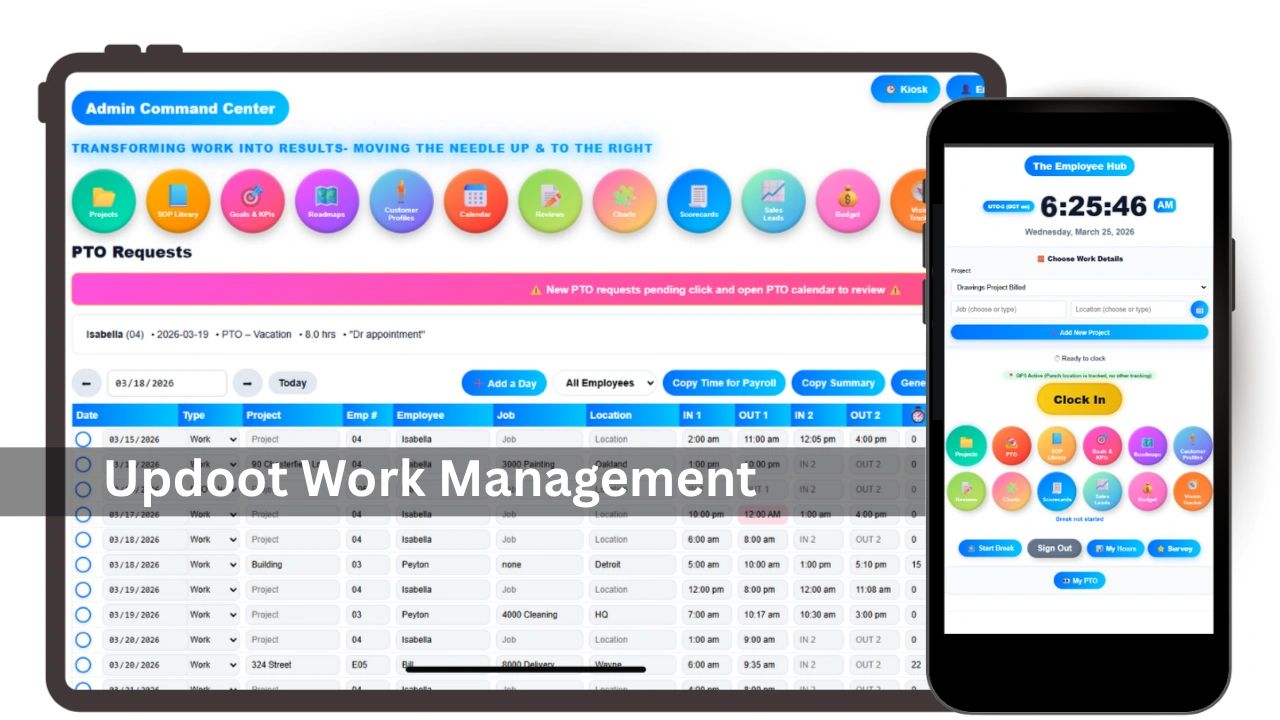
This is everything a small business management software needs to have and what it will do for you. Running a small business has never been more operationally complex. You are managing people, projects, invoices, schedules, time off, and customer relationships all at once, and for most small business owners that means a different tool for each one. A spreadsheet for scheduling. A separate app for invoicing. Another one for time tracking. An email thread for PTO requests. A text chain for shift swaps.
It works until it does not. And for most small businesses it stops working right around the time the team gets big enough that you cannot hold everything in your head anymore.
What Small Business Management Software Actually Is
Small business management software is a platform that brings the core operational functions of running a business into one place. Instead of managing five or six separate tools that do not talk to each other, you manage everything from a single system that shares data across functions automatically.
The best small business management platforms cover some combination of the following:
- Employee scheduling and shift management
- Time tracking and attendance
- Paid time off requests and approvals
- Invoicing and billing
- Project and task management
- HR records and employee information
- Payroll reporting
- KPI tracking and business performance visibility
The value is not just convenience. It is accuracy. When your time tracking feeds your invoicing which feeds your payroll reporting, the numbers are consistent because they come from the same source. When your scheduling connects to your capacity planning, you can see staffing problems before they become customer problems.
The Real Cost of Disconnected Tools
Most small business owners underestimate what disconnected tools are actually costing them. The obvious cost is the time spent switching between systems, re-entering data, and reconciling numbers that should match but do not. The less obvious cost is the decisions that get made on incomplete or outdated information.
When your invoicing data lives in one tool and your time tracking lives in another and your project costs live in a spreadsheet, nobody has a complete picture of profitability at any given moment. You might be billing accurately and still losing money on certain clients or certain types of work because the data to see that pattern is spread across too many places.
The hidden costs of disconnected small business tools include:
- Hours spent every week manually moving data between systems
- Billing errors caused by time entries that do not make it into invoices
- Overstaffing or understaffing because scheduling is not connected to actual demand
- PTO approval mistakes because nobody can see who else is already out
- Payroll errors that come from manual timesheet calculations
- Missed follow-ups because customer information is not connected to project status
- Decisions made on last month's numbers because real time data does not exist
None of these are dramatic on their own. Together they represent a significant drag on the business and they compound as the team grows.
What to Look For in Small Business Management Software
Not all small business management platforms are built the same way. Some are built for specific industries. Some are built for specific functions and bolt on everything else. Some are genuinely unified platforms and some are just collections of separate tools with a shared login.
The things that matter most when evaluating small business management software are:
Data connectivity. The most important question is whether the different functions actually share data or whether you are still re-entering information between modules. A time tracking tool that does not automatically feed your invoicing is not really saving you work.
Ease of use for non-technical teams. Small business software fails when employees will not use it. If the scheduling tool requires training or the time clock is confusing, adoption falls apart and you end up back where you started. Look for software that your least technical employee can figure out without help.
Mobile access. Most small business teams are not sitting at desks all day. Field workers, hourly employees, and remote staff need to clock in, check their schedules, and request time off from a phone. If the software does not work well on mobile it will not work for your business.
Pricing that makes sense for small teams. Enterprise software is built for enterprise budgets. Small businesses need tools that are priced per user at a rate that makes sense when you have five or fifteen people, not five hundred.
Support that is actually responsive. When something breaks or you cannot figure out how to do something, you need to be able to get help quickly. Small business owners do not have time to wait three days for a support ticket response.
Scheduling and Time Tracking
For most small businesses scheduling and time tracking are where the operational pain is most acute. Managing who is working when, tracking actual hours against scheduled hours, handling last minute callouts and shift swaps, and making sure the right people are in the right place on the right day is a full time job when it is done manually.
Good small business management software makes scheduling visual and fast. You should be able to see your entire team's schedule at a glance, spot gaps in coverage immediately, and make changes that automatically notify the affected employees.
Time tracking should connect directly to the schedule so you can see not just when people were supposed to work but when they actually worked, how many hours they logged, and where overtime is accumulating before it becomes a payroll surprise. The best platforms also flag anomalies automatically, like an employee who clocked in two hours late or worked through a scheduled break.
PTO and Leave Management
PTO management is one of the most consistently broken processes in small businesses. Requests come in over text, email, or in person. Approvals happen informally. Nobody has a clear view of who is out when and whether the coverage is adequate.
Small business management software fixes this by giving employees a single place to submit requests and giving managers a single place to review them with full visibility into who else is already approved for that period. When PTO connects to scheduling, approving a request automatically updates the schedule and adjusts capacity calculations.
The features that matter most for small business PTO management are:
- A simple employee-facing request flow that works on mobile
- Manager visibility into team calendar before approving or denying
- Automatic balance tracking so managers are not manually calculating accruals
- Notifications to relevant people when a request is approved or denied
- Integration with scheduling so coverage gaps are visible immediately
Invoicing and Project Billing
For service businesses invoicing is where time tracking and project management connect to revenue. Every hour logged against a project should flow automatically into an invoice without manual re-entry. Every project milestone should be visible alongside its billing status so nothing falls through the cracks.
Small business invoicing through a management platform is fundamentally different from standalone invoicing tools because the data is already there. You are not recreating timesheets in an invoice. You are pulling from the time entries that already exist, applying the right billing rates, and generating a professional invoice in minutes instead of hours.
The invoicing capabilities that matter most for small businesses are:
- Automatic population from time tracking and project hours
- Support for multiple billing rates across employees, project types, or clients
- Professional invoice templates that reflect the business brand
- Clear visibility into what has been billed, what is outstanding, and what has been paid
- The ability to generate payroll reports from the same data used for client billing
HR and Employee Records
Small businesses often manage employee information across a combination of paper files, email threads, and spreadsheets. Emergency contacts live in a binder. Certifications expire without anyone noticing. Performance conversations happen but are never documented.
Small business management software centralizes employee records so that everything is in one place, accessible to the people who need it, and protected from the people who do not. When HR records connect to scheduling and time tracking, you can see an employee's full picture in one view rather than piecing it together from multiple sources.
The HR features that add the most value for small businesses are:
- Centralized employee profiles including contact information, hire date, certifications, and emergency contacts
- Document storage for offer letters, signed policies, and performance records
- Visibility into PTO balances, usage history, and accrual rates
- Salary and compensation tracking with a review reminder system
- Manager assignment and org structure visibility
KPIs and Business Visibility
One of the most underrated benefits of unified small business management software is the visibility it creates at the business level. When your scheduling, time tracking, invoicing, and project data all live in the same system, you can start to see patterns that are impossible to spot when the data is scattered.
Which clients are most profitable? Which projects consistently run over on hours? Which employees are tracking toward overtime every week? Which months have historically low capacity that you should plan around?
These are not complicated questions but they are impossible to answer accurately without connected data. Small business management software makes the answers available without requiring a data analyst or a complex reporting setup.
Industry Fit for a Small Biz
Not all small business management software is equally suited to every industry. The features that matter most for a construction company are different from those that matter most for a medical practice or a marketing agency.
For field-based businesses like construction, landscaping, and facilities management the priorities are mobile time tracking, GPS verification, job site scheduling, and the ability to track hours and costs by project or job.
For professional services businesses like agencies, consultants, and staffing firms the priorities are project management, time tracking against client engagements, invoicing by project or retainer, and utilization reporting.
For businesses with hourly workforces like retail, hospitality, and healthcare the priorities are shift scheduling, availability management, PTO tracking, overtime monitoring, and payroll reporting.
The best small business management platforms are flexible enough to serve multiple types of businesses without requiring heavy customization to get started.
Making the Switch
The biggest barrier to adopting small business management software is not cost or complexity. It is inertia. The current system, however broken, is familiar. The spreadsheets work well enough. The text chains get the job done most of the time.
The switch becomes easier when you focus on one problem first rather than trying to replace everything at once. Pick the area where the pain is most acute, whether that is scheduling chaos, invoicing errors, or PTO confusion, and start there. Once that piece is working and the team is comfortable, expanding to other functions is much less disruptive.
The questions worth asking before making the switch are:
- What is the manual work that is consuming the most time every week
- Where are errors happening most often and what are they costing
- Which tool or process creates the most friction for employees
- What information do you wish you had but cannot get to easily right now
The answers will tell you where to start and what to prioritize.
One System for the Whole Business
The promise of small business management software is simple. Less time managing the tools that run your business means more time actually running your business. When scheduling, time tracking, PTO, invoicing, projects, and HR records all live in one connected system, the operational drag that comes from disconnected tools disappears and the visibility to make better decisions appears in its place.
Updoot is built for exactly this. It is a complete small business operations platform that brings employee scheduling, time tracking, PTO management, invoicing, project management, KPI tracking, HR records, payroll reporting, and more into one unified system. It is designed for real businesses with real teams, priced at five dollars per user per month with every feature included and no setup fees or long term contracts. If you are ready to stop running your business from a stack of disconnected tools, you can start a free 14 day trial with no credit card required at app.xecutethevision.com.
Frequently Asked Questions
What is small business management software? It is a platform that brings the core operational functions of running a business into one place. Instead of managing separate tools for scheduling, time tracking, invoicing, PTO, and HR records, everything shares data automatically through a single system so numbers are consistent and decisions are based on complete information.
What does disconnected small business software actually cost? Beyond the obvious time spent switching between systems and re-entering data, the hidden costs include billing errors from time entries that never make it into invoices, overstaffing or understaffing because scheduling is not connected to demand, payroll errors from manual timesheet calculations, and business decisions made on incomplete or outdated information because real-time data does not exist across fragmented tools.
What should you look for when evaluating small business management software? The most important factors are genuine data connectivity between functions rather than just a shared login, ease of use for non-technical employees, strong mobile access for hourly and field workers, pricing that makes sense for small teams, and responsive support that does not require waiting days for answers.
How does unified software improve invoicing for small businesses? When time tracking and project management share data with invoicing, hours flow automatically into invoices without manual re-entry. Instead of recreating timesheets in a billing tool, you pull from existing time entries, apply the right rates, and generate an invoice in minutes. This eliminates billing errors and ensures nothing falls through the cracks.
Which industries benefit most from small business management software? Field-based businesses like construction and facilities management benefit most from mobile time tracking, GPS verification, and job-based hour tracking. Professional services firms benefit most from project management, client billing, and utilization reporting. Hourly workforce businesses like retail and hospitality benefit most from shift scheduling, overtime monitoring, and payroll reporting.
What is the best way to start switching to small business management software? Focus on one problem first rather than trying to replace everything at once. Identify where the pain is most acute, whether that is scheduling chaos, invoicing errors, or PTO confusion, and start there. Once that piece is working and your team is comfortable, expanding to other functions is far less disruptive than attempting a complete operational overhaul at once.
Learn more about apps for business
Vacation Scheduling Software: How to Find the Best
Every Small Business App You Need in a List
AI-Powered Software for Running a Small Business
Workday HRIS vs Updoot HRIS Easy Comparison Chart
Best App for Sales Performance Tracking: A Quick Comparison Chart
Best CRM for SaaS: What You Need to Look For
Homebase Scheduling vs. Updoot Scheduling
ClockShark Pricing vs. Updoot Pricing: Let's Talk Value
Shift Swap Software for Restaurants, Construction, Retail, More