
Review of 6 Top Online Time Clocks for Small Business
.png)
Use of free comparison chart of the 6 top online time clocks for small business to determine which one you need. An online time clock is a web-based or app-based system that records when employees start and stop work, automatically calculates total hours, flags overtime, and feeds that data directly into payroll. It replaces paper timesheets, manual punch cards, and spreadsheet guesswork with a single source of verified, real-time data.
If your business still tracks hours by hand, you are paying for time that was never worked. Buddy punching costs U.S. employers an estimated $373 million every year, and 46% of small and midsize businesses admit they have caught at least one instance of time theft or falsified timesheets in the past 12 months. The fix is not stricter management. It is a better system. Payroll Partners
This guide covers what an online time clock does, what features actually matter, how the leading platforms compare, and what to look for before you commit to one.
What Is an Online Time Clock?
An online time clock is software that lets employees clock in and out from any internet-connected device, a phone, tablet, desktop, or dedicated kiosk, and stores that data in the cloud in real time.
Unlike physical punch clocks or paper timesheets, an online time clock:
- Records the exact time of every clock-in and clock-out
- Calculates regular hours, overtime, and break time automatically
- Flags missed punches and scheduling conflicts
- Syncs with payroll software to eliminate manual data entry
- Captures GPS location at the moment of each punch
- Prevents buddy punching through photo verification, facial recognition, or geofencing
Time theft and inaccurate timesheets cost businesses between 1.5% and 5% of their gross payroll and may add up to more than $400 billion in lost productivity every year in the United States. An online time clock closes that gap by replacing the honor system with automated verification. Truein
Who Needs an Online Time Clock?
Any business that pays hourly workers or manages shift-based teams needs an online time clock. It is not just for large companies. The businesses that benefit most are often the ones that have been managing time manually the longest.
Common industries where online time clocks make the biggest immediate impact:
- Construction and field services
- Restaurants and hospitality
- Retail and multi-location businesses
- Healthcare and home care
- Manufacturing and warehouses
- Cleaning and janitorial services
- Staffing agencies
If your payroll depends on hourly accuracy, an online time clock is not optional. It is infrastructure.
Key Features to Look for in an Online Time Clock
Not every online time clock is built the same. These are the features that separate a tool that saves you money from one that adds administrative overhead.
GPS clock-in verification. Employees punch in from their phone and the system records their exact location. You can see where every punch happened, timestamped, on a map. This matters for field teams, delivery drivers, and anyone who works across multiple sites.
Geofencing. A digital boundary around your job site or office. Employees cannot clock in until they are physically inside the geofence. Tying punches to GPS-based locations improves accuracy, cuts buddy punching, and reduces manual payroll corrections, because employees cannot clock in from unauthorized places and payroll teams no longer re-enter data by hand. Truein
Photo or biometric verification. Biometric time clocks reduce buddy punching by 95 to 100% because fingerprint or facial recognition cannot be shared. Photo clock-in requires employees to take a selfie when punching in, which managers can review to confirm identity. eMonitor
Overtime alerts. The system automatically flags when an employee is approaching or has exceeded overtime thresholds, so managers can make scheduling decisions before overtime costs stack up.
Payroll integration. A time clock that does not talk to your payroll software is only solving half the problem. Look for direct integrations with QuickBooks, Gusto, ADP, Paychex, and similar platforms.
Kiosk mode. For teams that share a single device, kiosk mode turns any tablet into a shared clock-in station. Employees enter a PIN or scan a QR code rather than logging into a personal account.
Offline mode. Critical for construction sites, basements, rural job sites, and anywhere signal is unreliable. Hours should save locally and sync automatically when the connection returns.
Scheduling integration. When your time clock connects to your schedule, the system automatically compares actual hours against planned shifts and flags discrepancies without manual review.
Online Time Clock Comparison: Top Platforms in 2025
Here is how the leading online time clock platforms compare across the features that matter most to small and midsize businesses.
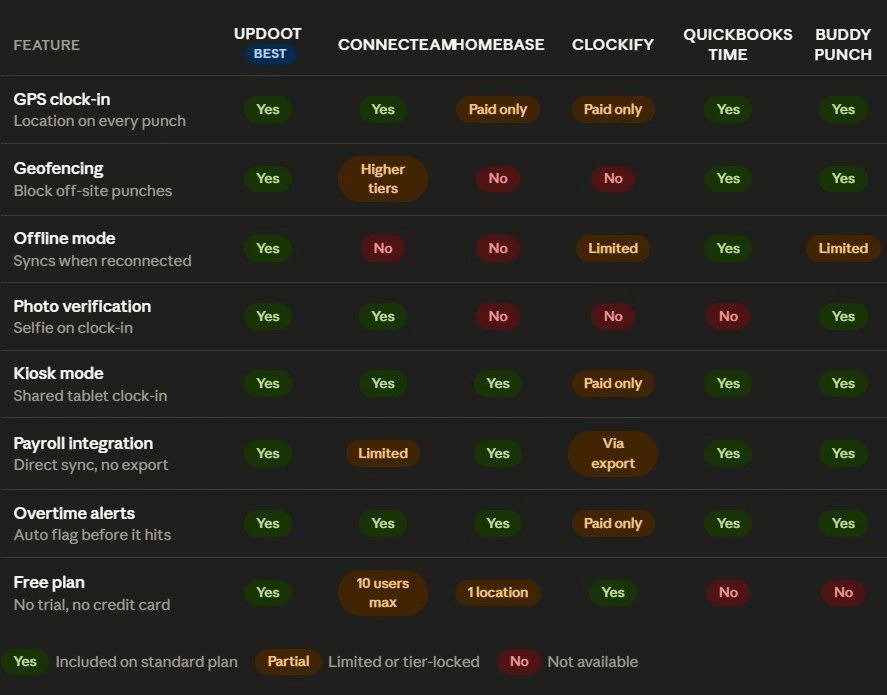
Connecteam vs Other Online Time Clocks: What the Reviews Actually Say
Connecteam is one of the most marketed time clock platforms and it has genuine strengths, particularly for mobile-first teams with frontline workers. But it has real limitations that reviews consistently surface.
Connecteam relies on an active internet connection and has little to no offline mode, so teams working in low-connectivity environments like construction sites or underground facilities may face missed punches or incomplete data until workers reconnect. Brain Sensei
Despite high aggregate ratings, detailed user reviews reveal significant concerns about mobile app performance and reliability, including reports of the time clock freezing and various bugs that required multiple app updates to address. TimeTrex
Geofencing and breadcrumb tracking are locked behind higher pricing tiers, and real-time live GPS is only available on the Expert plan. For teams that need location accountability on a standard plan, that is a meaningful limitation. Brain Sensei
Connecteam is not a strong fit for companies that want to access time and attendance software primarily on a desktop computer, organizations looking for a free plan with more than 10 employees, or businesses that need advanced reporting features. Business.com
If your team is larger than 10 people, needs offline reliability, or requires GPS and geofencing without upgrading to a premium tier, you will want to compare alternatives closely before committing.
How Much Does an Online Time Clock Cost?
Pricing across online time clock platforms varies widely based on team size and features. Here is a general breakdown of what you can expect:
Free tier: Several platforms offer free plans with limitations. Connecteam is free for the first 10 users, making it an affordable option for small teams. Clockify also offers a free tier but gates advanced features behind paid plans. ITQlick
Small business pricing: Most platforms charge between $3 and $10 per user per month on base plans. For a team of 20, expect to spend $60 to $200 per month depending on the features included.
Mid-market pricing: Platforms with GPS, geofencing, payroll integrations, and advanced reporting typically run $8 to $15 per user per month. For a 50-person team, budget $400 to $750 per month.
What drives cost up: Real-time GPS, breadcrumb tracking, biometric verification, and advanced reporting are almost always gated behind higher tiers. If those features matter to your operation, calculate your true cost at the tier that includes them, not the advertised entry price.
Online Time Clock vs Paper Timesheets: The Real Cost Comparison
The argument for sticking with paper timesheets is usually cost. But the actual math points in the other direction.
On average, a business loses approximately 4.5 hours per week per employee to time theft and inaccurate timekeeping. For a team of 15 hourly workers, that can add up to 36 hours of lost productivity every week. WorkforceHub
Organizations deploying automated time tracking report 300 to 800% ROI within the first year. A 100-person company paying $4.50 per user per month spends $5,400 annually while recovering $30,000 to $80,000 in previously untracked time. eMonitor
The cost of an online time clock is almost always less than the cost of not having one. The math is not close.
How to Set Up an Online Time Clock for Your Team
Getting an online time clock running does not require IT support or a long implementation timeline. Most platforms are operational within a day.
Follow these steps:
- Choose your platform based on team size, industry, and whether you need GPS or offline mode
- Create your account and add your business details, pay periods, and overtime rules
- Import or manually add your employees and assign roles
- Configure clock-in settings: GPS, geofencing boundaries, photo verification, or kiosk mode
- Connect your payroll software so hours flow directly without manual export
- Run a test punch from both a phone and a desktop to confirm everything is capturing correctly
- Train your team, which typically takes under 10 minutes for basic clock-in and clock-out functions
- Set up manager alerts for missed punches, overtime thresholds, and unusual patterns
Most businesses see the system paying for itself within the first pay period simply by eliminating rounded hours, manual entry errors, and undetected buddy punching.
Online Time Clock for Specific Industries
Different industries have different requirements. Here is what matters most by sector:
Construction and field services: GPS clock-in, geofencing, offline mode, and job code tracking. Workers move between sites and may lose signal. The time clock needs to work without connectivity and sync automatically.
Restaurants and hospitality: Kiosk mode for shared devices, break tracking, tip and shift reporting, and integration with scheduling software. Speed of clock-in matters because employees are often arriving in groups at shift start.
Healthcare and home care: Mobile clock-in with GPS, visit verification, compliance reporting, and the ability to tie hours to specific client or patient records for billing purposes.
Retail: Multi-location management, real-time visibility into who is clocked in across all stores, scheduling integration, and payroll sync.
Remote teams: Photo verification, IP-based location verification, project-level time tracking, and detailed reporting that managers can review asynchronously.
Frequently Asked Questions
What is an online time clock?
An online time clock is web-based or app-based software that records employee clock-ins and clock-outs in real time, calculates hours automatically, and feeds that data to payroll. It replaces paper timesheets, manual punch cards, and honor-system spreadsheets with verified, auditable records.
What is the best online time clock for small businesses?
The best online time clock for a small business depends on your team size, whether you have remote or field workers, and whether you need GPS or payroll integration. Platforms with a strong free tier work well for teams under 10 people. Growing teams benefit most from platforms that include GPS clock-in, geofencing, and direct payroll sync without requiring a premium tier.
How does an online time clock prevent buddy punching?
Online time clocks prevent buddy punching through GPS location verification, photo clock-in requirements, geofencing that restricts clock-ins to approved locations, and biometric verification such as facial recognition. Biometric verification reduces buddy punching by 95 to 100% because fingerprints and facial scans cannot be shared between employees. eMonitor
Can employees use an online time clock on their phone?
Yes. Most online time clock platforms have a mobile app that lets employees clock in and out from their smartphone. GPS coordinates are recorded at the moment of each punch, and photo verification can be required to confirm identity.
Do online time clocks work without internet?
It depends on the platform. Some online time clocks support offline mode, which saves punch data locally on the device and syncs to the server automatically when a connection is restored. This is critical for construction sites, remote job locations, and anywhere signal is unreliable. Not all platforms offer this, so check before you buy.
How does an online time clock connect to payroll?
Most platforms integrate directly with major payroll providers including QuickBooks, Gusto, ADP, and Paychex. When employees clock out, their hours are automatically calculated and passed to payroll, eliminating manual data entry, rounding errors, and timesheet disputes.
What is geofencing in a time clock?
Geofencing creates a digital boundary around a physical location such as a job site or office. When geofencing is enabled, employees can only clock in while they are physically inside that boundary. Attempts to clock in from outside the geofence are blocked, preventing remote or fraudulent punches.