
Payroll Report Generator for Business Owners and Managers
Use our free payroll report template and learn about an upgraded system to generate reports for you. Payroll is not complicated because of math. It is complicated because of time data. If your time tracking is messy, your payroll will be messy. If your inputs are clean, payroll becomes simple, fast, and accurate. That is why more businesses are moving toward using a payroll report generator tied directly to how employees clock in and out. Instead of manually calculating hours, chasing timesheets, or fixing errors, you generate payroll reports automatically from real-time data.
This article breaks down how payroll report generators work, why they matter, and how systems that connect kiosk time, punches, and an admin dashboard eliminate payroll headaches.
What Is a Payroll Report Generator
A payroll report generator is a system that takes employee time data and converts it into structured payroll reports.
These reports typically include:
- Total hours worked
- Regular hours
- Overtime hours
- Paid time off
- Employee breakdowns
- Pay period summaries
Instead of building payroll manually, the system compiles everything for you.
Why Payroll Becomes a Problem
Most payroll issues start before payroll even begins.
Common problems include:
- Employees forgetting to clock in or out
- Manual time entries that are inconsistent
- Managers correcting hours after the fact
- Data spread across multiple systems
- No clear source of truth
This leads to:
- Payroll errors
- Time wasted fixing mistakes
- Employee disputes
- Compliance risk
The issue is not payroll. It is how time is captured.
The Key to Accurate Payroll: Clean Time Data
If you want accurate payroll reports, you need consistent inputs.
That means:
- Every employee clocks time the same way
- Punches are recorded in real time
- Data flows into one system
- Managers can review and approve
This is where systems built around kiosk time tracking and punch data make a huge difference.
How Kiosk Time Tracking Improves Payroll Accuracy
A time clock kiosk is one of the simplest ways to standardize time tracking.
Employees clock in and out from a shared device using:
- Employee ID
- PIN
- Badge
This creates:
- Consistent data entry
- No reliance on memory
- Immediate recording of time
Why Kiosk Time Matters for Payroll
When time is captured through a kiosk:
- There is no delay in recording
- There is less room for error
- Everyone follows the same process
This eliminates one of the biggest payroll problems, which is inconsistent time entry.
The Role of Punch Data in Payroll Reporting
Every clock-in and clock-out creates a punch record.
These punches are the foundation of payroll.
From punch data, the system calculates:
- Total hours worked
- Breaks
- Overtime
- Shift duration
Why Punch-Based Systems Are More Reliable
Compared to manual timesheets:
- Punches are time-stamped
- Data is recorded automatically
- There is less manipulation
- Everything is traceable
This gives you a clean audit trail.
The Admin Dashboard: Where Payroll Comes Together
Once time is captured, you need a place to manage it.
That is the role of the admin dashboard.
The admin dashboard gives you:
- A full view of employee hours
- The ability to review punches
- Approval workflows
- Real-time updates
- Payroll report generation
What You Should See in an Admin Dashboard
A strong dashboard should show:
- Daily hours per employee
- Weekly totals
- Overtime flags
- Missing punches
- PTO and adjustments
This allows managers to fix issues before payroll is finalized.
How a Payroll Report Generator Works (Step by Step)
Here is how the process should flow.
Step 1: Employee Clocks In (Kiosk, Manual Time Entry or Device)
- Employee starts shift
- Punch is recorded instantly
Step 2: Employee Clocks Out
- Shift ends
- Total time is captured
Step 3: System Calculates Hours
Based on punches, the system calculates:
- Total hours
- Breaks
- Overtime
Step 4: Manager Reviews in Admin Dashboard
- Check for errors
- Approve hours
- Adjust if needed
Step 5: Payroll Report Is Generated
With one action, you get:
- Clean payroll report
- Employee breakdown
- Pay period totals
No manual calculations needed.
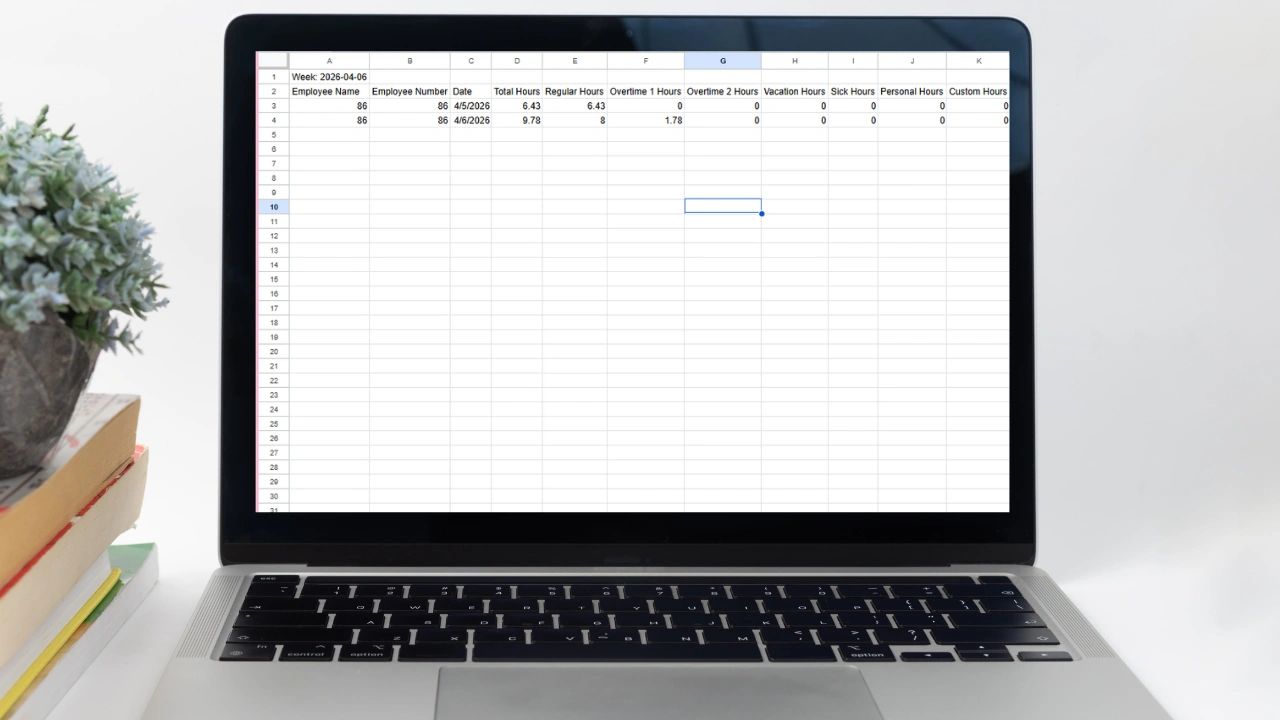
What a Payroll Report Should Include
A complete payroll report typically includes:
- Employee name
- Total hours worked
- Regular vs overtime hours
- PTO hours
- Pay period dates
- Project or job tracking (if applicable)
PAYROLL REPORT TEMPLATE
How to Use This Template
- Pull time data from your system
- Fill in totals per employee
- Separate regular and overtime
- Review before payroll submission
Common Payroll Mistakes (And How Systems Fix Them)
1. Missing Punches
Problem:
- Employees forget to clock in or out
Solution:
- Admin dashboard flags missing punches
2. Incorrect Hours
Problem:
- Manual entry errors
Solution:
- Automatic calculation from punches
3. Overtime Miscalculations
Problem:
- Overtime not tracked properly
Solution:
- System calculates based on rules
4. Delayed Payroll Processing
Problem:
- Time spent gathering data
Solution:
- Reports generated instantly
Why Businesses Move to Payroll Report Generators
The shift happens when:
- Payroll takes too long
- Errors become frequent
- Teams grow
- Compliance becomes a concern
At that point, manual systems stop working.
How Updoot Handles Payroll Reporting
Updoot connects everything into one system so payroll becomes simple.
Instead of pulling data from different places, everything starts with how time is captured.
With Updoot, you can:
- Capture time through a kiosk or employee punches
- Track hours in real time
- Review and approve time in the admin dashboard
- Automatically generate payroll reports
- See hours tied to projects, jobs, and locations
This means your payroll is built from actual work, not estimates or manual input.
Frequently Asked Questions
What is a payroll report generator? A payroll report generator is a system that takes employee time data and converts it into structured payroll reports showing total hours worked, regular and overtime hours, paid time off, and employee breakdowns by pay period. Instead of building payroll manually, the system compiles everything automatically from real-time time tracking data.
Why does payroll become inaccurate in most businesses? Most payroll problems start before payroll even begins. Employees forget to clock in or out, manual time entries are inconsistent, managers correct hours after the fact, and data lives across multiple disconnected systems with no single source of truth. The issue is not the payroll calculation itself. It is the quality of the time data going into it.
How does kiosk time tracking improve payroll accuracy? A time clock kiosk standardizes how every employee records their time by clocking in and out through a shared device using an ID, PIN, or badge. This creates consistent data entry with no reliance on memory, immediate real-time recording of punches, and the same process for every employee, which eliminates the inconsistent time entry that causes most payroll errors.
What should a complete payroll report include? A complete payroll report should include employee name, total hours worked, regular versus overtime hours separated clearly, PTO hours, pay period dates, and project or job tracking if the business bills by client or work type. These details give both managers and payroll processors everything needed without manual calculations.
What should an admin dashboard show for payroll management? A strong admin dashboard should display daily hours per employee, weekly totals, overtime flags, missing punches that need correction, and PTO and adjustments. This visibility allows managers to identify and fix issues before payroll is finalized rather than discovering errors after employees have already been paid.
When should a business switch from manual payroll processing to a payroll report generator? The switch makes sense when payroll consistently takes too long to process, errors are becoming frequent and time-consuming to fix, the team has grown beyond what manual tracking can reliably handle, or compliance requirements around accurate record keeping are creating risk. At that point manual systems stop working and the cost of errors exceeds the cost of a proper system.
Final Take on Payroll Reporting
Payroll is only as accurate as the data behind it.
If your time tracking is inconsistent, your payroll will always require fixing.
If your time tracking is structured through:
- Kiosk clock-ins
- Real-time punches
- Admin oversight
Then payroll becomes a simple output.