
Military Time Converter with Template
If you’ve ever looked at a time like 14:30 and had to pause for a second, you’re not alone.
Military time (also called the 24-hour clock) is widely used in:
- Payroll and time tracking
- Healthcare
- Military and logistics
- Scheduling systems
But for most people, converting between standard time (AM/PM) and military time isn’t second nature.
The good news? Once you understand the pattern—and especially if you use a simple spreadsheet—you can convert times instantly.
This guide will show you:
- How a military time converter works
- How to convert manually (so you actually understand it)
- Copy-paste Google Sheets template and formulas you can use immediately
What Is Military Time?
Military time uses a 24-hour format instead of the 12-hour AM/PM system.
Instead of:
- 1:00 PM
- 2:00 PM
- 3:00 PM
You get:
- 13:00
- 14:00
- 15:00
👉 It eliminates confusion between AM and PM and is more precise for tracking time.
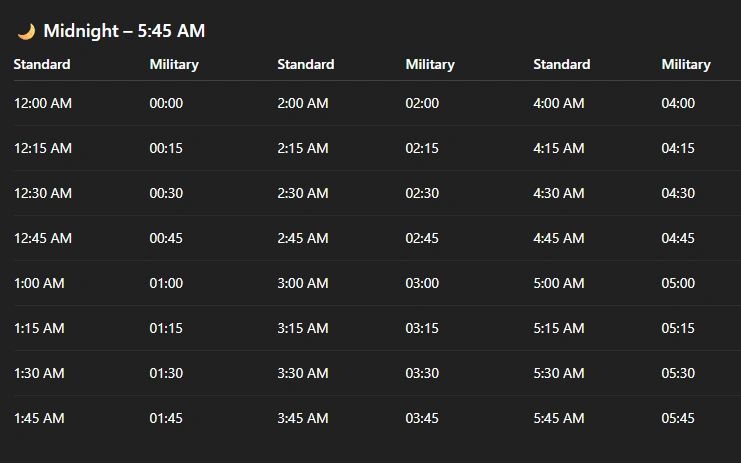
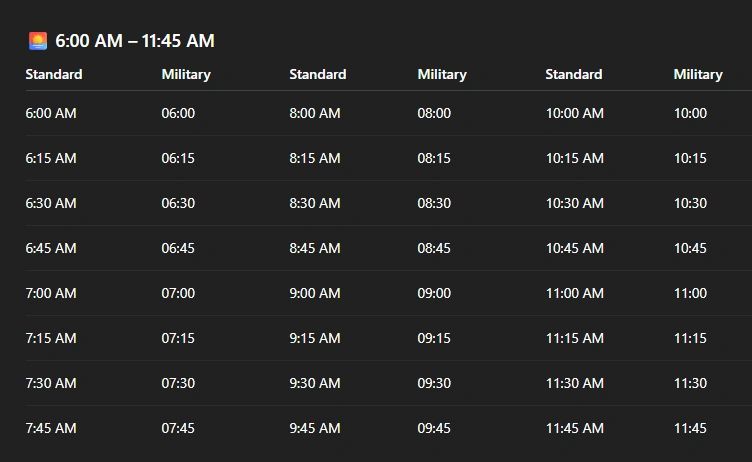
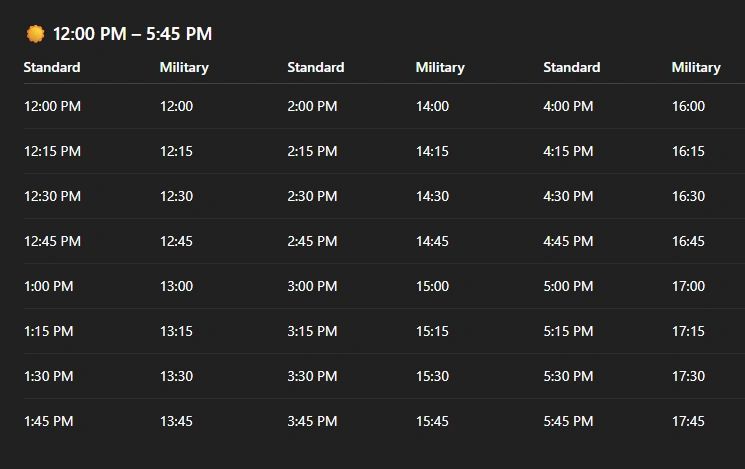
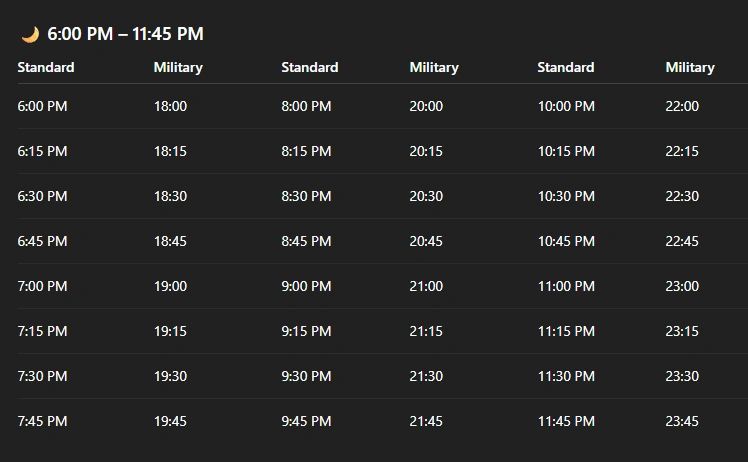
Quick Military Time Conversion Chart
How to Convert to Military Time (Step-by-Step)
Here’s the simple rule:
👉 For AM times:
- Keep the same hour
- Add a leading zero if needed
Example:
- 7:00 AM → 07:00
👉 For PM times:
- Add 12 to the hour
Example:
- 2:00 PM → 14:00
- 6:30 PM → 18:30
👉 Special Cases:
- 12:00 AM → 00:00
- 12:00 PM → 12:00
Example Conversions
Let’s make this practical.
Example 1:
3:45 PM
- 3 + 12 = 15 👉 15:45
Example 2:
9:15 AM 👉 09:15
Example 3:
12:30 AM 👉 00:30
How to Convert Military Time Back to Standard Time
To reverse it:
If time is greater than 12:
- Subtract 12
- Add PM
Example:
- 18:00 → 6:00 PM
If time is less than 12:
- Keep as AM
Example:
- 09:00 → 9:00 AM
Special Cases:
- 00:00 → 12:00 AM
- 12:00 → 12:00 PM
Why This Matters for Businesses
If you’re running payroll or time tracking:
- Most systems store time in military format
- It avoids AM/PM errors
- It’s required for accurate overtime calculations
👉 Especially in systems like time clocks and payroll tools
Copy-Paste Google Sheets Military Time Converter
Now let’s make this easy.
📥 Convert Standard Time → Military Time
If your time is in Cell A1 (e.g., 3:45 PM):
=TEXT(A1,"HH:MM")
👉 Output: 15:45
📥 Convert Military Time → Standard Time
If your time is in Cell A1 (e.g., 15:45):
=TEXT(A1,"h:mm AM/PM")
👉 Output: 3:45 PM
🔢 If You’re Entering Numbers (Like 1300 or 1430)
This is where most people struggle so here’s the exact fix.
📥 Convert 4-Digit Military Number → Standard Time
If A1 = 1430, use:
=TEXT(TIME(INT(A1/100),MOD(A1,100),0),"h:mm AM/PM")
👉 Output: 2:30 PM
📥 Convert Standard Time → 4-Digit Military Number
If A1 = 2:30 PM, use:
=TEXT(A1,"HHMM")
👉 Output: 1430
Real-World Example (Time Tracking)
Let’s say an employee works:
- Clock in:
8:00 AM - Clock out:
4:30 PM
Converted to military:
- 08:00 → 16:30
This makes calculating hours much easier:
- 16:30 – 08:00 = 8.5 hours
👉 No AM/PM confusion
Common Mistakes to Avoid
❌ Mixing formats
Don’t mix:
- Text times
- Number-based times
❌ Forgetting leading zeros
07:00 ≠ 7:00 in systems
❌ Manual calculations
This leads to errors use formulas instead
How to Set This Up in a Google Sheet (Simple Setup)

👉 Now you have a working military time converter inside your spreadsheet
Why a Military Time Converter Is Essential
If you’re:
- Running payroll
- Tracking employee hours
- Managing shifts
You need consistent time formatting.
Without it:
- Calculations break
- Overtime errors happen
- Reporting becomes messy
Military Time Converter FAQ
Frequently Asked Questions About Military Time Conversion
What is military time? Military time is a 24-hour clock format used to avoid confusion between AM and PM.
How do you convert military time to standard time? For times over 12:00, subtract 12 to convert to standard PM time. For example, 14:00 becomes 2:00 PM.
Why is military time used in business? Military time eliminates ambiguity and is commonly used in scheduling, healthcare, and operations.
What is a military time converter? A military time converter is a tool that quickly converts 24-hour time into standard 12-hour format and vice versa.
How can military time improve scheduling? It reduces errors and ensures clear communication across teams and systems.
Final Takeaway
A military time converter isn’t just a convenience it’s a necessity for accurate time tracking.
Once you understand the logic (or use the formulas above), you can:
- Convert instantly
- Avoid errors
- Save time
Start with the formulas, and you’ll never have to guess again.
Opens in Google Drive — view and download for free