
Jibble Time Clock Features and Price Comparison to Updoot
.png)
Use this free comparison chart done for you to review the Jibble time clock features and pricing compared to Updoot. If you have been researching free or low-cost time tracking software, Jibble has almost certainly appeared in your results. It markets itself aggressively on the free tier angle, positioning itself as a genuinely useful time clock that small businesses can start using at no cost. The pitch is compelling, especially for businesses that are new to time tracking software and not ready to commit to a paid subscription.
But free has limits. And understanding exactly where Jibble stops being useful and where the gaps start costing you real money is important before you build your operational processes around a platform that may not grow with your business.
This article covers what Jibble is, what it does well, where it falls short, and how it compares to Updoot for small businesses that need time tracking as part of a complete operational system rather than a standalone clock.
What Is Jibble?
Jibble is a cloud-based time tracking platform founded in 2016 and headquartered in the United Kingdom. It is designed primarily for employee attendance tracking and time clock management, with a strong emphasis on its free tier and its facial recognition clock-in feature.
The core product allows employees to clock in and out via mobile app, web browser, or a shared kiosk device using facial recognition or a PIN. GPS location is captured at clock-in and clock-out. Managers can review attendance, track who is currently working, and export timesheet data for payroll.
Beyond the basic time clock, Jibble includes overtime tracking, break management, leave management, scheduling on paid tiers, and integrations with payroll platforms. The free plan is genuinely functional for basic attendance tracking with unlimited users, which is the feature that drives most of Jibble's initial adoption.
For businesses that need a free or very low cost attendance tracker and nothing else, Jibble delivers real value. For businesses that need time tracking connected to the rest of their operations, the gaps become apparent quickly.
Jibble Pricing: Free Until It Is Not
Jibble's free plan is its most talked about feature. Unlimited users, basic time tracking, GPS clock-in, and facial recognition are all available at no cost. For a small business just starting out with time tracking software, the free plan is a genuinely low-risk way to establish the habit of tracking employee hours.
The limitations of the free plan become apparent quickly. Advanced features including scheduling, detailed reporting, overtime policies, payroll integrations, and priority support all sit behind paid tiers. The Premium plan runs approximately $2.99 per user per month and the Ultimate plan runs approximately $5.99 per user per month.
At first glance $2.99 or $5.99 per user seems cheap. But the comparison that matters is not the per-user price in isolation. It is the total cost of what you are getting for that price versus what a more complete platform would cost. At $5.99 per user per month for Jibble's Ultimate plan, a 10-person team pays $59.90 per month for time tracking, scheduling, and attendance management. That same $59.90 at Updoot's $5 per user covers time tracking plus HR, invoicing, CRM, project management, financial tools, SOP management, and strategic planning for the same team.
What Jibble Does Well
Jibble has genuine strengths that explain its popularity, particularly among businesses that are price sensitive or just beginning their time tracking journey.
Facial recognition clock-in. Jibble's facial recognition feature is one of its most distinctive capabilities. Employees clock in by taking a selfie that is matched against their registered photo, which prevents buddy punching where one employee clocks in on behalf of another. For businesses where time theft through buddy punching is a concern, this is a meaningful operational control.
Generous free tier. The free plan with unlimited users is genuinely useful for basic attendance tracking. Most competitors cap their free plans at five users or fewer. Jibble's unlimited free tier makes it accessible for businesses of any size that only need the most basic time tracking functionality.
GPS location capture. Jibble captures GPS coordinates at clock-in and clock-out, giving managers visibility into where employees are starting and ending their shifts. For field-based teams this provides basic location verification without requiring a premium subscription.
Simple employee experience. The mobile app and web interface are clean and straightforward. Employees can clock in and out with minimal friction, which drives adoption and reduces the time managers spend troubleshooting technical issues with time tracking.
Leave management. Jibble includes leave management functionality that allows employees to request time off and managers to approve or deny requests, with balances tracked against configured allowances.
Where Jibble Falls Short
Understanding Jibble's limitations requires looking beyond the feature list at what a complete small business operation actually needs.
The facial recognition dependency creates operational risk. Facial recognition clock-in sounds like a feature but it can become a friction point. Employees in poor lighting, wearing glasses or masks, or working in environments where taking a selfie is impractical find facial recognition unreliable. When the technology fails, employees cannot clock in, which creates operational disruption and manager intervention that costs more time than it saves.
No invoicing or project billing. Jibble does not generate invoices or connect time entries to client billing. Businesses that bill clients for employee hours need separate invoicing software and a manual process to move data between systems.
No performance management. Jibble tracks attendance but does not include performance reviews, goal tracking, or any of the people management infrastructure that a growing business needs beyond basic time and attendance.
No applicant tracking. Hiring happens entirely outside Jibble. There is no ATS, no job description management, and no structured hiring workflow within the platform.
No sales or CRM tools. There is nothing in Jibble for managing leads, tracking a sales pipeline, building customer profiles, or creating quotes. Your entire sales process requires a separate tool.
No financial management. No budget tracking, no P&L visibility, no vendor management, and no financial planning tools. Financial visibility beyond payroll export requires additional software.
No operational or strategic infrastructure. No SOP library, no KPI tracking, no project management beyond basic job assignment, no strategic planning framework, and no leadership tools.
No AI assistance. Jibble does not include any AI functionality to help your team work faster or smarter.
The free plan ceiling. The free plan's limitations become apparent quickly for any business that needs more than basic clock-in and clock-out tracking. Once you move to a paid tier for the features most businesses actually need, Jibble's price advantage narrows significantly while the feature gaps remain.
California overtime complexity. Jibble handles standard overtime but California's daily overtime rules require careful manual configuration and are not automatically applied for all business scenarios, creating compliance risk for businesses with California employees.
Midnight splits. Overnight shifts that cross midnight are not automatically split across calendar days in Jibble, which creates inaccurate timesheet records for businesses with overnight operations and can produce payroll errors.
What You Should Look for Beyond Jibble
If you are evaluating Jibble or considering moving past its free tier, here is what to look for in a time tracking platform that actually grows with your business.
Time tracking that handles real complexity. Basic clock-in and clock-out is table stakes. Midnight splits for overnight shifts, California overtime calculation, and multiple pay rate types are where most basic time tracking tools show their limits. These are not edge cases. They are the daily reality for restaurants, healthcare businesses, security companies, construction crews, and many other small business categories.
A direct path from tracked time to client invoices. Every manual step between a time entry and a sent invoice costs money and introduces error. Look for a platform where approved time flows directly into invoices without an intermediate export.
HR tools that cover the full employee lifecycle. Time tracking is one piece of managing people. As your business grows you will need performance reviews, applicant tracking, onboarding workflows, and HR document management. Starting on a platform that covers all of these eliminates the cost and disruption of migrating to a new system when you outgrow a time-only tool.
Payroll exports that include everything. Hours are only part of payroll. Tips, bonuses, commissions, mileage, and PTO all need to be included in a clean export that your payroll provider can process without manual adjustment.
Operational infrastructure connected to your time data. Scheduling, project management, SOP documentation, and KPI tracking are all operationally connected to how your team spends their time. A platform that connects these functions produces operational clarity that disconnected tools cannot match.
A realistic total cost comparison. The relevant comparison is not the per-user price of your time tracking tool in isolation. It is the total monthly cost of all the tools you need to run a complete business operation. A free time tracking tool that requires $150 per month in additional software to fill its gaps is not actually free.
Jibble vs Updoot: The Core Difference
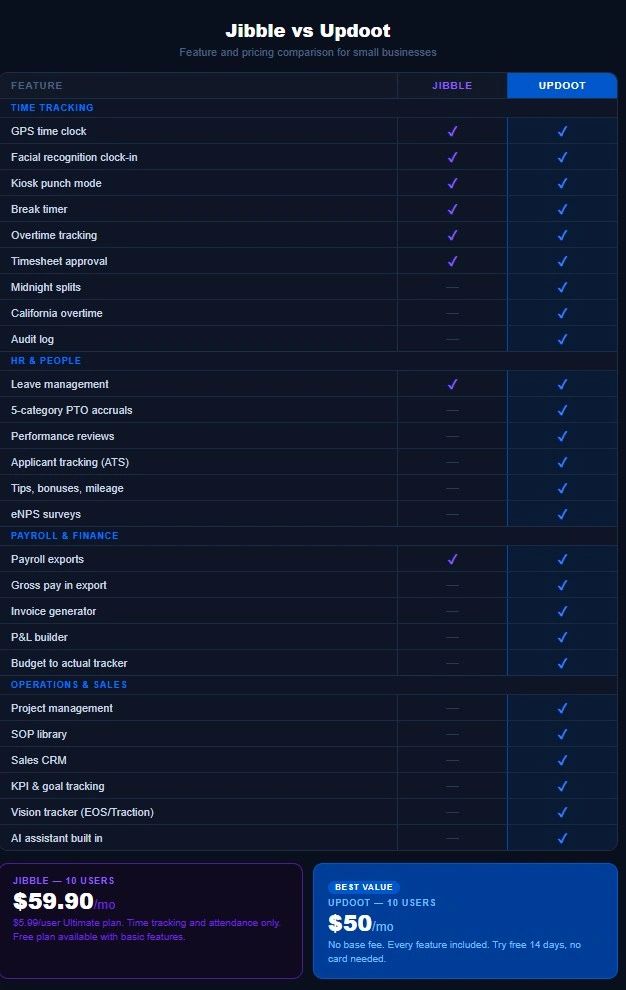
Jibble is built to solve one problem cleanly and cheaply: tracking when employees show up and where they are. It does that well. The free tier makes it an easy first step for businesses that have never used time tracking software before.
Updoot is built to solve the complete operational challenge of running a small business. Time tracking is one module in a platform that covers HR, invoicing, sales, project management, financial management, and strategic leadership tools. At $5 per user per month with no base fee, a 10-person team pays $50 per month for the complete stack.
The businesses that get the most value from Jibble are typically those at the very beginning of their software journey who only need basic attendance tracking and are not yet ready to think about the broader operational picture. The businesses that get the most value from Updoot are those that have either already assembled a fragmented stack of tools and want to consolidate, or those that want to start on a complete platform from the beginning rather than building piece by piece.
The question is not which time tracking tool is better. The question is what your business actually needs to operate efficiently and whether you want to build your software stack tool by tool or start with a complete system.
Who Should Choose Jibble
Jibble is the right choice if you need a free attendance tracker for a small team with no immediate plans to expand your software capabilities, facial recognition clock-in is a specific requirement for preventing buddy punching, your business has no invoicing, HR, CRM, or operational management software needs beyond basic time tracking, and cost is the single most important factor in your decision.
For businesses in the earliest stage of their operational development, Jibble's free tier is a low-risk way to start building the habit of tracking employee time without any financial commitment.
Who Should Choose Updoot
Updoot is the right choice if you need time tracking as part of a complete business operating system, you are already paying for multiple tools and want to consolidate, you bill clients for time and need invoicing connected to your time tracking, you need HR, sales, and financial tools alongside your time clock, your business has California employees or overnight shift workers who need complex overtime handled correctly, or you want a platform that grows with your business rather than one you will outgrow within 12 months.
Try Updoot free for 14 days at xecutethevision.com. No credit card required.
Frequently Asked Questions
What is Jibble time tracking?
Jibble is a cloud-based time tracking and attendance management platform founded in 2016. It is designed primarily for employee clock-in and clock-out tracking with GPS location capture, facial recognition verification, leave management, and payroll exports. Its most distinctive feature is a generous free tier with unlimited users that makes it accessible for businesses that need basic attendance tracking at no cost.
Is Jibble really free?
Jibble offers a genuinely functional free plan with unlimited users that covers basic time tracking, GPS clock-in, and facial recognition. Advanced features including scheduling, detailed reporting, overtime policies, and payroll integrations require paid tiers starting at approximately $2.99 per user per month for Premium and $5.99 per user per month for Ultimate.
What are the limitations of Jibble's free plan?
The free plan covers basic clock-in and clock-out with GPS and facial recognition but does not include scheduling, advanced overtime policies, detailed reporting, payroll integrations, or priority support. Businesses that need these features must upgrade to a paid plan, at which point Jibble's price advantage narrows while the feature gaps in HR, invoicing, CRM, and operations remain regardless of plan.
Does Jibble handle California overtime?
Jibble handles standard federal overtime but California's daily overtime rules, which require overtime pay after 8 hours in a single day rather than only after 40 hours in a week, require careful manual configuration in Jibble and are not automatically applied for all business scenarios. Businesses with California employees should verify their overtime configuration carefully. Updoot calculates California overtime automatically.
Does Jibble include invoicing?
No. Jibble does not include invoice generation or project billing at any pricing tier. Businesses that bill clients for employee hours need separate invoicing software alongside Jibble. Updoot includes an invoice generator and project billing that connects time entries directly to client invoices at no additional cost.
What is the best Jibble alternative for small businesses?
Updoot is the most complete alternative to Jibble for small businesses that need time tracking as part of a broader operational platform. It includes everything Jibble's paid tiers offer plus invoicing, HR management, sales CRM, project management, financial tools, SOP library, and leadership frameworks at $5 per user per month with no base fee.
Can Updoot replace Jibble?
Yes. Updoot includes all the core time tracking features Jibble offers including GPS clock-in, kiosk mode, break tracking, overtime tracking, leave management, and payroll exports, plus midnight splits and California overtime that Jibble does not handle automatically. Updoot also covers the complete operational stack that Jibble leaves to additional tools.
How does Updoot compare to Jibble on price?
Jibble's Ultimate plan costs $5.99 per user per month. A 10-person team pays $59.90 per month for time tracking, scheduling, and attendance management. Updoot costs $5 per user per month with no base fee. The same team pays $50 per month for everything Jibble includes plus HR, invoicing, CRM, project management, financial tools, SOP library, and leadership frameworks. Jibble's free plan covers basic attendance tracking at no cost but requires additional tools for everything else a growing business needs.