
How to Calculate a Weighted Average Grade and Cost
.png)
Your vision is to assign weights to the average.
It's not complete to have just an average but to be able to assign different levels of importance to each number that makes up your average. You should be using a weighted average. This article is going to explain the weighted average, how to calculate it, and an example of why you would use weighted averages in costing.
What is a weighted average?
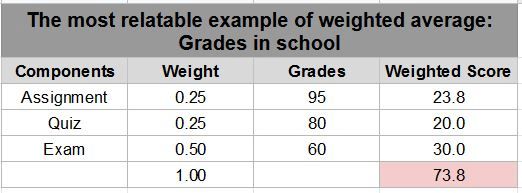
There will be times when a straight average isn’t enough. The most relatable example we’ve probably all experienced would be grades in school. Often, you will have assignments, quizzes and exams, and each of those is weighted slightly differently so that exams for example are the most important or most heavily weighted piece of your grade. You may have done really well on assignments, but if you fail an exam, it can put your grade at risk of passing since those are often weighted as more important.
How to get started in calculating a weighted average
Click on the spreadsheet link and follow these steps.
Step 1
List the components to the average. We have assignment, quiz and exam. Each component should already be an average of the grades for each one. So, if you had 3 assignments with scores of (94 + 95 + 96) / 3 = 95, then you would plug in 95 and do the same for the quizzes and exams.
Step 2
List the weight or importance of each. The weight of the scores should total 100% or 1 if you are totaling in decimal form. So in order to weigh your figures, you need to determine what portion of 100% each is valued at. You may choose the value, or, in the case of our upcoming example we are going to determine what the weight is by some quick math.
Step 3
Multiply weight x grade to get your weighted scores.
Step 4
Total the weighted scores to get your grade for the class.
Example of weighted average in costing
If you were looking into margins and determining the average cost of a product purchased on the last few purchase orders, you could use a weighted average because you know that the various purchase orders placed over the year do not cost the same. There are many factors, some being how much is purchased, to seasonal supply issues. Let’s use an example of a pharmaceutical distributor.
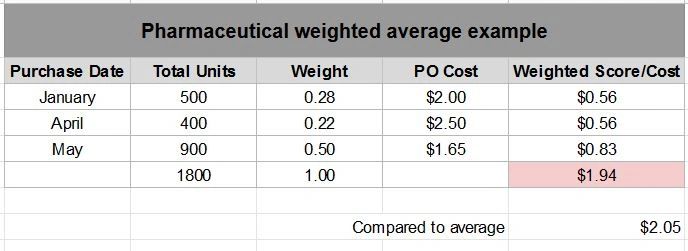
This business placed a purchase order in January for 500 units at $2.00 each, a purchase order in April for 400 units at $2.50 each, there was an unexpected rush on those so right away in May you placed another order for 900 units this time at $1.65 each.
How do you calculate the weighted factor?
Step 1
Find the total number of units on the purchase orders, which is 1,800.
Step 2
Get the percentage of the total of each order by taking January for example, or 500 divided by 1,800 which is a weight of .28. Do that for the rest as the example shows. This is your weight now based on actuals versus just assigning a weight as we did for grades.
Step 3
Proceed to find the weighted score by multiplying your weight X PO Cost, and then total the scores, which is $1.94.
If you looked at the average of these, you would get a cost of $2.05. That isn’t quite accurate though because each purchase order is a different cost and quantity. So, follow the steps as we did for grades and you will see the weighted cost is actually less at $1.94.
In summary, whenever you run into cases where you want to look at the average, but you have differing levels of importance or values for the various components, make sure you are using a weighted average to get a more accurate picture. Feel free to use the spreadsheet sample as a template!
Written by Nicole Hullihen, October 31st, 2021