
Project Tracker Excel Template: A Monday.com, ClickUp Replica
.png)
Here is an Excel and Google Sheets project management template styled exactly like Asana and monday.com. If you’ve ever felt overwhelmed managing tasks, deadlines, and team collaboration across different tools or email threads, you're not alone. Project management software like Monday.com, Asana, and ClickUp has skyrocketed in popularity over the last decade, helping businesses organize work visually and improve team alignment. But these tools often come with steep monthly costs and steep learning curves especially for smaller teams, freelancers, or early-stage businesses.
That’s where the Excel Project Tracker Template comes in.
This downloadable, customizable spreadsheet gives you all the core features you need to manage projects, without the price tag or complexity of SaaS platforms. It’s a practical dupe for tools like Monday, Asana, and ClickUp right inside the familiar environment of Microsoft Excel or Google Sheets. If at some point you outgrow it, use this template as a way to prototype and determine the must-have features you need.
Why Project Tracking Is Non-Negotiable
Whether you’re managing a marketing campaign, product launch, or internal process improvement, tracking your projects is essential to success. Here’s why:
Visibility
Having a clear view of what’s in progress, what’s completed, and what’s falling behind keeps everyone on the same page. It helps you spot bottlenecks before they become fire drills.
Accountability
With assigned owners and due dates, tasks don’t get lost in the shuffle. A good tracker shows who is responsible for what—and when it’s due.
Better Planning
Tracking helps you forecast resources, shift priorities, and make informed decisions based on real progress—not guesswork.
Improved Communication
You avoid endless email threads and status update meetings when everyone can refer to one central tracker that’s always up-to-date.
Why Use an Excel Dupe Instead of Monday, Asana, or ClickUp?
Platforms like Monday.com and ClickUp are feature-rich but not always the best fit for everyone. Here’s how an Excel version compares:
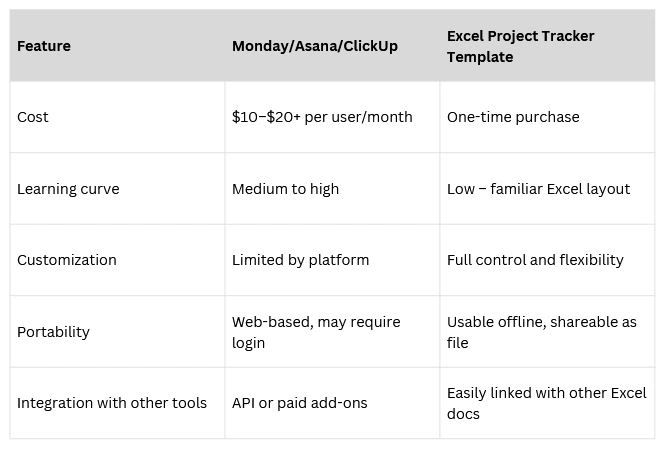
What’s Inside the Excel Project Tracker Template?
.png)
.png)
Think of this as your drag-and-drop dashboard but in spreadsheet form. The template is built to mirror popular views in modern PM tools:
- Project Board View – Like Monday’s, Asana's, or ClickUp’s List View, tasks are organized in list form with statuses like Not Started, Approval Needed, Done, On Track, and Shelved.
- Gantt Chart Timeline – Visualize project timelines, task dependencies, and deadlines in one sleek horizontal chart.
- Priority and Status Filters – Instantly filter to see only high-priority items or overdue tasks.
- Owner Assignments – Assign team members with a drop-down list and insert photos to easily see who’s responsible.
- Progress Tracker – Track % complete, overdue dates, and overall project health.
- Dashboard Summary – A simple dashboard highlights what’s on track and what needs attention.
- Permanent Time Stamps- At the time of marking items done
- Check boxes strike through done items when checked off
- Total Budget- Track it for each item
- Notes column- Add details on roadblocks or other relevant info.
All without needing to learn a new tool or remember another login.
Benefits of Using This Excel Template
- Low Cost, High Value Perfect for budget-conscious teams or startups trying to reduce software sprawl. No recurring fees just a powerful, easy-to-use file.
- Fast Setup No onboarding sessions needed. Just download, plug in your tasks, and go.
- Customizable to Any Workflow Whether you're tracking campaigns, client projects, IT tickets, or content calendars, this template molds to your process.
- Shareable Across Teams Use it in Excel or Google Sheets. Share via email or cloud drive, everyone sees the same up-to-date information.
- Offline Access Work even without an internet connection, perfect for travel, client sites, or secure environments.
Downsides to Be Aware Of
While Excel is incredibly versatile, it does have limitations compared to SaaS tools:
- No real-time collaboration like comments or notifications (though Google Sheets helps with this).
- Manual data entry and task updates unless you automate with formulas or macros.
- Limited integration with outside platforms without advanced add-ins or scripting.
However, if you’re using the tracker for small to medium-sized projects, these trade-offs are often outweighed by the benefits.
Using the Tracker to Start the Right Conversations
One hidden advantage of using a spreadsheet template is how it naturally prompts better project conversations. Unlike an app that hides data behind tabs and filters, the Excel format lays it all out—making it easier to review progress in meetings, assign tasks live, or identify gaps in planning.
This tracker becomes a living document—part roadmap, part accountability tool.
Who This Is For
This Excel project tracker is ideal for:
- Freelancers managing client work
- Small teams without the budget for expensive PM tools
- Department heads needing quick clarity without admin overhead
- Business owners who love simplicity and control
- Teams already using spreadsheets for everything else
Ready to Track Smarter?
Project management doesn't need to be complicated or expensive. With this Excel template, you get the functionality of Monday.com or ClickUp in a format that’s lightweight, flexible, and scalable.
Whether you're managing one project or dozens, this template gives you clarity, control, and confidence without a subscription fee.
👉 Download the Excel Project Tracker Template now and start managing your work like a pro or start using Updoot below for free to automate project tracking and billing.
Frequently Asked Questions
What is an Excel project tracker template? An Excel project tracker template is a downloadable spreadsheet that replicates the core features of project management tools like Monday.com, Asana, and ClickUp inside Microsoft Excel or Google Sheets. It includes a project board view, Gantt chart timeline, priority and status filters, owner assignments, progress tracking, and a dashboard summary without any subscription fees or login required.
How does an Excel project tracker compare to Monday.com or Asana? Excel templates are significantly cheaper, require no onboarding, work offline, and are fully customizable to any workflow. The tradeoffs are no real-time commenting or notifications, manual data entry, and limited integration with outside platforms. For small to medium sized projects the simplicity and cost savings typically outweigh those limitations.
Who should use an Excel project management template? This template works best for freelancers managing client work, small teams without the budget for expensive project management software, department heads who need quick visibility without administrative overhead, and business owners who prefer simplicity and control over feature-heavy tools they will never fully use.
Can this template be used in Google Sheets as well as Excel? Yes. The template works in both Microsoft Excel and Google Sheets. Using it in Google Sheets adds the benefit of cloud-based sharing so multiple team members can view the same up-to-date file without emailing versions back and forth.
What features does the Excel project tracker include? The template includes a project board view with status labels, a Gantt chart for visualizing timelines and dependencies, priority and status filters, dropdown owner assignments, percentage complete tracking, overdue date flags, a dashboard summary, permanent timestamps when items are marked done, checkboxes that strike through completed tasks, budget tracking per item, and a notes column for roadblocks and details.
When should a team consider upgrading from an Excel template to project management software? When real-time collaboration becomes critical, when the number of projects or team members makes manual updates too time-consuming, or when you need integrations with other business tools. Using the template first is actually a smart way to identify exactly which features matter most before committing to a paid platform.
Opens in Google Drive — view and download for free