
Excel and Google Sheets Timesheet Template
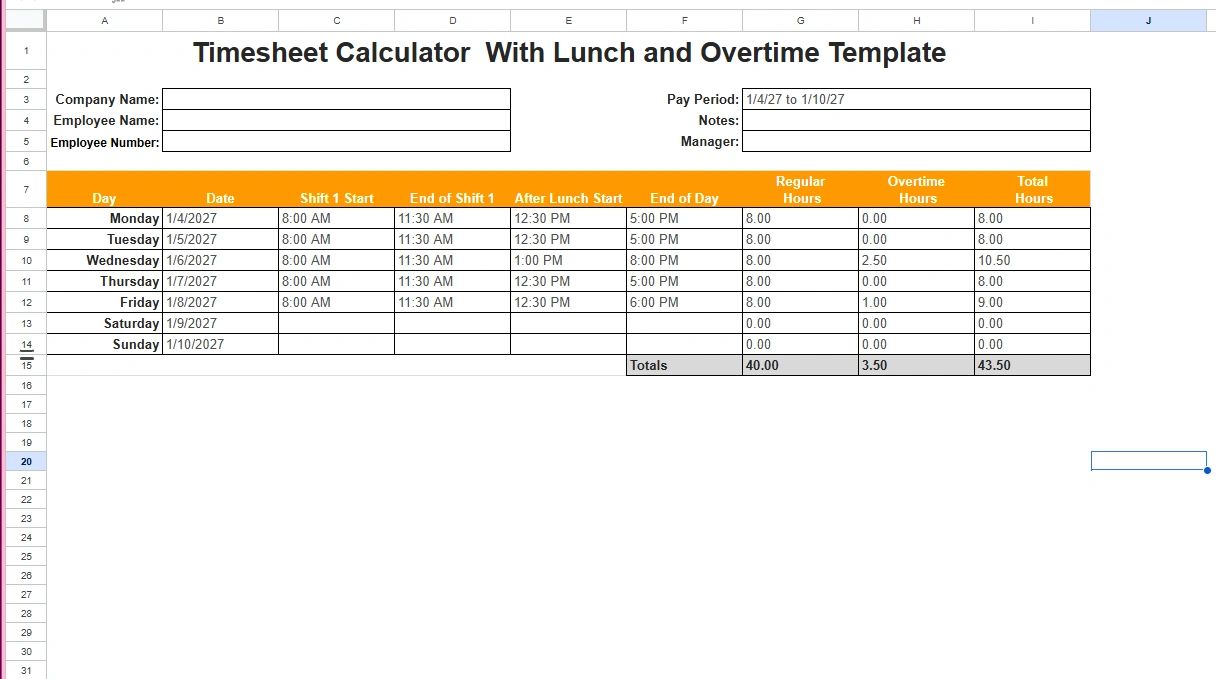
Time tracking shouldn’t feel like a chore but for most businesses, it does.
If you’ve ever dealt with:
- Employees forgetting to log hours
- Payroll discrepancies
- Confusing spreadsheets
- Or last-minute timecard corrections
Then you already know the problem isn’t just tracking time it’s having a system that actually works.
That’s where a well-built Google Sheets and Excel timesheet template comes in.
It gives you structure without complexity, visibility without expensive software, and just enough control to keep your operations running smoothly.
In this guide, you’ll learn:
- Why Google Sheets is one of the best tools for time tracking
- What separates a good timesheet from a broken one
- How to use a timesheet effectively
- And access a ready-to-use template you can implement immediately
Why Google Sheets Is a Smart Choice for Time Tracking
Before jumping into tools and systems, it’s important to understand why Google Sheets works so well.
Most businesses jump too quickly into expensive software when what they really need is a simple, consistent process.
Google Sheets offers:
1. Accessibility
Your team can access it from anywhere, desktop, tablet, or phone. No installs, no onboarding headaches.
2. Real-Time Collaboration
Managers can review hours as they’re entered. No waiting until payroll day to find mistakes.
3. Flexibility
You can customize it to fit your business:
- Different roles
- Different pay structures
- Weekly or biweekly tracking
4. Cost Efficiency
It’s free and for many businesses, that’s all you need for a long time.
But here’s the key: Google Sheets only works if your template is structured properly.
What Makes a Timesheet Template Actually Work
Most templates look fine at first glance but they fall apart in real use.
A strong timesheet template should do three things:
- Be easy to use
- Capture accurate data
- Provide useful insights
Let’s break that down.
Clear Daily Inputs
Your team should know exactly what to enter without thinking:
- Start time
- End time
- Breaks
- Total hours
No guessing. No interpretation.
Automated Calculations
If your template relies on manual math, you’re setting yourself up for errors.
A good template automatically calculates:
- Daily hours
- Weekly or biweekly totals
- Overtime (if applicable)
Clean Summary Section
At the bottom (or top), you should instantly see:
- Total hours worked
- Regular vs overtime hours
- Pay period totals
If you have to dig for this you’ve already lost efficiency.
Simple Layout
The biggest mistake people make is overcomplicating their sheet.
More tabs, more formulas, more fields this doesn’t make it better.
It makes it harder to use.
And if it’s hard to use, your team won’t use it correctly.👉 Access the Google Sheets Timesheet Template
This is where you plug in your actual asset.
Use one of the options below depending on your setup.
Option 1: Direct Access Link (Best for Blogs)
👉 Open the Google Sheets Timesheet Template
The template also works in Excel.
Option 2: Embedded Template (Best for Website Pages)
<iframe
  src="PASTE-YOUR-EMBED-LINK-HERE"
  width="100%"
  height="600"
  style="border:1px solid #ccc;">
</iframe>
How to Use the Template
Once opened:
- Click File → Make a copy
- Save it to your Google Drive
- Share it with your team
- Start tracking immediately
How to Use a Timesheet the Right Way
This is where most businesses go wrong.
They have a template but no process.
A template without a process is just a document.
Step 1: Set Clear Expectations
Decide:
- When employees log time (daily vs end of week)
- What format to use
- What counts as billable vs non-billable time
Then communicate it clearly.
Consistency matters more than perfection.
Step 2: Make It Part of the Routine
If time tracking feels optional, it will be treated that way.
Build it into the workflow:
- End of day updates
- End of week reviews
- Manager check-ins
Step 3: Review Weekly (Not Just During Payroll)
This is a big one.
If you wait until payroll day to review timesheets:
- Errors pile up
- Details are forgotten
- Fixing issues becomes time-consuming
Instead:
- Review weekly
- Flag inconsistencies early
- Address issues while they’re fresh
Step 4: Use the Data to Make Decisions
This is where you level up.
A timesheet isn’t just for payroll it’s a business intelligence tool.
It can tell you:
- Where you’re overspending on labor
- Which teams are overloaded
- Where inefficiencies exist
- How productive your workforce actually is
If you’re not using it this way, you’re leaving value on the table.
Common Timesheet Mistakes (And How to Avoid Them)
Let’s call these out directly because they cost time and money.
Mistake 1: Inconsistent Time Entry
Some employees log exact times. Others estimate.
That creates unreliable data.
Fix: Standardize how time is entered and enforce it.
Mistake 2: Ignoring Break Tracking
Skipping break tracking inflates hours and leads to payroll issues.
Fix: Include clear break fields and require them.
Mistake 3: No Approval Process
If no one verifies timesheets, errors slip through.
Fix: Add a simple manager review step before payroll.
Mistake 4: Overcomplicated Templates
Too many fields = low adoption.
Fix: Keep only what you actually need.
Mistake 5: Treating It as Admin Work
This is the biggest mistake.
Time tracking isn’t just administrative it’s operational.
It impacts:
- Costs
- Efficiency
- Planning
- Growth
When to Upgrade Beyond Google Sheets
Google Sheets is powerful but it’s not forever.
You’ll know it’s time to upgrade when:
- You have 3 to 15+ employees
- You need real-time clock-ins
- Compliance requirements increase
- Payroll errors become frequent
- You need integrations with payroll systems
At that point, a dedicated time tracking system makes sense.
But until then, a well-structured Google Sheets template will take you surprisingly far.
Final Thoughts
Most businesses don’t need more tools.
They need better systems.
A Google Sheets timesheet template when used correctly gives you:
- Structure
- Consistency
- Visibility
- Control
It turns something messy into something manageable.
And that’s what good operations are all about.
Start simple. Stay consistent. Improve over time.
Opens in Google Drive — view and download for free