
CRM System Examples: Features, Costs, and Implementation
.png)
These are the CRM features, examples and options to consider in your decision making. If you're running a small business and trying to figure out which CRM system is right for you, you're not alone. The CRM software market is crowded, confusing, and full of tools that either do too little or cost too much. This guide breaks down real CRM system examples, the features that actually matter, what you should expect to pay, and how implementation works in practice.
What Is a CRM System?
A CRM (Customer Relationship Management) system is software that helps businesses manage interactions with current and potential customers. At its core, a CRM tracks leads, deals, communications, and customer data so nothing falls through the cracks.
But the best CRM systems do more than store contacts. They connect your sales pipeline to the rest of your business, your team, your billing, your projects, and your performance data. That's where most standalone CRM tools fall short.
What Features Should a CRM System Include?
Before looking at examples, it helps to know what features to look for. Not every business needs the same thing, but these are the core capabilities a solid CRM should offer:
Lead and Pipeline Tracking
You need to see every lead, where they are in the sales process, and what action is needed next. A good CRM gives you a visual pipeline so your team knows exactly what to work on.
Contact and Customer Profiles
Detailed records for every prospect and customer — including communication history, deal value, notes, and custom fields. The more context your team has, the better they can sell and serve.
Activity Logging
Calls, emails, meetings, and follow-ups should all be logged automatically or manually so nothing gets lost between team members.
Reporting and Dashboards
Sales performance, conversion rates, pipeline value, and revenue forecasting all need to be visible in real time. Without data, you're guessing.
Integration with the Rest of Your Business
This is where most CRMs fail small businesses. A CRM that doesn't connect to your invoicing, project management, or HR system creates more work, not less. You end up double-entering data and switching between five tabs to get a complete picture of a customer.
Mobile Access
Your sales team is not always at a desk. Mobile-friendly CRM access means leads get followed up on immediately, not when someone gets back to the office.
CRM System Examples: The Best Options for Small Businesses
1. Updoot: Best All-in-One CRM for Small Businesses
Updoot is the top choice for small businesses that want CRM functionality without paying for five separate tools. Unlike traditional CRM platforms that only manage leads and contacts, Updoot combines CRM with time tracking, invoicing, project management, HRIS, scheduling, payroll reporting, SOPs, and KPI dashboards — all in one login.
Key CRM Features in Updoot:
- Sales lead tracker with full pipeline visibility
- Customer profile builder with detailed contact records
- Sales quote creator that connects directly to invoicing
- CRM dashboard showing pipeline health and conversion data
- Activity tracking tied to individual leads and deals
- Integration with invoicing so a won deal becomes an invoice in seconds
What Makes Updoot Different:
Most CRM tools force you to integrate with external software for billing, project management, and HR. Updoot eliminates that entirely. When a lead converts to a customer in Updoot, your team can immediately create an invoice, assign a project, and track time against that account without leaving the platform.
For a small business owner or operations manager, this means one system instead of five. One login instead of five subscriptions. One place to see the full picture of every customer relationship from first contact to final invoice.
Cost:
Updoot is $5 per user per month with all features included. No contracts, no setup fees, no add-ons. You can start a free trial with no credit card required.
Implementation:
Updoot is designed to be operational within minutes. Adding your first employee takes about 30 seconds. Entering your existing leads and customers requires no technical setup or data migration support. Most small business teams are fully up and running the same day they sign up.
Best for: Small businesses that want CRM, invoicing, project management, time tracking, and HR in one platform without paying enterprise prices or managing multiple integrations.
2. HubSpot CRM
HubSpot offers a well-known free CRM tier that gives small businesses contact management, deal tracking, and basic email integration at no cost. It's a solid starting point for businesses that are brand new to CRM software.
Key Features:
- Contact and company records
- Deal pipeline with drag-and-drop stages
- Email tracking and templates
- Meeting scheduling
- Basic reporting
Cost:
The free tier is genuinely useful, but most growing businesses quickly outgrow it. Paid plans start around $20 per user per month and scale significantly from there. Advanced features like custom reporting, automation, and sales sequences require higher-tier plans that can reach $100+ per user per month.
Implementation:
HubSpot has extensive onboarding documentation and a large user community. Setup is relatively straightforward for the free tier, but configuring automation and integrations on paid plans can require significant time investment or a HubSpot partner.
Limitations:
HubSpot CRM does not include time tracking, payroll, scheduling, invoicing, or HR tools. You will need separate software for all of those functions and will need to manage integrations between them.
Best for: Businesses just starting with CRM that want a free tool and are comfortable adding other software for the rest of their operations.
3. Salesforce
Salesforce is the dominant CRM platform for large enterprises. It offers deep customization, advanced automation, and a massive ecosystem of integrations and third-party apps.
Key Features:
- Highly customizable sales pipeline
- Advanced automation and workflow rules
- AI-powered forecasting
- Extensive AppExchange marketplace
- Enterprise-grade reporting
Cost:
Salesforce Starter begins around $25 per user per month, but most businesses need the Professional or Enterprise tier which runs $80 to $165 per user per month. Implementation costs for mid-size or enterprise deployments often run into the tens of thousands of dollars when you factor in consulting, customization, and training.
Implementation:
Salesforce is powerful but complex. Most businesses of any significant size hire a Salesforce consultant or certified partner for implementation. Expect weeks to months for a full deployment depending on the complexity of your requirements.
Limitations:
Salesforce is built for enterprise. For a small business, the cost, complexity, and implementation time are significant barriers. It also does not include time tracking, invoicing, scheduling, or HR natively.
Best for: Large enterprises with dedicated IT resources, complex sales processes, and the budget to support full implementation and ongoing administration.
4. Zoho CRM
Zoho CRM offers a broad feature set at a competitive price point. It's a popular choice for small to mid-size businesses that want more than HubSpot's free tier but aren't ready for Salesforce.
Key Features:
- Multi-channel lead capture
- Workflow automation
- AI assistant for sales insights
- Territory management
- Integration with Zoho's broader suite of apps
Cost:
Plans range from $14 to $52 per user per month depending on the tier. Zoho also offers a broader business suite that bundles multiple apps together, which can provide better value if you're using multiple Zoho products.
Implementation:
Zoho CRM has solid documentation and setup is manageable for most small business owners. The interface can feel cluttered compared to newer tools, and getting the most out of automation features has a learning curve.
Limitations:
Like most standalone CRMs, Zoho does not include time tracking, payroll, project management, or HRIS natively. You would need Zoho's broader suite or external integrations to cover those functions.
Best for: Small to mid-size businesses that want a capable standalone CRM at a reasonable price and are comfortable managing separate tools for other business functions.
5. Pipedrive
Pipedrive is a CRM built specifically around the sales pipeline. It's clean, intuitive, and designed for sales teams that want to focus on moving deals forward without a lot of noise.
Key Features:
- Visual pipeline management
- Activity-based selling methodology
- Email integration and tracking
- Revenue forecasting
- Mobile app
Cost:
Plans start at $14 per user per month and go up to $99 per user per month for advanced features. Most teams end up on mid-tier plans around $34 to $49 per user per month.
Implementation:
Pipedrive is one of the easier CRMs to get up and running. Most teams can set up their pipeline and import existing contacts within a day or two.
Limitations:
Pipedrive is focused exclusively on sales pipeline management. It does not include invoicing, time tracking, project management, scheduling, or HR tools. For small businesses wearing multiple hats, this means Pipedrive is just one piece of a larger software puzzle.
Best for: Sales-focused teams that have a dedicated salesperson or sales team and want a clean, focused tool specifically for pipeline management.
CRM Implementation: What to Expect
Regardless of which CRM you choose, implementation involves a few consistent steps:
Step 1: Define Your Sales Process
Before setting up any CRM, map out your actual sales stages. What happens from the moment a lead comes in to the moment a deal closes? Your pipeline stages in the CRM should reflect reality, not theory.
Step 2: Import Existing Data
Most businesses have customer and lead data sitting in spreadsheets, email inboxes, or a previous tool. Clean your data before importing. Duplicate records and incomplete information will undermine the value of any CRM from day one.
Step 3: Set Up Your Pipeline
Configure your deal stages, custom fields, and any automation rules based on your sales process. Keep it simple to start — you can always add complexity later.
Step 4: Train Your Team
A CRM only works if your team actually uses it. Training doesn't need to be elaborate, but everyone who touches a lead or customer interaction needs to understand what to log and when.
Step 5: Review and Adjust
After 30 to 60 days, review how the CRM is being used. Are deals being updated? Is data accurate? Are leads falling through? Use that feedback to refine your setup.
How Much Does a CRM System Cost?
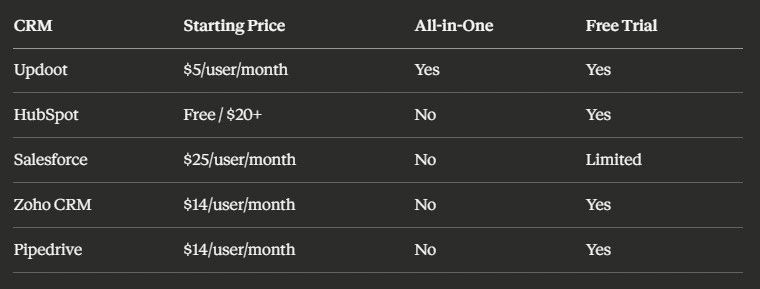
Here's a quick comparison of what you can expect to pay:
Which CRM Is Right for Your Small Business?
If you're a small business that needs more than just a contact database — if you need to track time, send invoices, manage projects, and keep HR records alongside your CRM, Updoot is the only platform that covers all of it at $5 per user per month with no contracts.
If you're just getting started and want to try a free tool first, HubSpot's free tier is a reasonable starting point with the understanding that you'll likely outgrow it.
If you have a dedicated sales team and want a clean pipeline-focused tool, Pipedrive is a solid choice.
If you're an enterprise with complex requirements and a real implementation budget, Salesforce is the standard.
For most small businesses, the right CRM is the one that fits into how you actually work not the one with the most features or the biggest brand name. Updoot was built specifically for that: a platform that combines the tools you already need into one place so you can stop switching tabs and start running your business.
Frequently Asked Questions
What is a CRM system and what does it do? A CRM or Customer Relationship Management system is software that helps businesses manage interactions with current and potential customers. It tracks leads, deals, communications, and customer data so nothing falls through the cracks from first contact to closed deal.
What features should a small business CRM include? The core features are lead and pipeline tracking, detailed contact and customer profiles, activity logging for calls and emails, real-time reporting and dashboards, mobile access, and integration with invoicing and project management tools. A CRM that does not connect to the rest of your business creates more work, not less.
How much does a CRM system cost? Costs vary widely. HubSpot offers a free tier but paid plans start around $20 per user per month and scale significantly higher. Pipedrive starts at $14 per user per month. Zoho CRM ranges from $14 to $52 per user per month. Salesforce runs $80 to $165 per user per month before implementation costs. All-in-one platforms like Updoot start at $5 per user per month with no contracts.
How long does CRM implementation take? It depends on the platform. Simpler tools designed for small businesses can be operational the same day you sign up. Salesforce deployments for mid-size or enterprise organizations typically take weeks to months and often require a certified consultant.
What is the biggest mistake businesses make when setting up a CRM? Importing messy data. Duplicate records and incomplete information undermine the value of any CRM from day one. Clean your existing spreadsheets and email records before importing anything into the new system.
What is the difference between a standalone CRM and an all-in-one platform? A standalone CRM manages leads and contacts but requires separate tools for invoicing, project management, time tracking, and HR. An all-in-one platform combines all of those functions in one place, eliminating the need to manage multiple integrations and switch between systems to get a complete picture of a customer relationship.
Get Started With Updoot
Updoot includes CRM, time tracking, invoicing, project management, HRIS, scheduling, payroll reporting, SOPs, and KPI dashboards for $5 per user per month. No contracts. No setup fees. Start your free trial at xecutethevision.com.
Learn more about apps for business
Vacation Scheduling Software: How to Find the Best
Every Small Business App You Need in a List
AI-Powered Software for Running a Small Business
Workday HRIS vs Updoot HRIS Easy Comparison Chart
Best App for Sales Performance Tracking: A Quick Comparison Chart
Best CRM for SaaS: What You Need to Look For
Homebase Scheduling vs. Updoot Scheduling
ClockShark Pricing vs. Updoot Pricing: Let's Talk Value
Shift Swap Software for Restaurants, Construction, Retail, More