
ConnectTeam Feature Comparison Chart Before You Buy
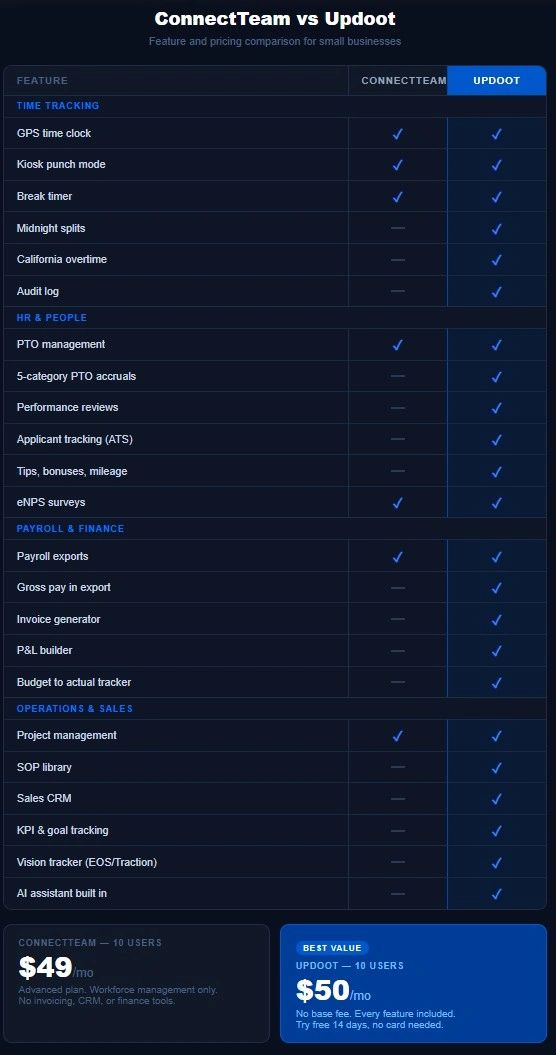
Use our free comparison chart to review ConnectTeam vs Updoot features and pricing. If ConnectTeam has shown up in your search for employee management software, you are probably a small business owner looking for a way to manage your team without the complexity and cost of enterprise HR software. ConnectTeam markets itself as an all-in-one solution for deskless and frontline workers. The pitch is compelling. One app for scheduling, time tracking, communication, and training.
But before you commit, it is worth understanding exactly what you are paying for, where the gaps are, and whether there is a better option that covers more ground for less money.
This is the honest comparison between ConnectTeam and Updoot that nobody who sells ConnectTeam will give you.
What Is ConnectTeam?
ConnectTeam is a mobile-first workforce management platform launched in 2014 and aimed primarily at businesses with frontline, deskless, or field-based employees. Think retail teams, construction crews, cleaning services, hospitality staff, and similar workforces where employees are not sitting at a desk all day.
The platform focuses heavily on communication, scheduling, time tracking, and training. It has a clean mobile interface and has built a strong reputation for being easy for non-technical teams to adopt. For a business whose primary challenge is keeping a distributed team connected and coordinated, ConnectTeam does that well.
The limitations become apparent when you look at what a small business actually needs beyond team coordination. Invoicing. Financial tracking. Sales tools. HR systems that go beyond basic scheduling and time off. Leadership frameworks for running the business strategically. These are the areas where ConnectTeam falls short and where the comparison with Updoot gets interesting.
ConnectTeam Pricing: The Real Cost
ConnectTeam pricing is where most small business owners get a surprise. The free plan sounds generous at first. Up to 10 users, no charge. But the free plan is heavily limited in features and is designed to get you comfortable with the product before you need to upgrade.
The paid plans start at around $29 per month for up to 30 users on their Basic plan. That sounds reasonable until you realize the Basic plan excludes many of the features in the marketing materials. To get the full feature set including advanced scheduling, task management, and reporting, you need the Advanced plan at around $49 per month for up to 30 users, or the Expert plan at around $99 per month for up to 30 users.
Beyond 30 users the pricing jumps significantly and is calculated per user with a minimum monthly charge that applies regardless of how many people you actually have active.
The more significant issue is what none of the plans include at any price. ConnectTeam does not have invoicing. It does not have a CRM. It does not have financial tracking, P&L tools, or budget management. It does not have an applicant tracking system or performance review tools beyond basic surveys. And it does not have the kind of operational and leadership infrastructure that a growing small business actually needs to scale.
So while ConnectTeam's entry price looks competitive, the total cost of running your business on ConnectTeam plus the additional tools you need for everything it does not cover puts you well past what Updoot costs for a complete solution.
Updoot Pricing: Simple and Complete
Updoot costs $5 per user per month. No base fee. No tiers. No feature gates. Every user on your team gets access to every feature in the platform from day one.
A 10-person team pays $50 per month. A 30-person team pays $150 per month. The price scales cleanly with your team and never requires you to upgrade to a higher tier to unlock features you thought were included.
More importantly, that $5 per user covers the complete operational stack for a small business. Time tracking, scheduling, HR, invoicing, project management, sales CRM, financial tools, SOP management, and leadership frameworks. Not as separate modules you negotiate for. All of it, for every user, at one price.
Feature Comparison: Time Tracking
Time tracking is one of ConnectTeam's stronger areas. The mobile clock-in experience is clean, GPS tracking works reliably, and the interface is genuinely easy for frontline workers to use without training.
ConnectTeam time tracking: GPS clock in and out, geofencing, break tracking, timesheet management, payroll integrations, and a kiosk mode for shared devices. The mobile experience is polished and the app works well for teams in the field.
Updoot time tracking: GPS time clock, midnight splits for overnight shift workers, break timer, kiosk punch mode, admin time card approval with a full audit log, optional employee time card approval, daily and weekly overtime tracking, and California overtime calculations built directly into the dashboard.
The midnight splits feature is worth highlighting specifically for businesses with overnight operations. When a shift crosses midnight, Updoot automatically splits the time entry across the two calendar days so your records, overtime calculations, and payroll exports are always accurate. This is a detail that matters enormously for restaurants, security companies, hospitality businesses, and healthcare providers but is rarely handled correctly in basic time tracking tools.
California overtime is the other standout. Daily overtime thresholds under California law differ significantly from federal standards and most time tracking software either handles it incorrectly or requires manual configuration. Updoot calculates it automatically.
Both platforms handle the fundamentals of time tracking well. Updoot has meaningful advantages in overnight shift handling and overtime complexity.
Feature Comparison: Scheduling
Scheduling is a genuine strength for ConnectTeam. The drag and drop interface is intuitive, shift templates save time, and the mobile notification system means employees actually see their schedules rather than missing a shift because they did not check an email.
ConnectTeam scheduling: Drag and drop shift builder, shift templates, open shift management where employees can claim available shifts, schedule publishing with push notifications, and basic conflict detection.
Updoot scheduling: Shift scheduling with suggest and swap functionality by job and location, capacity-aware scheduling that shows you whether you are overstaffed or understaffed before you publish, integration with the capacity calendar for operational planning, and shift management that connects directly to time tracking and payroll exports.
The capacity awareness in Updoot's scheduling is the differentiator. Most scheduling tools let you build a schedule. Updoot's scheduling is connected to your operational capacity data so you can see in real time whether a schedule is sustainable before you publish it. For businesses managing labor costs carefully, that visibility is genuinely valuable.
ConnectTeam's scheduling interface is more polished and easier for non-technical managers to pick up quickly. For businesses where scheduling is the primary challenge and everything else is secondary, ConnectTeam wins on ease of use. For businesses that need scheduling connected to the rest of their operations, Updoot wins on depth.
Feature Comparison: Communication
Communication is where ConnectTeam differentiates itself most clearly. The in-app chat, announcements, and team feed features are built specifically for frontline workers who may not have company email addresses or access to desktop computers.
ConnectTeam communication: In-app chat with direct messaging and group channels, company announcements with read receipts, an employee directory, and a social-style team feed for updates and recognition.
Updoot communication: Updoot is built around operational coordination rather than social communication. The meeting agenda tool with Vision Tracker integration, combined with the SOP library and project management tools, creates a structured communication environment focused on work output rather than casual team chat.
This is a genuine difference in philosophy rather than a gap in features. ConnectTeam is designed for teams that need casual, social, mobile communication. Updoot is designed for businesses that want structured, operational communication tied to goals, projects, and processes.
If your primary challenge is keeping a field-based team connected socially and sharing quick updates, ConnectTeam's communication tools are better suited to that specific need. If your primary challenge is running a well-organized business with clear accountability, Updoot's operational approach serves you better.
Feature Comparison: Training and Onboarding
ConnectTeam includes a training module that lets businesses create courses, quizzes, and onboarding checklists within the app. For businesses that need to train frontline workers on compliance procedures, safety protocols, or customer service standards, this is a genuinely useful feature.
Updoot approaches training and onboarding through its SOP library. Every standard operating procedure in your business is documented, versioned, and accessible to every team member. Review due dates are tracked automatically, revisions go through an approval workflow, and managers receive alerts when SOPs are due for review. The onboarding experience for a new employee becomes a structured process tied to documented procedures rather than a separate training course.
For businesses with complex compliance training needs or certification tracking, ConnectTeam's dedicated training module has more depth. For businesses that want their training to be directly tied to how work actually gets done every day, Updoot's SOP-driven approach creates more operational alignment.
What ConnectTeam Does Not Include
ConnectTeam is a strong workforce management tool for frontline teams. Outside of that specific use case, the gaps are significant.
No invoicing or project billing. If your business bills clients for work performed, you need a separate invoicing tool. ConnectTeam does not generate invoices or connect time entries to client billing.
No sales CRM. There is no lead tracker, no sales pipeline, no customer profile builder, and no quote creator in ConnectTeam. Your sales process lives in a completely separate tool.
No financial tracking. No budget to actual tracker, no P&L builder, no vendor management. Your financial visibility beyond payroll requires additional software.
No applicant tracking system. Hiring happens outside ConnectTeam entirely. You need a separate ATS to manage job postings, applications, and the hiring process.
No performance review system. ConnectTeam has basic surveys but not a structured performance review system with two-way feedback, goal tracking, and performance history.
No leadership and strategy tools. No KPI tracking, no Vision Tracker, no roadmap builder, no RASCI accountability charts. Running your business strategically requires tools that ConnectTeam does not provide.
No AI assistant. ConnectTeam does not have built-in AI to help your team work faster or smarter across the platform.
Each of these gaps represents either a separate software subscription or a manual process your team is handling outside the system. The cumulative cost of filling these gaps with additional tools typically runs $150 to $300 per month on top of ConnectTeam's subscription for a small business with basic needs across each category.
What Updoot Includes That ConnectTeam Does Not
Every feature below is included in Updoot's $5 per user per month price with no upgrades required.
HR and people: Employee time clock with GPS and midnight splits, California overtime tracking, five-category PTO accruals, salaried employee setup, pay rates and multipliers with gross pay in export, tips and bonuses tracking, performance reviews with two-way feedback, an applicant tracking system, a custom job description library, an employee HR vault with emergency contacts and key dates, eNPS surveys, a team location map, and admin and employee time card approval with audit log.
Sales and marketing: A sales CRM lead tracker and dashboard, a sales quote creator, a customer profile builder, competitor analysis tools, an invoice generator, and project billing that connects time tracking directly to client invoices.
Finance: A budget to actual tracker, vendor management scorecards, payroll-ready exports with overtime and all compensation types included, a P&L builder, and a capacity calendar.
Operations: An SOP library with review due alerts, revision tracking, and approval workflows, project management with custom templates and proposal tools, a flow chart builder, a risk tracker, a RASCI roles and accountability chart builder, and meeting agendas with Vision Tracker integration.
Leadership: A Vision Tracker inspired by Gino Wickman's book Traction, a Gantt roadmap builder, an org chart builder, and goal and KPI tracking.
AI: Updoot is AI-powered throughout. Doot, the built-in AI assistant, helps your team work faster across every module without adding headcount or switching tools.
Who Should Use ConnectTeam
ConnectTeam is the right choice if your business is primarily managing a large frontline or deskless workforce, team communication and social connectivity are your top priorities, you need a polished mobile experience above all else, and you are willing to manage additional tools for invoicing, CRM, financial tracking, and everything else your business needs to operate.
It is a well-built product for a specific type of workforce management challenge. If that challenge is your only challenge, ConnectTeam delivers.
Who Should Use Updoot
Updoot is the right choice if you need time tracking and scheduling as part of a complete business operating system rather than a standalone workforce app, you are currently paying for multiple tools that do not talk to each other and want to consolidate, you bill clients for work and need time tracking connected directly to invoicing, you want financial visibility, sales tools, and leadership frameworks alongside your HR features, and you want to pay $5 per user per month for all of it instead of $200 or more per month across a fragmented stack.
Updoot is built for the business owner who is not just managing a workforce but actually building a business. The time clock is one feature in a complete operational platform, not the center of the product.
The Bottom Line
ConnectTeam is a solid workforce management tool that excels at keeping frontline teams connected and coordinated. If your primary challenge is frontline worker communication and scheduling, it earns its price.
But for most small businesses, workforce management is one piece of a much larger operational picture. You need to bill clients, manage sales, track finances, document processes, and lead your team toward strategic goals. Paying separately for every piece of that picture is expensive, creates friction, and means your data never talks to itself.
Updoot gives you the complete picture at $5 per user per month. A 10-person team pays $50 per month for time tracking, scheduling, HR, invoicing, project management, CRM, financial tools, SOP management, and leadership frameworks. No base fee, no tiers, no add-ons. Everything your business needs to operate and grow, in one platform.
Try Updoot free for 14 days at xecutethevision.com. No credit card required.
Frequently Asked Questions
What is ConnectTeam used for?
ConnectTeam is a mobile-first workforce management platform designed primarily for businesses with frontline or deskless employees. It focuses on team communication, scheduling, time tracking, and training. It is particularly well-suited to retail, hospitality, construction, and field service businesses where employees work away from a desk and need a simple mobile experience for staying connected and clocking in.
How much does ConnectTeam cost?
ConnectTeam has a free plan for up to 10 users with limited features. Paid plans start at around $29 per month for up to 30 users on their Basic plan. The Advanced plan runs around $49 per month and the Expert plan around $99 per month for the same 30-user base. Beyond 30 users pricing scales per user with a minimum monthly charge. The full-featured plans required for most business needs run significantly higher than the entry price suggests.
Does ConnectTeam include invoicing?
No. ConnectTeam does not include invoice generation or project billing. Businesses that bill clients for hours worked need a separate invoicing tool alongside ConnectTeam. Updoot includes an invoice generator and project billing that connects time entries directly to client invoices at no additional cost.
How does Updoot compare to ConnectTeam on price?
Updoot costs $5 per user per month with no base fee and no tiers. A 10-person team pays $50 per month for every feature Updoot offers. ConnectTeam's comparable plan for 10 users costs less at entry but excludes invoicing, CRM, financial tools, performance reviews, and leadership frameworks that most businesses need from additional tools. The total cost of ConnectTeam plus the tools needed to fill its gaps typically exceeds Updoot's all-inclusive price significantly.
Does ConnectTeam have a CRM?
No. ConnectTeam does not include a sales CRM, lead tracker, customer profile builder, or quote creator. Sales processes for businesses using ConnectTeam must be managed in a separate tool. Updoot includes a full sales CRM with lead tracking, customer profiles, a quote creator, and competitor analysis all included in the base price.
Is ConnectTeam good for small businesses?
ConnectTeam works well for small businesses whose primary challenge is managing a frontline or deskless workforce and whose software needs are limited to scheduling, time tracking, and team communication. For small businesses that also need invoicing, financial tracking, sales tools, and HR systems beyond basic scheduling, ConnectTeam covers only part of the picture and requires additional tools to fill the gaps.
Can Updoot replace ConnectTeam?
Yes. Updoot includes everything ConnectTeam covers including GPS time tracking, scheduling, kiosk mode, PTO management, payroll exports, and team management. Updoot also includes everything ConnectTeam does not, including invoicing, CRM, project management, SOP library, performance reviews, financial tracking, and leadership tools. For businesses currently using ConnectTeam alongside other tools, Updoot replaces the entire stack at a lower combined cost.
Does Updoot work for frontline workers?
Yes. Updoot's time clock includes GPS tracking, kiosk punch mode for shared devices, a mobile-friendly interface, and break tracking that works for field-based and frontline teams. The scheduling system supports shift management across multiple jobs and locations. Updoot is built for small businesses across all workforce types, not just office-based teams.