
ClockShark Pricing vs. Updoot Pricing: Let's Talk Features
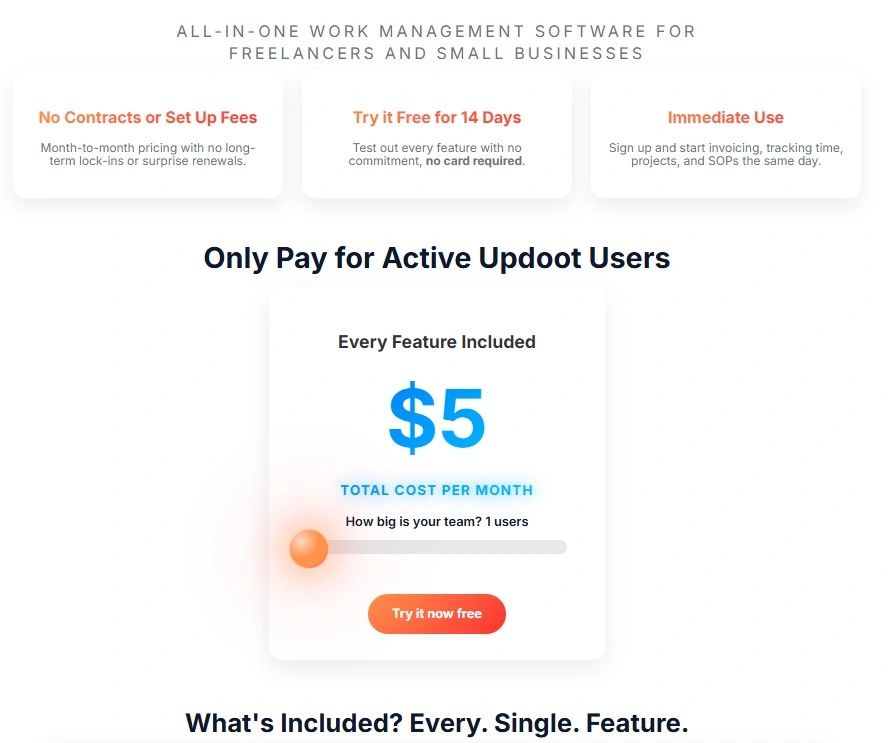
This easy comparison chart shows the price and feature differences between ClockShark and Updoot. If you’re evaluating time tracking or workforce management software, you’ve probably come across ClockShark.
At first glance, it’s a solid option, especially for field teams. But once you look deeper into pricing and how it scales, the conversation changes.
And that’s where platforms like Updoot are starting to stand out.
In this guide, we’ll break down:
- How ClockShark pricing actually works
- What you really get for the cost
- How Updoot compares
- Which platform makes more sense depending on your business
What Is ClockShark?
ClockShark is a time tracking and job costing platform built primarily for:
- Construction companies
- Field service businesses
- Trade-based teams
It’s designed to answer one core question:
“Where is my team working, and how many hours are tied to each job?”
It does this through:
- GPS-based time tracking
- Job and task tracking
- Scheduling tools
- Payroll integrations
It’s strong—but it’s also very focused on field operations.
ClockShark Pricing Breakdown
ClockShark uses a base fee + per-user pricing model, which is where things start to matter.
Standard Plan
- ~$40/month base fee
- ~$8–$9 per user/month
Pro Plan
- ~$60/month base fee
- ~$10–$11 per user/month
Example: What You Actually Pay
Let’s make this real.
For a team of 10 employees:
- Standard plan ≈ $130/month
- Pro plan ≈ $170/month
And that number continues to grow as you add employees.
What You Get with ClockShark
ClockShark is solid at what it’s built for.
Core Features
- Time tracking (mobile + web)
- GPS tracking and geofencing
- Job and task tracking
- Drag-and-drop scheduling
- Timesheet approvals
Pro Plan Adds
- PTO management
- Advanced job costing
- Department controls
- Compliance forms
Where ClockShark Falls Short
This is the part most businesses don’t realize until they’re already using it.
1. Pricing Scales With Every Employee
Per-user pricing sounds fine—until you grow.
Every new hire = higher monthly cost.
That creates:
- Budget unpredictability
- Hesitation to scale
- Higher long-term software spend
2. Limited Beyond Time Tracking
ClockShark is excellent for:
- Tracking hours
- Managing field crews
But it’s not built for:
- SOP management
- Internal documentation
- Project collaboration beyond hours
- Performance tracking
- Goal alignment
So what happens?
You start adding:
- Another tool for SOPs
- Another tool for projects
- Another tool for communication
Now your “simple” system isn’t simple anymore.
3. Built for Field Teams, Not All Businesses
If you’re running:
- A service business
- A construction company
ClockShark fits.
But if you’re managing:
- Office teams
- Hybrid teams
- Cross-functional teams
It can feel limiting.
What Is Updoot Pricing?
Updoot takes a completely different approach.
Instead of:
- Charging per user
- Charging for specific features
It focuses on one unified system with simplified pricing.
How Updoot Is Different
Updoot isn’t just a time tracking tool—it’s a business operating system.
Instead of only tracking hours, it connects:
1. Time Tracking + Payroll Alignment
- Track hours worked
- Assign time to projects
- Convert hours into invoices
2. Project Management with Real Accountability
- Assign roles and responsibilities
- Set hours per task
- Track progress with visual indicators
- Manage start dates and deadlines
3. Built-In SOP System
- Store processes in one place
- Control access by role
- Ensure team consistency
4. PTO and Employee Dashboard
- Employees can track:
- Hours
- PTO
- Performance
- Managers get visibility without micromanaging
5. Invoicing Connected to Work Completed
- Turn tracked hours into invoices
- Reduce admin work
- Improve cash flow
6. Performance + Goal Tracking
- Tie daily work to company goals
- Track execution, not just activity
ClockShark vs. Updoot Pricing: Side-by-Side
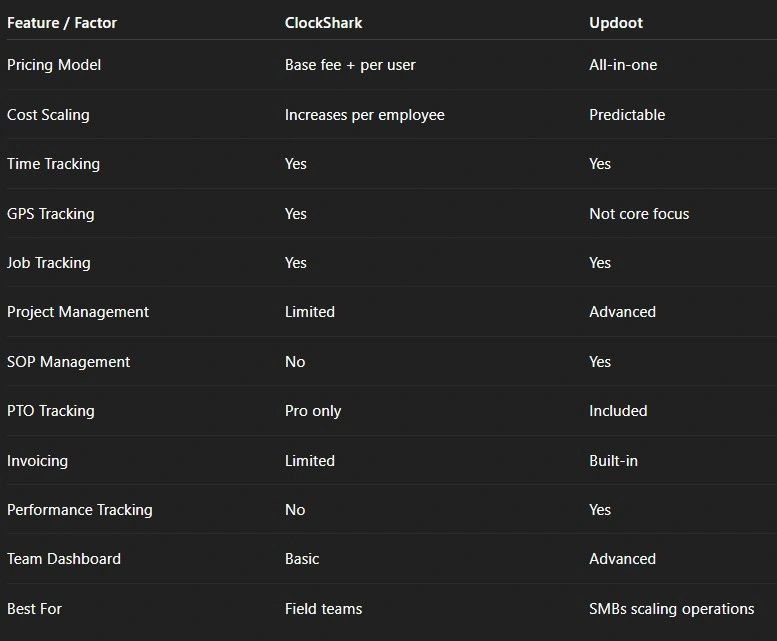
The Real Cost Comparison
Here’s what most businesses overlook:
ClockShark Cost = Software + Missing Pieces
You’re paying for:
- Time tracking
- Scheduling
But still need:
- Project management tool
- SOP/documentation system
- Performance tracking
- Possibly invoicing software
Updoot Cost = One System That Replaces Multiple Tools
Instead of stacking tools, you get:
- One platform
- One workflow
- One source of truth
That’s where cost savings actually happen.
If you're still in comparison mode, here is an article to review Connecteam pricing vs. Updoot.
What Reddit and Real Users Say About Pricing
Per-user pricing is one of the biggest complaints across time tracking tools.
From real users:
“Per-user pricing is the worst for small teams… it adds up fast.”
This is exactly why all-in-one and flat-style pricing models are gaining traction.
Which One Should You Choose?
Choose ClockShark If:
- You run a construction or field service business
- You mainly need GPS time tracking and job costing
- You’re okay adding other tools later
Choose Updoot If:
- You want one system to run your business
- You care about accountability and business growth, not just tracking time
- You want to eliminate tool fragmentation
- You need projects, SOPs, invoicing, CRM, HRIS and performance in one place
The Bottom Line
ClockShark is a strong tool, but it solves a narrow problem.
Updoot solves a bigger one.
And that’s the real difference.
Because most businesses don’t fail from:
- Poor time tracking
They struggle with:
- Lack of clarity
- Disconnected systems
- Poor execution
Tracking time doesn’t fix that.
A connected system does.
Final Thoughts
When comparing pricing, don’t just look at the number.
Look at:
- What you’re actually getting
- What you still need to add
- How your system will scale
Because the cheapest tool upfront is rarely the cheapest long-term. If you're still in comparison mode, here is an article to review Connecteam pricing vs. Updoot.
Frequently Asked Questions
What is ClockShark and what is it built for? ClockShark is a time tracking and job costing platform built primarily for construction companies, field service businesses, and trade-based teams. Its core strength is answering where your team is working and how many hours are tied to each job through GPS-based time tracking and scheduling.
How much does ClockShark actually cost? ClockShark uses a base fee plus per-user pricing model. The Standard plan runs approximately $40 per month base plus $8 to $9 per user. The Pro plan runs approximately $60 per month base plus $10 to $11 per user. For a team of 10 employees that works out to roughly $130 to $170 per month before any growth.
What are the main limitations of ClockShark? ClockShark is limited beyond time tracking and field crew management. It does not include SOP management, internal documentation, project collaboration beyond hours, performance tracking, or goal alignment. Most businesses end up adding separate tools for those functions, which increases cost and complexity.
How is Updoot pricing different from ClockShark? ClockShark charges a base fee plus a per-user fee that grows with every new hire. Updoot uses simplified flat pricing at $5 per user per month with all features included, no base fee, no contracts, and no add-ons required for core functionality.
What does Updoot include that ClockShark does not? Updoot includes project management with task-level accountability, built-in SOP management, invoicing connected to tracked hours, performance and goal tracking, CRM, and HRIS tools alongside time tracking and scheduling. It is designed to replace multiple disconnected tools rather than serve as one piece of a larger stack.
Which platform is right for your business? Choose ClockShark if you run a construction or field service business and primarily need GPS time tracking and job costing. Choose Updoot if you want one system to manage operations, need accountability beyond time tracking, or want to eliminate the cost and fragmentation of stacking multiple tools together.
Want More Than Just Time Tracking?
If you’re ready to move beyond basic time tracking and actually run your business in one place, Updoot gives you:
- Time tracking tied to projects
- Built-in SOPs and documentation
- Team accountability and dashboards
- PTO, invoicing, and performance tracking
All without stacking tools or unpredictable pricing.
Because at some point, it’s not about tracking time, it’s about executing better.
Learn more about apps for business
Vacation Scheduling Software: How to Find the Best
Every Small Business App You Need in a List
AI-Powered Software for Running a Small Business
Workday HRIS vs Updoot HRIS Easy Comparison Chart
Best App for Sales Performance Tracking: A Quick Comparison Chart
Best CRM for SaaS: What You Need to Look For
Homebase Scheduling vs. Updoot Scheduling
Shift Swap Software for Restaurants, Construction, Retail, More