
Clockify Alternatives in 2026: Businesses Need More Than a Timer
This is an easy-to-read comparison of Clockify alternatives in 2026. Clockify is where most businesses start with time tracking. It is free, easy to set up, and does one thing well: it records hours. For a freelancer or a small agency billing clients by the hour, that is often enough.
But most growing businesses are not freelancers. They have hourly employees, multiple job sites, payroll to run, HR to manage, and operations to coordinate. Clockify falls short in scheduling, customization, and payroll integration, making it less flexible for full workforce planning. At the point where a business needs more than a timer, Clockify starts creating more work than it saves. capterra
This guide covers what Clockify does well, where it runs out of runway, and which alternatives actually solve the problems growing teams face, starting with the one that goes furthest.
What Clockify Does Well
Before going further, Clockify deserves credit for what it genuinely does well.
The free plan is real. Unlimited users, unlimited time tracking, and basic reporting at no cost is a legitimate offer that most competitors cannot match. For teams that need to start tracking time today without a budget conversation, Clockify removes every barrier to entry.
The web app is clean and fast. The web interface feels like software designed this decade, with keyboard shortcuts that work as expected and reports that load quickly even with six months of data. G2
It connects to a wide range of tools. Clockify connects with over 80 integrations including project management and CRM software, and supports an open API and Zapier, allowing teams to track time inside tools like Trello, Jira, and Salesforce. When I Work
For what it is built to do, it does it reliably. The problem is not what Clockify does. It is what it does not do.
Where Clockify Falls Short
Payroll export requires manual cleanup every pay period
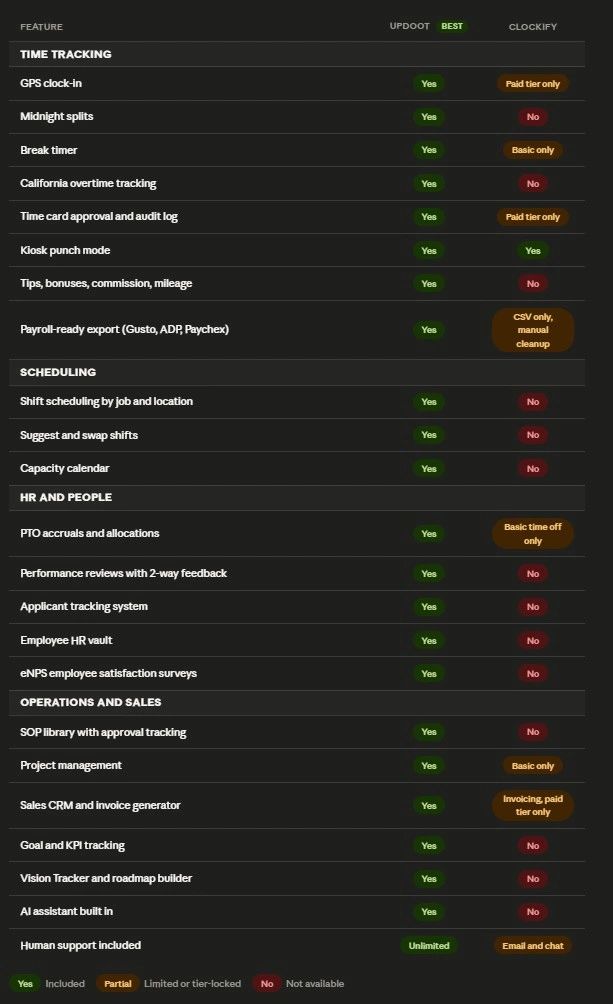
Clockify can export a CSV of hours. What it cannot do is generate a payroll-ready file formatted for your specific payroll provider. That CSV cleanup process typically costs two to three hours every week that someone spends making Clockify data talk to your payroll system. For a business running bi-weekly payroll with 20 or more employees, that adds up to over 100 hours a year spent on a problem that should not exist. Updoot generates a payroll-ready export formatted directly for Gusto, ADP, Paychex, and more, with no manual field mapping required. PulseSignal
No scheduling
Clockify does not offer shift scheduling tools. If you need to build a schedule, communicate shifts, manage swap requests, or align staffing with demand, you need a completely separate platform. That is another subscription, another login, and another place where data lives that should be connected to your time tracking. When I Work
No geofencing
Clockify offers GPS tracking in the form of breadcrumb routes but does not offer geofencing. As of 2026, while a location alerts update was added, it does not offer a hard lockout based on GPS coordinates. Employees can clock in from anywhere. For field teams and job site crews, the honor system is still in play. HowToiSolve
No HR, no performance management, no hiring
Clockify does not offer payroll or other HR services, making it less suitable for larger organizations. There is no employee record system, no performance reviews, no PTO accrual engine, no applicant tracking. A business that needs those things ends up paying for Clockify plus three or four separate tools running simultaneously, with data scattered across all of them. StackScored
Android app problems
The Android app is inconsistent. The timer stops randomly, GPS drains battery aggressively, and rotation bugs cause time entries to vanish. Android users tend to run into problems within the first two months. For businesses where a significant portion of the team is on Android devices, this is not a minor inconvenience. G2
Mobile admin does not work
Managers cannot perform administrative tasks from the mobile app. You cannot create projects, manage schedules, or handle invoicing from mobile. Full workspace management requires a desktop browser. For managers running teams in the field this creates daily friction, since the device they have in their hand cannot do the job. g2
The Best Clockify Alternatives in 2026
1. Updoot (Best Overall)
Updoot is the alternative for businesses that have outgrown point solutions. Where every other tool on this list solves one or two of Clockify's gaps, Updoot replaces the entire stack: time tracking, HR, scheduling, operations, sales, finance, and leadership tools in one platform built for growing businesses.
A manager running on Clockify needs separate tools for scheduling, payroll export, performance reviews, hiring, SOP documentation, and project management. A manager running on Updoot does all of that in one place, with one login, with data that connects across every function.
Time tracking built for hourly teams. Updoot's employee time clock includes GPS clock-in, midnight splits for overnight shifts, a break timer, California overtime tracking, and both admin and optional employee time card approval with a full audit log. Tips, bonuses, commission, mileage, and punch notes are all tracked in the same place. Kiosk punch mode covers shared device environments. When payroll runs, time card data exports directly in a payroll-ready format for Gusto, ADP, Paychex, and more. No CSV cleanup. No manual field mapping.
HR built into the same platform. Updoot includes five categories of PTO accruals and allocations, a full HRIS for employee management and performance tracking, an employee HR vault with emergency contacts, birthdays, and anniversaries, salaried employee setup, a team location map, eNPS employee satisfaction surveys, two-way performance reviews, and an applicant tracking system for hiring. None of this requires a separate subscription or a separate login.
Operations that connect to how work actually runs. The SOP library includes review due alerts, revision tracking, and approval workflows so documented processes stay current and accountable. Project management comes with custom templates, briefs, and proposals. There is a flow chart builder, a risk tracker, a RASCI accountability chart, a meeting agenda tool with Vision Tracker integration, and a scheduling system that handles shift suggestions and swaps by job and location.
Sales and finance without switching tools. Updoot includes a sales CRM with lead tracking and a dashboard, a quote creator, a customer profile builder, a competitor analysis tool, an invoice generator, and project billing. On the finance side there is a budget to actual tracker, vendor management scorecards, a P&L builder, and a capacity calendar.
Leadership tools most platforms do not touch. Goal and KPI tracking, an org chart builder, a Gantt roadmap builder, and a Vision Tracker built around the framework from Gino Wickman's book Traction give leadership teams a place to connect strategy to execution without switching to a separate platform.
AI is built in. Updoot's AI assistant Doot is embedded across the platform. That is not an add-on or an integration. It is part of how the product works.
Human support is included. Unlimited support from real people. Not a chatbot, not a ticket queue with a 48-hour response window.
Clockify is a timer. Updoot is how a business runs.
2. Hubstaff
Hubstaff is the strongest alternative for remote teams that need productivity monitoring alongside time tracking. It combines GPS tracking, activity levels, and optional screenshots with time tracking and scheduling. Payroll integrations are available on paid plans. The limitation is that geofencing and live GPS are locked behind the most expensive tier, and the monitoring features can create morale issues if not implemented carefully. It is a good fit for remote-first teams. It is not built for the operational complexity of a growing business.
3. Homebase
Homebase is built specifically for hourly teams at single physical locations: restaurants, retail shops, cafes. It handles scheduling, time tracking, team messaging, and basic HR well. Payroll integrations are solid. The limitation is that it is designed around one location and does not scale well across multiple sites or complex organizational structures. For a single-location business with straightforward hourly needs, it is a practical choice.
4. QuickBooks Time
QuickBooks Time is the right answer for businesses already running QuickBooks for accounting. The integration is direct and the time-to-payroll workflow requires no manual steps. GPS and geofencing are included without requiring an enterprise upgrade. Outside the QuickBooks ecosystem the value proposition weakens significantly, and the pricing structure becomes expensive for teams that do not need the full QuickBooks suite.
5. Toggl Track
Toggl Track is the cleanest and simplest option for freelancers and agencies billing clients by the hour. The interface is well-designed, the reporting is strong for project-level visibility, and the free plan covers up to five users. It does not verify time independently, there is no GPS, no scheduling, no HR, and no payroll integration. For self-reporting professional services teams it works. For anyone managing hourly employees it does not.
Updoot vs Clockify: Feature Comparison
Which Clockify Alternative Is Right for You
Choose Updoot if your business has moved past point solutions and you are tired of paying for five tools that do not talk to each other. If you have hourly employees, need real payroll integration, want HR and operations in the same platform, and want AI built in rather than bolted on, Updoot is the only platform on this list built to run a whole business.
Choose Hubstaff if your primary need is monitoring remote desk-based employees and productivity visibility is the core problem.
Choose Homebase if you run a single physical location with straightforward hourly scheduling and do not need multi-site or operational tools.
Choose QuickBooks Time if you are already inside the QuickBooks ecosystem and the integration value alone justifies the price.
Stay on Clockify if you are a freelancer or small agency tracking billable hours by project and payroll, HR, and scheduling are not in scope.
Frequently Asked Questions
What is the best Clockify alternative for small businesses?
The best alternative depends on what Clockify is missing for your team. For businesses that need time tracking connected to payroll exports, HR, scheduling, and operations in one platform, Updoot covers everything Clockify leaves out without requiring multiple subscriptions.
Does Clockify have a payroll export?
Clockify does not integrate directly with payroll providers such as ADP or Gusto. Teams have to export hours as a CSV and manually process that data into their payroll system each pay period. Updoot generates a payroll-ready export directly formatted for Gusto, ADP, Paychex, and more. When I Work
Does Clockify have shift scheduling?
Clockify does not offer shift scheduling tools. Building and communicating schedules, managing swap requests, and tracking capacity all require a separate platform on top of Clockify. When I Work
Is Clockify good for hourly employees?
Clockify works for basic hour logging but lacks the features hourly employee management requires: payroll-ready exports, scheduling, California overtime tracking, and HR tools. Teams that start on Clockify with hourly employees typically find themselves adding multiple other tools as they grow, which defeats the purpose of starting with a simple solution.
What does Updoot have that Clockify does not?
Updoot includes everything Clockify offers in time tracking and adds midnight splits, California overtime tracking, payroll-ready exports, shift scheduling with suggest and swap, PTO management, a full HRIS, performance reviews, applicant tracking, SOP management, project management, a sales CRM, invoice generation, goal and KPI tracking, a Vision Tracker, a Gantt roadmap builder, and an AI assistant. Clockify is a time tracker. Updoot is an operating system for a growing business.
How hard is it to switch from Clockify to Updoot?
Most teams are up and running on Updoot within a single day. The employee-facing clock-in is straightforward and requires minimal training. The bigger shift is realizing how many other tools you can consolidate and cancel once Updoot is running.