
BusyBusy Reviews, Pricing, Feature Comparison vs Updoot

If you searched for busybusy reviews, you are probably evaluating it for a construction or field-based team. Maybe you are on paper timecards and need something better. Maybe you are on a different tool and considering a switch. Either way, this article gives you the complete picture: what busybusy actually does, what it costs, where it falls short based on verified user feedback, and how it compares to Updoot for teams that need more than a time clock.
We built Updoot after spending serious time studying field workforce tools. busybusy was one of the products we examined closely because it sits in the same market. Here is what we found.
What is busybusy?
busybusy was founded in 2010 by a construction professional and is used by more than 75,000 contractors. It is purpose-built for construction and field-based workers, and that focus shows in the product. The core is GPS time tracking tied to specific job sites and cost codes, which means supervisors can see not just who is clocked in but what they are working on and what that labor is costing by project.
Beyond the time clock, busybusy includes daily field reports, equipment tracking through VisionLink integration, project photos, document sharing, basic scheduling, and payroll export including a well-reviewed QuickBooks sync. For construction companies that have been running on paper timecards, busybusy represents a meaningful upgrade.
It is worth being direct: busybusy does what it says. For construction-focused GPS time tracking and job costing, it is a genuinely capable tool with high satisfaction ratings and a loyal user base.
The questions worth asking are about what it does not do, and whether that matters for your business.
busybusy Pricing
busybusy starts at $9.99 per user per month on the base plan with a free trial available. That is competitive for construction time tracking.
The pricing structure adds up as you grow. Features like equipment tracking, advanced job costing reports, and certain integrations are available on higher tiers. For a growing construction company, the per-user cost across a crew of twenty or thirty people becomes meaningful, and the total cost of the tier that includes everything you need is worth calculating before you commit.
busybusy Pros
The user reviews tell a consistent story.
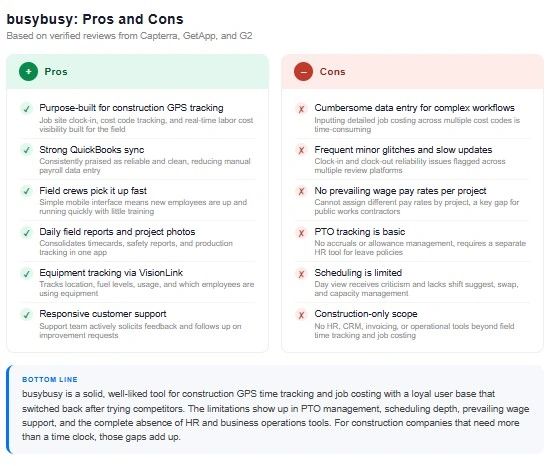
- Field crews pick it up quickly with little training.
- GPS clock-in tied to job sites means supervisors know where their people are and what they are working on without chasing anyone down.
- The QuickBooks sync is frequently praised as reliable and clean, which matters for construction companies where job costing and payroll accuracy are tied directly to profitability.
- Daily field reports, equipment usage tracking, and production tracking in one app reduces the number of separate systems a site supervisor has to manage.
- The customer support is another bright spot.
- Multiple reviewers note that busybusy support is responsive and that the team actively solicits feedback and improvement ideas. For a niche product used by field workers, that responsiveness matters.
busybusy Cons
- The weaknesses in busybusy reviews follow consistent patterns.
- Data entry is cumbersome for more complex workflows. Reviewers flag that inputting detailed job costing information, especially across multiple cost codes, is more time-consuming than it should be. Slow and inconsistent updates and frequent minor technical glitches show up across review platforms, particularly around the clock-in and clock-out reliability.
- PTO tracking is basic. busybusy does not support PTO accruals, allowances, or the kind of five-category PTO management that businesses with diverse leave policies need. If you have salaried employees alongside hourly field workers, the PTO layer requires a separate system.
- Scheduling is limited. The day view in scheduling receives criticism from reviewers, and the overall scheduling functionality does not match what dedicated scheduling tools offer. For businesses that need to manage shift capacity, suggest shifts by location, or handle complex swap workflows, busybusy scheduling falls short.
- Pay rates per project are missing. One of the most specific complaints from construction reviewers is the inability to assign different pay rates per project, which matters for prevailing wage work where rate requirements vary by job. This is a real operational gap for contractors doing public work.
- And busybusy is construction-specific by design. If your business has sales, HR, invoicing, finance, or operations needs beyond field time tracking, busybusy does not touch any of it. It is a focused tool for a specific problem.
busybusy vs Updoot: A Detailed Comparison
Time Tracking and GPS
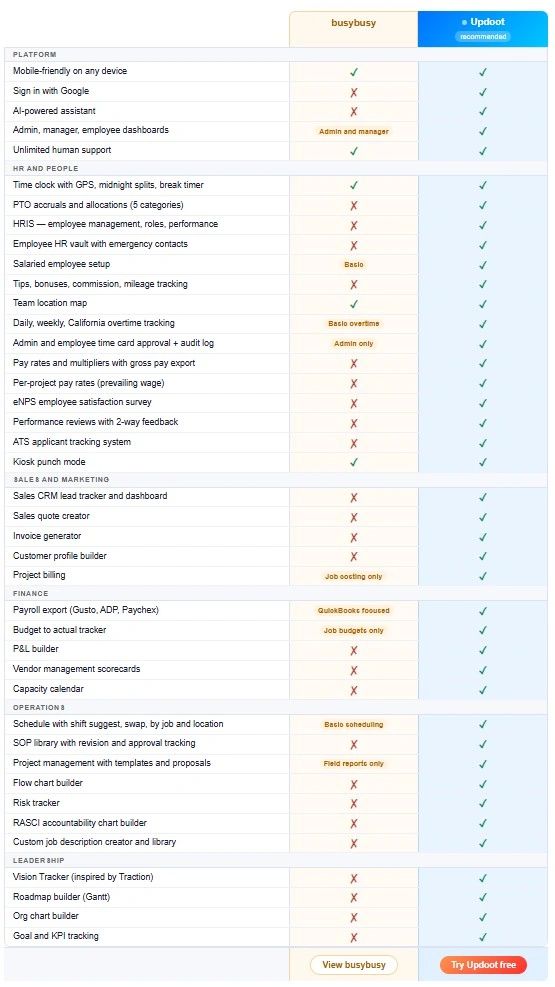
busybusy GPS time tracking is built specifically for construction job sites, with cost code tracking, equipment logging, and project-level labor visibility. For pure construction job costing tied to specific cost codes, busybusy goes deep.
Updoot includes GPS time tracking with midnight splits, break timers, kiosk punch mode, and geofencing enforcement. Every punch is tied to a location. Timesheet anomaly detection flags missed punches and extreme hour totals automatically before they reach payroll. The time clock connects directly to scheduling and payroll export without a separate integration.
Job Costing
busybusy is strong here. Project-level cost tracking, budget monitoring, labor expense allocation by cost code, and real-time visibility into what a job is costing are core to the product.
Updoot includes project billing and a budget to actual tracker that connects labor costs to project budgets without requiring a separate job costing module.
Scheduling
busybusy scheduling is basic and reviewers note that the day view needs improvement. It does not support shift suggest, capacity management by location, or complex swap workflows.
Updoot includes full scheduling with shift suggest, shift swap, and capacity management by job and location. The schedule connects directly to the time clock so discrepancies between scheduled shifts and actual punches get flagged automatically.
PTO and HR
busybusy PTO is limited, with no accrual tracking or allowance management.
Updoot includes five categories of PTO accruals and allocations, salaried employee setup, HRIS with employee management and performance reviews, an HR vault with emergency contacts and certifications, ATS for hiring, eNPS surveys, and two-way performance reviews. Everything a growing company needs from HR is included alongside the time clock.
Payroll Export
busybusy integrates with QuickBooks and other payroll platforms. The QuickBooks sync is well-reviewed.
Updoot includes payroll-ready export to Gusto, ADP, Paychex, and more with pay rates, multipliers, tips, bonuses, commission, mileage, and gross pay calculated in the export. Pay rate multipliers by project are included, which addresses the prevailing wage gap that busybusy reviewers specifically call out.
Operational Scope
busybusy covers construction time tracking and job costing. Everything else requires a separate tool.
Updoot covers time tracking, scheduling, HR, payroll export, sales CRM, invoice generator, project management, SOP library, budget to actual tracker, P&L builder, capacity calendar, RASCI accountability charts, org chart builder, Vision Tracker for business planning, and a Gantt roadmap builder. For a construction business owner who is also managing sales, invoicing, and business planning, Updoot replaces the stack of separate tools those functions currently require.
Pricing
busybusy starts at $9.99 per user per month. The full-featured tiers cost more and the per-user pricing adds up for larger crews.
Updoot offers a free tier to start and transparent per-plan pricing that includes the full feature set without gating core functions behind higher tiers.
Who Should Choose busybusy
busybusy is the right choice for construction companies whose primary need is GPS time tracking tightly integrated with job costing, daily field reports, and QuickBooks. If your team is on a job site every day, cost code tracking is central to how you run projects, and you are happy connecting busybusy to separate HR and business tools for everything else, it does that job well.
It is a stronger fit for pure construction operations than for businesses with mixed workforces, salaried employees alongside hourly field workers, or owners who need more than time tracking in a single platform.
Who Should Choose Updoot
Updoot is the right choice for construction and field-based businesses that need GPS time tracking plus the HR, scheduling, payroll, and operational tools to run the whole business in one place.
If you are evaluating busybusy and finding that PTO accruals, prevailing wage pay rates, scheduling depth, or the absence of sales and invoicing tools are creating gaps you will need to fill with other software, Updoot covers all of it without building a stack of separate tools.
Sign up free and have your first employee clocked in today.
Frequently Asked Questions
Is busybusy good for construction companies?
Yes, for GPS time tracking and job costing specifically. busybusy is purpose-built for construction and the core time tracking and cost code features are well-reviewed by contractors. The gaps show up in PTO management, scheduling depth, prevailing wage pay rates, and the absence of HR and operational tools beyond the job site. For construction businesses that need all of that in one platform, Updoot covers the full scope.
How much does busybusy cost?
busybusy starts at $9.99 per user per month with a free trial available. Higher tiers include additional features like advanced job costing reports and equipment tracking. The per-user pricing adds up for larger crews and the tier that includes everything you need is worth pricing out before committing.
Does busybusy track PTO accruals?
No. busybusy PTO tracking is basic and does not support accruals or allowances. For businesses with PTO policies that accrue by hours worked, tenure, or any other formula, a separate HR tool is required. Updoot includes five categories of PTO accruals and allocations natively.
Does busybusy support prevailing wage pay rates?
Not currently. One of the most consistently cited limitations in busybusy reviews is the inability to assign different pay rates per project, which is essential for prevailing wage work where rate requirements vary by job. Updoot includes pay rate multipliers by project in the payroll export.
What are the most common busybusy complaints?
The most frequent complaints are cumbersome data entry for complex job costing workflows, slow and inconsistent app updates, occasional clock-in and clock-out reliability issues, basic scheduling that does not match dedicated tools, limited PTO management, and no support for per-project pay rates on prevailing wage jobs.
What is the best busybusy alternative?
For construction and field-based teams that need GPS time tracking plus scheduling, PTO management, HR, and operational tools in one platform, Updoot is the most complete alternative. It covers the core time tracking that busybusy does well and adds the HR and operations layer that busybusy leaves out. For teams that need prevailing wage pay rate support specifically, Updoot's pay rate multipliers by project address that gap directly.
Can I switch from busybusy to Updoot?
Yes. Employee data and historical timesheet records can be imported from CSV exports. Reach out to the Updoot support team and they will walk you through the migration. Unlimited human support is included on all plans.