
Best CRM for SaaS: What You Need to Look For
This is what to look for and what to avoid in a CRM.
Why Your SaaS Business Is Bleeding Revenue Without a CRM And What to Do About It
There is a moment every SaaS founder knows. You are three months into a sales cycle with a prospect who seemed like a sure thing. You ping them on Tuesday. No response. You check your notes and there are no notes, just a thread buried in your inbox from six weeks ago and a mental reminder you forgot to act on. The deal dies not because your product was not good enough, but because the follow-up fell through a crack that did not need to exist.
This is not a talent problem. It is a systems problem. And it is exactly the kind of problem a CRM exists to solve.
The irony is that most of the founders and sales reps who lose deals this way are not lazy or incompetent. They are busy. They are juggling demos, onboarding calls, investor updates, and product questions all at the same time. The problem is not effort. The problem is that effort without structure produces inconsistent results, and inconsistent results kill growth. A CRM does not replace the effort. It makes the effort count.
What a CRM Actually Is And Isn't
Customer Relationship Management software gets oversold as a magic revenue engine and undersold as a glorified spreadsheet. The truth is somewhere more practical. A CRM is a structured system for tracking every prospect, every interaction, every follow-up, and every outcome across your entire sales pipeline. It is not a replacement for good salespeople. It is the infrastructure that makes good salespeople great and prevents average ones from losing deals they should have won.
For SaaS businesses specifically, a CRM is non-negotiable. Your sales cycle is relationship-driven. Unlike e-commerce where a customer browses, clicks, and buys in one session, SaaS deals unfold over days, weeks, or months. There are demos, follow-ups, pricing conversations, stakeholder approvals, legal reviews, and onboarding discussions, all before a single dollar changes hands. Without a system tracking each of these touchpoints, you are flying blind.
Think about what that actually means in practice. It means a rep sends a proposal and then forgets to follow up because they got pulled into a product demo. It means a manager has no idea how many deals are in negotiation right now because the information lives in three different inboxes. It means a founder walks into a board meeting and presents a revenue forecast that was built on memory rather than data. None of these are hypothetical scenarios. They are Tuesday at most early-stage SaaS companies.
The Real Cost of Not Having a CRM System
Most founders underestimate the cost of disorganization in their sales process. They think about the deals they know they lost. They rarely account for the deals they lost without knowing it. The prospect who went cold because nobody followed up. The quote that expired because no one noticed. The lead that converted with a competitor because they were faster.
Research consistently shows that companies that respond to a lead within the first hour are seven times more likely to qualify that prospect than those who wait even a few hours. Speed is a competitive advantage, but speed requires clarity, and clarity requires a system.
Beyond speed, there is the question of visibility. Without a CRM, your pipeline exists in someone's head. When that person is out sick, on vacation, or leaves the company, the pipeline goes with them. A CRM externalizes institutional knowledge. It makes the sales process a company asset rather than a personal one.
There is also the forecasting problem. When a VP of Sales or a founder asks how much the company is going to close this quarter, the answer in a CRM-less organization is usually a guess dressed up as a number. With a proper CRM tracking potential deal values, close probabilities, and expected close dates, that forecast becomes a calculation rather than a gut feeling.
There is a cultural cost too. When your sales team operates without a shared system, information hoarding becomes a survival strategy. Reps protect their deals because there is no transparency. Managers make decisions based on whoever spoke to them last. New hires take months to get up to speed because there is no record of what was tried before. A CRM is not just a tool for closing deals. It is a foundation for building a team that operates with trust and accountability.
What to Look For in a SaaS CRM
Not every CRM is built for SaaS. Many are built for enterprise sales teams with armies of reps, complex territory management, and six-figure implementation budgets. If you are a growing SaaS company, here is what actually matters.
Pipeline visibility by stage. You need to see at a glance how many deals are at each stage of your funnel and what the total dollar value sitting at each stage is. This is your weighted pipeline, and it is the most important number in your sales operation.
Per-rep performance tracking. Who is generating the most leads? Who is closing the highest percentage? Who has the most overdue follow-ups? A CRM should answer these questions by owner so you can coach effectively and identify where your process is breaking down.
Lead source attribution. Are your best leads coming from Google, paid ads, referrals, or outbound? Without tracking this, you are allocating marketing budget based on assumption. Source attribution turns that assumption into data.
Follow-up alerts. The single biggest driver of lost deals is delayed or missed follow-up. Your CRM should make it impossible to forget a follow-up by surfacing overdue contacts, highlighting due-today tasks, and flagging leads that have gone cold.
Forecasting by month. You need a dashboard that shows forecasted value, actual closed revenue, close rate, and average account value broken down by month. This lets you spot seasonal patterns, measure month-over-month growth, and set realistic targets.
Quote and proposal integration. When a deal reaches the Proposal Sent stage, you need a record of what was quoted, to whom, for how much, and when it expires. Disconnecting your quote process from your CRM creates a gap where deals fall through.
Invoice handoff. When a deal closes, someone needs to create an invoice. The closer this process is to the CRM data, the less room there is for errors like the wrong client name, the wrong amount, or the wrong terms.
Mobile and multi-user access. Your sales team is not always at a desk. A CRM that works on mobile and allows multiple reps to update records simultaneously without overwriting each other is not optional for a team of any meaningful size. Deals get updated on the road, after calls, between meetings. Your system needs to keep up.
Private and shared list management. Not every deal should be visible to every person on the team. A rep working a sensitive enterprise account should be able to keep that list private without losing the ability to share it with a manager or hand it off to a colleague. Visibility controls are a feature that looks minor on paper and causes serious problems when it is missing.
What to Avoid
Just as important as knowing what to look for is knowing what to avoid.
Avoid overcomplicated tools built for enterprise. Salesforce is a remarkable piece of software for a 200-person sales org with dedicated administrators. For a 10-person SaaS company, it is a tax on your time. You will spend more energy configuring fields and training your team than actually selling. The best CRM for a growing company is one that your team actually uses, not one that sits half-empty because the onboarding took three months.
Avoid tools that don't connect to your existing workflow. If your CRM doesn't talk to your invoicing system, your email, or your project management tool, you end up with data silos. The sales team updates the CRM. Finance works from spreadsheets. Management pulls reports that contradict each other. Integration is not a nice-to-have feature. It is the foundation of a functional system.
Avoid CRMs with weak reporting. The point of tracking data is to learn from it. If your CRM cannot tell you your close rate by month, your average days to close, your top lead sources by conversion rate, or your revenue by rep, you are paying for a database you cannot query. Reporting is not a premium feature. It is the entire point.
Avoid platforms with no audit trail. In SaaS sales, knowing when a proposal was sent, who sent it, and what it contained is not just useful. It is sometimes legally important. A CRM without an audit log is a liability.
Avoid tools that punish growth. Some CRM platforms are cheap at ten users and prohibitively expensive at fifty. Before you commit, understand the pricing at two and three times your current team size. The switching cost of migrating a CRM, including your data, your history, and your workflows, is enormous. Get this decision right the first time.
Avoid platforms that require a consultant to customize. If you need to hire someone to build custom objects and configure workflows before your team can use the tool, you have bought a construction project, not a CRM. The best systems are opinionated enough to be useful out of the box while flexible enough to adapt to your process without professional services.
The Stages That Actually Matter
A common mistake in CRM setup is creating too many stages or stages that don't reflect how deals actually move. For most SaaS businesses, a pipeline that works looks something like this.
Prospect — you have identified this company as a potential fit. You have contact information but have not yet reached out or received a response.
Contacted — you have made initial contact. An email has been sent, a call has been made, or a connection has been established. The ball is in their court.
Qualified — you have had enough of a conversation to know this prospect has a real problem your product solves, the budget to pay for it, and the authority to make a decision. This is the most important gate in your funnel.
Proposal Sent — you have sent a formal quote or proposal. This is a major milestone and should trigger an automatic log entry so there is a record of when the proposal was delivered.
Negotiation — the prospect is engaged on terms. Price, scope, contract length, or implementation details are being discussed.
Sent to Finance — the deal is essentially closed from the sales side. It is now in the prospect's internal review process, legal, procurement, or finance approval. This stage is often overlooked but critical for accurately forecasting close dates.
Discovery — for prospects who need more education before they are ready to move forward. This is not a dead deal it is a deal that needs nurturing.
Each stage should have a distinct color in your CRM so anyone glancing at the pipeline can instantly understand where every deal stands.
Forecasting That Actually Works
Most sales forecasts are wrong because they treat all deals as equally likely to close. A deal in Proposal Sent with a signed NDA and a verbal yes is not the same as a deal in Prospect with one cold email sent. Your forecast should weight deals by their close probability.
If you have a $10,000 deal with a 70% chance of closing, its forecasted value is $7,000. If you have ten deals like that, your expected revenue is $70,000, not $100,000. The difference between these numbers is the difference between making payroll and missing it.
A good CRM captures both the potential deal value and the close probability for every lead, calculates the forecasted expected value automatically, and rolls it up into a monthly dashboard so you always know where you stand.
The other forecasting metric most teams ignore is average days to close. If your average deal takes 47 days from first contact to signed contract, and you have a deal that has been in Negotiation for 60 days, that is a signal worth acting on. Either the deal is stalling for a reason you should understand, or it is not as close as the rep believes. Your CRM should surface these patterns so you can manage proactively instead of reactively.
Frequently Asked Questions
Why do SaaS businesses need a CRM? SaaS deals unfold over days, weeks, or months with demos, follow-ups, pricing conversations, and stakeholder approvals before any money changes hands. Without a system tracking every touchpoint, deals get lost not because the product was not good enough but because follow-up fell through a crack that did not need to exist.
What does a CRM actually do? A CRM is a structured system for tracking every prospect, every interaction, every follow-up, and every outcome across your entire sales pipeline. It externalizes institutional knowledge so the sales process becomes a company asset rather than something that lives in one person's head or inbox.
What is the real cost of not having a CRM? Beyond the deals you know you lost, there are the deals you lost without realizing it. Research consistently shows that companies responding to a lead within the first hour are seven times more likely to qualify that prospect than those who wait even a few hours. Without a system, speed and consistency are impossible to maintain.
What should a SaaS company look for in a CRM? The most important features are pipeline visibility by stage, per-rep performance tracking, lead source attribution, follow-up alerts, monthly forecasting, quote and proposal integration, invoice handoff, and mobile access for a team that is not always at a desk.
What CRM mistakes should SaaS companies avoid? Avoid overcomplicated enterprise tools your team will not actually use, platforms that do not connect to your invoicing or project management tools, weak reporting that cannot tell you close rate or revenue by rep, no audit trail for proposals, and pricing that becomes prohibitive as the team grows.
How should a SaaS sales forecast actually work? Weight every deal by its close probability rather than treating all deals as equally likely to close. A $10,000 deal at 70 percent probability has a forecasted value of $7,000, not $10,000. The difference between these numbers is the difference between making payroll and missing it.
Updoot: Built for Teams That Actually Work
Updoot is an all-in-one business operations platform designed for growing companies that need real tools without enterprise complexity. The Sales CRM inside Updoot was built from the ground up to solve the exact problems outlined in this post — not to replicate a bloated platform nobody enjoys using.
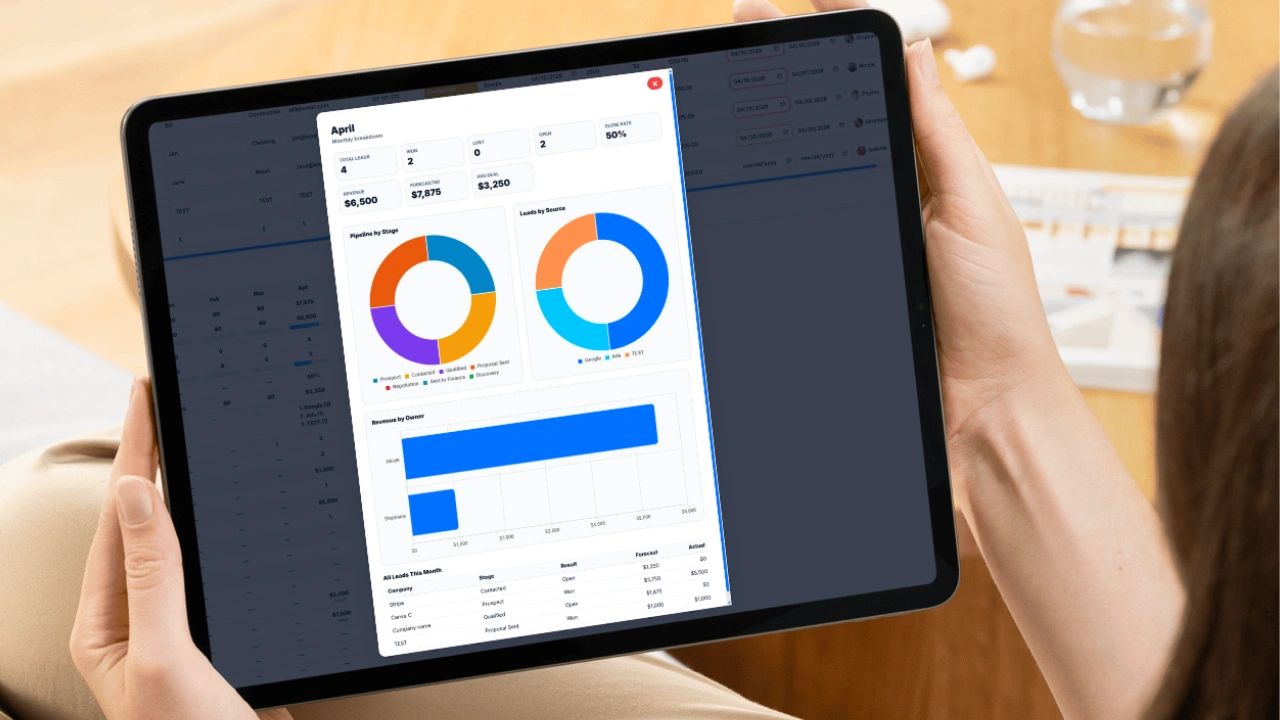
The Updoot CRM gives your team a clean lead table where every deal lives with its own stage, source, potential value, close probability, forecast, follow-up dates, and owner. Color-coded stages make pipeline health visible at a glance. Overdue follow-ups glow red. Deals due today are highlighted in orange. Upcoming ones show green. You never forget a follow-up again.
The dashboard updates in real time as your team edits the pipeline. Monthly breakdowns show forecasted value, actual revenue, close rate, average account value, top lead sources, and pipeline value by stage all in one scrollable view. Click any month and a full breakdown modal opens with pie charts by stage, pie charts by lead source, and a bar chart of revenue by rep.
When a deal reaches Proposal Sent, an audit log entry is created automatically and timestamped in your company's local timezone so there is always a record of when proposals went out and who sent them. When a deal closes and needs to be invoiced, a single button on the lead row pulls the quote data and pre-fills the invoice modal directly, so finance can generate and download a PDF without re-typing a single field.
Updoot also handles time tracking, payroll management, project management, employee PTO, HR records, and team surveys all under one roof, all connected. The same employee records that power your HR page feed the owner dropdown in your CRM. The same invoice generator that processes your time-tracked billables can generate a sales invoice from a closed deal.
It is built for companies between five and two hundred people who are tired of duct-taping eight different SaaS tools together and want one system that actually talks to itself.
If your sales process lives in a spreadsheet, a shared inbox, or someone's memory, it is time to change that. The deals you are losing aren't going to a better product. They are going to a better-organized competitor.
Visit below to learn more.
Learn more about apps for business
Vacation Scheduling Software: How to Find the Best
Every Small Business App You Need in a List
AI-Powered Software for Running a Small Business
Workday HRIS vs Updoot HRIS Easy Comparison Chart
Best App for Sales Performance Tracking: A Quick Comparison Chart
Homebase Scheduling vs. Updoot Scheduling
ClockShark Pricing vs. Updoot Pricing: Let's Talk Value
Shift Swap Software for Restaurants, Construction, Retail, More