
Atto Time Tracking vs Updoot Price and Feature Comparison Chart
.png)
This is a direct comparison of Atto features and price to Updoot. If you have been searching for employee time tracking software for a small business or field-based team, Atto has likely appeared in your results. It is a newer, cleaner, more focused time tracking app that positions itself as a simpler alternative to the more complex workforce management platforms on the market. The pitch is straightforward: an easy to use mobile time clock for teams that do not want to deal with complicated software.
That simplicity is Atto's biggest selling point and its biggest limitation simultaneously. For a business whose only challenge is tracking when employees clock in and out, Atto is genuinely easy to use. For a business that needs time tracking as part of a complete operational system, Atto covers a very small slice of what is actually needed and leaves the rest to additional tools and additional monthly costs.
This article breaks down what Atto does, where it falls short, and how it compares to Updoot for small businesses that need more than a mobile time clock.
What Is Atto?
Atto is a mobile-first time tracking app designed primarily for small businesses and field-based teams. It was built around the idea that time tracking software should be simple enough for any employee to use without training, accessible from any mobile device, and focused on doing a few things very well rather than trying to be everything to everyone.
The core of what Atto does is track time. Employees open the app, tap a button to clock in, and tap again to clock out. GPS records where they were when they clocked in and out. Managers can see who is working in real time, review timesheets, and export hours for payroll.
Beyond that core, Atto includes basic scheduling, a team activity feed that shows who is currently working and where, break tracking, overtime alerts, timesheet approval, and payroll exports. The mobile experience is clean and the learning curve for employees is genuinely low, which matters for businesses with non-technical frontline workers.
For what it is, Atto is a well-designed product. The problem for most small businesses is that what it is covers only a fraction of what they actually need.
Atto Pricing: What You Actually Pay
Atto pricing is structured around three tiers. The Free plan covers up to three users with basic time tracking features. The Premium plan runs around $7.99 per user per month and adds GPS tracking, team management features, and payroll integrations. The business contact plan requires reaching out directly for pricing on larger teams.
At $7.99 per user per month, a 10-person team on the Premium plan pays approximately $80 per month for time tracking, basic scheduling, GPS, and payroll exports. That is a meaningful price for a tool that covers only the time tracking piece of running a business.
The more significant issue is what that $80 per month does not include. No invoicing. No HR beyond basic time and scheduling. No CRM. No project management beyond simple job tracking. No financial tools. No SOP management. No strategic planning infrastructure. Every one of those needs requires an additional tool and an additional monthly cost.
A 10-person small business using Atto and filling the gaps with other tools typically ends up paying $200 to $400 per month across their software stack, all to accomplish what a single complete platform could cover at a fraction of the total cost.
What Atto Does Well
Atto has real strengths that explain its growing user base and positive reviews. Being honest about what it does well is important for understanding where it is and is not the right fit.
Simplicity of the employee experience. Atto's mobile app is genuinely easy to use. The clock in and clock out experience requires almost no training and works reliably across different devices and operating systems. For businesses with frontline workers or field teams who are not comfortable with technology, this simplicity is a real operational benefit.
Real-time team visibility. Atto's team activity feed gives managers a live view of who is currently working, who has clocked out, and where each team member is located. For small business owners managing field crews or multiple locations, this real-time visibility is practically useful.
GPS tracking accuracy. Atto's GPS location tracking is reliable and captures location at clock in, clock out, and throughout the shift at configurable intervals. For businesses that need to confirm employees are at the right job site, this works well.
Clean timesheet management. Timesheets in Atto are easy to read, adjust, and approve. The approval workflow is straightforward and the interface makes it easy for managers to catch and correct errors before hours are exported for payroll.
Overtime alerts. Atto sends automatic alerts when employees are approaching or exceeding overtime thresholds, which helps managers make scheduling decisions before overtime costs are incurred rather than discovering them after the fact.
Where Atto Falls Short
Atto's limitations are not flaws in execution. They are the natural consequence of building a focused product that does one thing well. For businesses that need more than that one thing, the gaps are significant.
No invoicing or project billing. If your business bills clients for time worked, Atto does not help you get from tracked hours to a client invoice. You need separate invoicing software and a manual process to transfer the data between systems.
No HR beyond time and attendance. Atto tracks when people work. It does not help you manage how they perform, how you hire new ones, how you document your processes, or how you manage leave across multiple categories. Performance reviews, applicant tracking, job description management, employee document storage, and HR surveys all require separate tools.
No sales or CRM tools. There is nothing in Atto for managing leads, tracking a sales pipeline, building customer profiles, or creating sales quotes. Your entire sales process lives outside the platform.
No financial management. No budget tracking, no P&L visibility, no vendor management, and no financial planning tools beyond the basic payroll export. Understanding the financial health of your business requires additional software.
No operational or strategic infrastructure. No SOP library, no KPI tracking, no project management beyond simple job assignment, no strategic planning framework, and no leadership tools. Running a business strategically on top of Atto requires building an entirely separate operational stack.
No AI assistance. Atto does not include any AI functionality to help your team work faster or smarter across the platform.
The price per feature ratio. At $7.99 per user per month for the Premium plan, Atto is not cheap for what it delivers. You are paying a meaningful price for a time tracking tool when that same budget applied to a more complete platform would cover time tracking and significantly more.
What You Should Actually Need From a Time Tracking Platform
Before committing to any time tracking tool, it is worth being clear about what your business actually needs both today and as it grows.
Reliable GPS and mobile clock in. Non-negotiable for field teams. The tool needs to work on the devices your employees actually use without friction or technical problems.
Overtime handling that covers complexity. Standard federal overtime is straightforward. If you have employees in California, multiple shift types, or complex pay rate structures, you need a tool that handles overtime correctly by default. California daily overtime thresholds differ significantly from federal standards and most basic time tracking tools do not handle this correctly.
Midnight splits for overnight operations. Shifts that cross midnight need to be split correctly across calendar days for accurate records, overtime calculations, and payroll exports. This is a detail that basic time tracking tools frequently get wrong and that payroll errors trace back to.
Payroll exports that include everything. Hours are only part of payroll. Tips, bonuses, commissions, mileage reimbursements, and PTO all need to be included in a complete payroll export. A tool that only exports raw hours forces manual aggregation of the rest.
A path from time tracking to invoicing. If you bill clients for time, the distance between a tracked hour and a sent invoice should be as short as possible. Every manual step in that path is a cost and an error risk.
HR tools that grow with your team. As your business grows, time tracking becomes one piece of a larger people management challenge. The tool you choose today should be able to grow with you into performance management, applicant tracking, and more sophisticated HR functionality without requiring a platform migration.
A complete operational system rather than another silo. The most expensive operational mistake small businesses make is assembling a stack of disconnected tools that each do one thing and do not talk to each other. Every additional tool is an additional login, an additional cost, an additional piece of data that does not automatically connect to the rest. The most efficient businesses run on platforms where their operational data flows between functions automatically.
Atto vs Updoot: The Core Difference
The core difference between Atto and Updoot is not a feature list. It is a philosophy about what software should do for a small business.
Atto is built on the belief that simplicity is the highest priority and that a tool that does one thing excellently is more valuable than a platform that tries to do many things. That philosophy produces a genuinely good time tracking app. It also produces a tool that covers roughly 10% of what a small business needs to operate and grow.
Updoot is built on the belief that small businesses should not have to pay for five different tools, manage five different logins, and manually reconcile data across five different systems to run their operations. Time tracking is one feature in a complete business operating system that covers the full scope of what a small business actually needs.
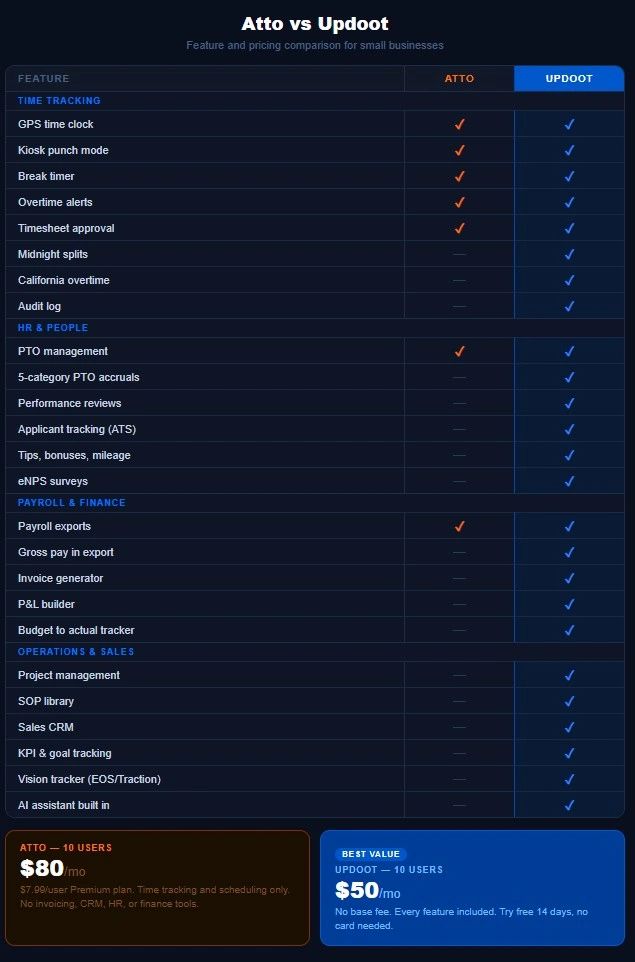
At $5 per user per month with no base fee, Updoot's 10-person team pays $50 per month for time tracking with GPS, midnight splits, California overtime, kiosk mode, break timer, and audit log. Plus scheduling with suggest and swap by job and location. Plus five-category PTO accruals. Plus performance reviews with two-way feedback. Plus an applicant tracking system. Plus an invoice generator and project billing. Plus a sales CRM with lead tracking, customer profiles, and quote creator. Plus a P&L builder and budget to actual tracker. Plus an SOP library with revision tracking and review alerts. Plus project management with custom templates. Plus KPI and goal tracking. Plus a Vision Tracker inspired by Gino Wickman's book Traction. Plus an AI assistant built throughout the platform.
All of that for $50 per month for 10 users. Compare that to $80 per month for Atto's time tracking and scheduling alone, plus everything else you still need to buy.
Who Should Choose Atto
Atto is the right choice if your business genuinely only needs time tracking and basic scheduling, your team is primarily field-based and simplicity of the mobile experience is the top priority, you have no current need for invoicing, HR, CRM, or operational management tools, and you are willing to manage additional software for everything else.
For freelancers, very small teams, or businesses at the absolute beginning of their software journey whose only immediate need is a clean mobile time clock, Atto is a reasonable starting point.
Who Should Choose Updoot
Updoot is the right choice if you need time tracking as part of a complete business operating system, you are currently paying for multiple tools and want to consolidate onto a single platform, you bill clients for time and need invoicing connected to your time tracking, you need HR, sales, and financial tools alongside your time clock, your business has employees in California or overnight shift workers who need complex overtime handled correctly, or you want to pay less per month for more capability.
Try Updoot free for 14 days at xecutethevision.com. No credit card required.
Frequently Asked Questions
What is Atto time tracking?
Atto is a mobile-first time tracking app designed for small businesses and field-based teams. It allows employees to clock in and out via mobile app with GPS location capture, gives managers real-time visibility into who is working and where, handles basic scheduling and timesheet approval, and exports hours for payroll. It is designed around simplicity and ease of use for non-technical employees.
How much does Atto cost?
Atto offers a free plan for up to three users with basic features. The Premium plan costs approximately $7.99 per user per month and includes GPS tracking, team management, overtime alerts, and payroll integrations. A 10-person team on the Premium plan pays approximately $80 per month for time tracking and scheduling features only.
Does Atto include invoicing?
No. Atto does not include invoice generation or project billing. Businesses that bill clients for time worked need separate invoicing software alongside Atto. Updoot includes an invoice generator and project billing that connects time entries directly to client invoices at no additional cost.
Does Atto handle California overtime?
Atto includes overtime alerts but does not automatically calculate California daily overtime rules, which differ significantly from federal standards. Businesses with California employees need to verify that their time tracking tool handles California overtime correctly to avoid payroll errors and compliance risk. Updoot calculates California overtime automatically based on employee setup.
What is the best Atto alternative for small businesses?
Updoot is the most complete alternative to Atto for small businesses that need time tracking as part of a broader operational platform. It includes everything Atto offers plus invoicing, HR management, sales CRM, project management, financial tools, SOP library, and leadership frameworks at $5 per user per month with no base fee.
Can Updoot replace Atto?
Yes. Updoot includes all the core time tracking features Atto offers including GPS clock in and out, kiosk mode, break tracking, overtime alerts, timesheet approval, and payroll exports. Updoot also includes midnight splits and California overtime handling that Atto does not, plus a comprehensive platform covering HR, invoicing, sales, operations, and strategic planning that Atto does not address.
Is Atto good for small businesses?
Atto is well-suited for small businesses whose only software need is a simple mobile time clock for a field-based team. For small businesses that also need invoicing, HR management, sales tools, project management, and financial tracking, Atto covers only a small fraction of the operational picture and requires significant additional software to fill the gaps.
How does Updoot compare to Atto on price?
Atto's Premium plan costs $7.99 per user per month for time tracking and basic scheduling. A 10-person team pays $80 per month. Updoot costs $5 per user per month for the complete platform with no base fee. The same 10-person team pays $50 per month for everything Atto includes plus HR, invoicing, CRM, project management, financial tools, SOP library, and leadership frameworks.